What WCAG Compliance Actually Demands of Your Software Build

 Published by CodeNicely, the product studio founded by Meghal Agrawal and Ujjwal Agrawal in 2017
For: CIO or VP of Digital at a UAE enterprise — a government-linked company, large retailer, or regulated financial institution — whose legal team has just flagged that a customer-facing portal or internal HR system may not meet UAE Federal Law No. 29 of 2006 accessibility obligations and the TDRA's digital accessibility standards, and who needs to understand what fixing it actually requires of the codebase before briefing a dev partner or approving a remediation budget.
In this guide
- What triggers the obligation in the UAE
- What WCAG 2.1 AA actually demands of the architecture
- Why automated tools miss the majority of real issues
- What this demands of the vendor you hire
- How long readiness actually takes, and what drives the range
- The things teams discover far too late
- The buying decision in front of you
- Frequently Asked Questions
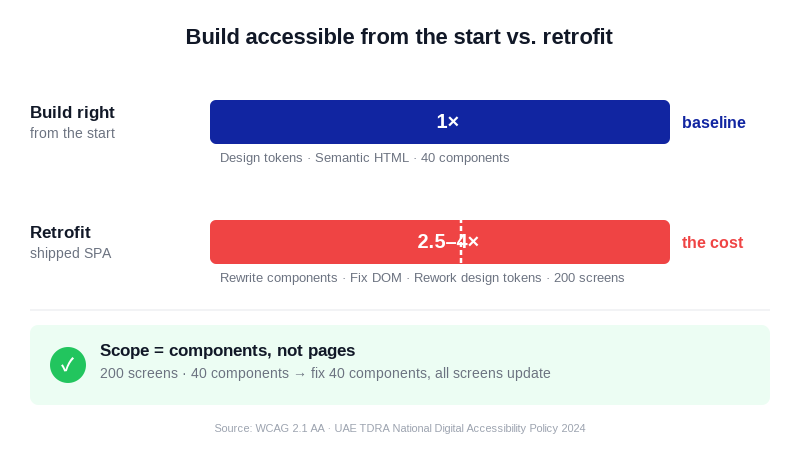
If your legal team has flagged a portal or HR system against UAE Federal Law No. 29 of 2006 and the TDRA's National Digital Accessibility Policy, the honest answer is this: the fix is almost certainly an engineering problem, not a policy-binder problem. WCAG 2.1 Level AA — the standard the TDRA adopted in March 2024 and now enforces across federal services and public-facing private sector platforms — makes demands on your component library, your DOM structure, your focus management, and your design tokens that cannot be met by adding alt text and running axe-core in CI. Retrofitting it onto a shipped single-page application typically costs 2.5 to 4 times more than building to the standard from the start. Before you brief a dev partner or approve a remediation budget, you need to know what you are actually buying.
This is a scoping guide for CIOs and VPs of Digital at UAE enterprises who have just inherited that problem.
What triggers the obligation in the UAE
Three instruments stack on top of each other, and most legal teams flag only one of them at a time.
Federal Law No. 29 of 2006 (the Rights of People of Determination law) establishes the baseline obligation to make services accessible, with administrative penalties up to AED 200,000 for non-conformance. It is sector-agnostic — it applies to your customer portal and your internal HR system alike if the HR system serves employees who are People of Determination.
Dubai Law No. 3 of 2022 layers emirate-level enforcement with fines up to AED 100,000 for violations in Dubai.
The TDRA National Digital Accessibility Policy, adopted by Cabinet in March 2024, is the one that actually dictates what your code must do. It sets WCAG 2.1 Level AA as the mandatory standard for federal digital services and extends it explicitly to private sector platforms in e-commerce, health, education and finance. Repeated non-conformance can ground exclusion from federal tenders. That is usually the trigger that reaches the CIO's desk — not a complaint, but a procurement gate.
The market behind this is not small. The UAE Ministry of Family disclosed roughly 49,000 registered People of Determination at AccessAbilities Expo in October 2025, and WHO prevalence estimates put the broader figure near 10.8% of the population. The accessibility obligation is also a user-base question.
What WCAG 2.1 AA actually demands of the architecture
WCAG is organised around four principles — Perceivable, Operable, Understandable, Robust — and 50 Level A and AA success criteria. That reads like a checklist. It is not. In a modern React, Angular or Vue application, roughly a third of those criteria cannot be satisfied by content edits; they require changes to how the application is built.
The component library is the unit of compliance
If you have a design system or a shared component library, every WCAG failure in a Button, Modal, Dropdown, DataTable or DatePicker component multiplies across every screen that uses it. Conversely, every fix lands everywhere at once. This is why TDRA launched the UAE Design System 2.0 in 2024 — the bar is now being set at the design-system level, not the page level.
What this means in practice: your remediation scope should be measured in components, not pages. A portal with 200 screens built on 40 components is a 40-component remediation, not a 200-page one. If the answer from your current dev partner is quoted per page, they are quoting the wrong unit.
Keyboard navigation and focus management
Every interactive element must be reachable and operable with a keyboard alone, in a logical order, with a visible focus indicator that meets the 3:1 contrast ratio against adjacent colours (SC 2.4.11, new in 2.1). Modals must trap focus while open and return focus to the trigger on close. Route changes in SPAs must move focus to the new page's main landmark — browsers do not do this automatically the way they do for full page loads, which is why SPAs fail accessibility audits at roughly twice the rate of server-rendered sites.
This is architectural. Focus management lives in your router, your modal primitive, and your form library. It is not a styling pass.
Semantic structure and ARIA landmarks
Screen readers navigate by landmarks (header, nav, main, aside, footer), headings (h1 through h6 in logical order), and lists. A page built with nested <div> soup — the default output of many component libraries and most AI code generators — is navigationally opaque to a screen reader user even if every visible element looks correct. Fixing this requires rewriting the component templates, not adding ARIA attributes on top. ARIA is a patch, not a substitute for semantic HTML, and misapplied ARIA is worse than none.
Colour contrast and design tokens
WCAG 2.1 AA requires 4.5:1 contrast for normal text, 3:1 for large text and UI components. If your brand palette was signed off without an accessibility review — and most UAE enterprise brand palettes were — then primary buttons, disabled states, placeholder text, chart colours and status indicators will routinely fail. The fix is new colour tokens, propagated through the design system. Doing this on a live product means a visual regression testing pass across every screen.
Forms, errors, and programmatic labels
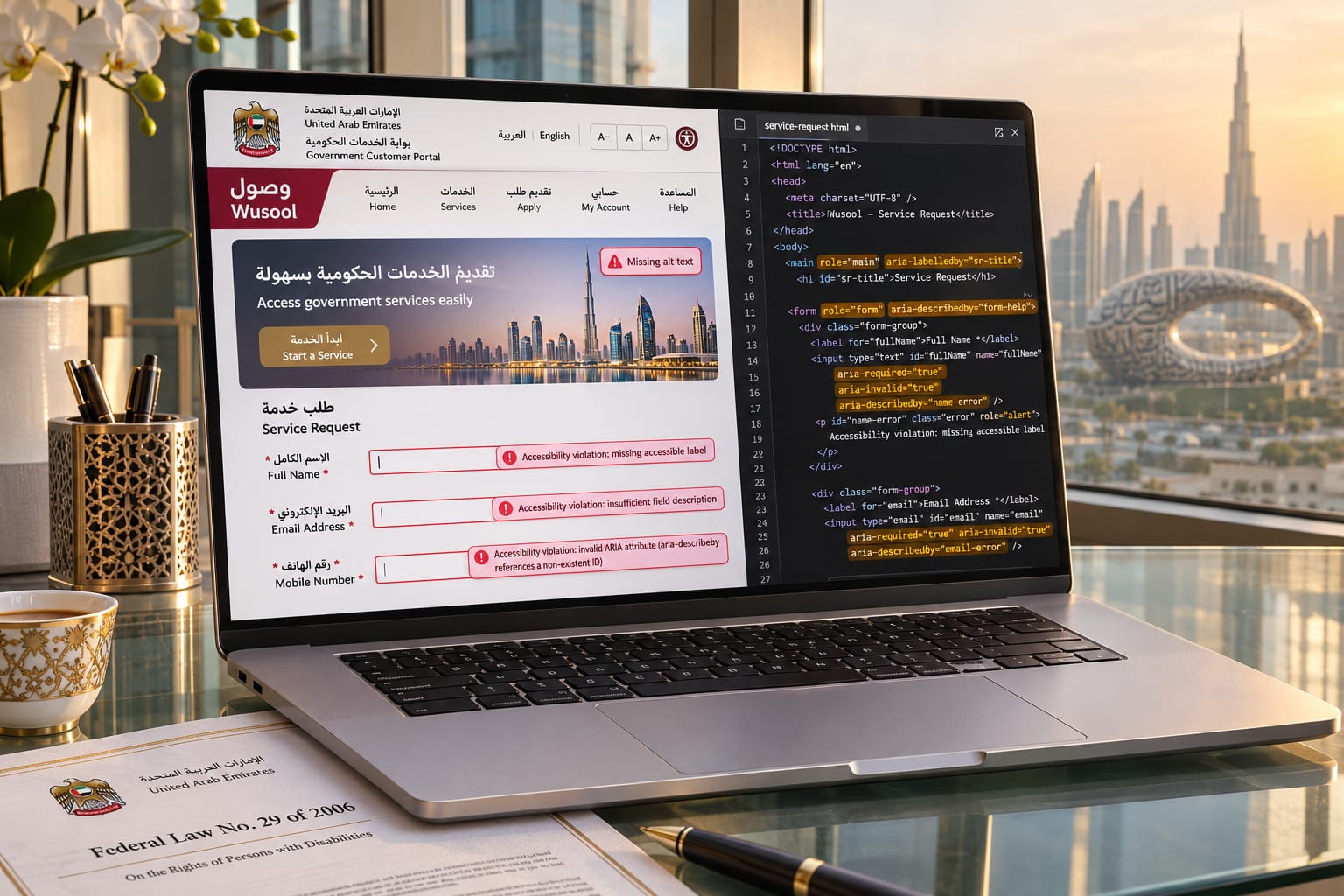
Every form input needs a programmatically associated label (not just a placeholder), error messages must be announced to assistive technology via live regions, required fields must be marked both visually and programmatically, and validation must not rely on colour alone. HR systems and KYC flows fail here constantly. Fixing a KYC flow — the kind of work that sits behind lending products like AI-driven credit scoring platforms — means rebuilding the form layer, not restyling it.
Media, captions, and alternatives
Pre-recorded video needs captions (SC 1.2.2) and audio description (SC 1.2.5). Live video needs live captions (SC 1.2.4). If your marketing team ships product videos through the portal, there is an operational workflow to build, not just a technical one.
Arabic, RTL, and language attributes
Specific to the UAE: the lang and dir attributes must be set correctly on the root and on any inline language switches. Screen readers switch pronunciation engines based on these. A bilingual portal where the Arabic view inherits lang="en" is a WCAG 3.1.1 and 3.1.2 failure that is invisible to sighted QA and obvious to any Arabic-speaking screen reader user.
Why automated tools miss the majority of real issues
This is the finding that most surprises executives: automated scanners — axe, WAVE, Lighthouse, Siteimprove — flag only around 25% of WCAG issues. The other 75% require manual expert evaluation plus assistive technology testing with actual screen readers (NVDA, JAWS, VoiceOver).
The reason is structural. Automated tools can detect missing alt attributes, insufficient colour contrast on static text, and malformed ARIA. They cannot judge whether an alt text is meaningful, whether a reading order makes sense, whether a custom component's keyboard interaction matches user expectations, or whether an error message is useful when announced out of visual context. A clean axe report is necessary but nowhere near sufficient. Procurement teams reviewing your VPAT know this. So do auditors.
What this demands of the vendor you hire
A dev partner competent to deliver WCAG 2.1 AA — and to defend it in a third-party audit — should be able to answer the following without hesitation:
- Which accessibility specialist on the team is IAAP-certified (CPACC or WAS)? Not "we have accessibility experience" — a named individual.
- Show a VPAT they have authored, in the current ITI/ITIC format, for a product of comparable complexity.
- Describe their assistive technology testing matrix: which screen readers on which browsers and operating systems, and how often in the development cycle.
- Explain how they handle focus management in the specific framework your product uses — React, Angular, Vue, or server-rendered.
- Produce their accessible component library or show how they extend established accessible primitives (Radix, Headless UI, Adobe React Aria).
- Describe their CI accessibility gates: which tools run on every PR, which fail the build, which are advisory.
If the answer to any of these is vague, you are looking at a vendor who will deliver a project that passes an automated scan and fails a real audit. That is the scenario that produces the 2.5–4× retrofit cost.
How long readiness actually takes, and what drives the range
There is no universal number here, and anyone who quotes one without seeing your codebase is guessing. What can be said honestly is what drives the range.

Variables that compress the timeline:
- You already have a design system, and the remediation is at the component layer
- Your application is server-rendered or uses a framework with good accessibility primitives
- You have design tokens, so colour fixes propagate
- Your team has at least one developer who has shipped accessible work before
Variables that stretch it:
- A legacy SPA with custom components, no design system, and no semantic HTML discipline
- Heavy use of third-party widgets (charts, data grids, rich text editors) whose accessibility you do not control
- Dynamic content, real-time updates, or complex interactive flows like KYC, onboarding, or document upload
- Bilingual Arabic/English with RTL mirroring issues
- No existing automated testing infrastructure to catch regressions
Illustrative only, with assumptions stated: a mid-sized customer portal — around 60 screens, built on a React SPA with roughly 35 reusable components, no existing design system, Arabic and English, no prior accessibility work — will typically need a component-library audit, a design token refactor, a focus management rebuild, a forms rebuild, a VPAT authoring pass, and manual AT testing across at least two screen readers. The industry data cited above suggests retrofit costs run 30–100% higher than the original design-phase cost; the equivalent spend on a greenfield build is 5–10% of design cost. The delta is the price of the retrofit.
To turn that shape into an actual quote, three things need scoping: the component inventory (how many unique components, built on what), the audit scope (public portal only, or internal systems too, and whether you need a certified VPAT at the end), and the CI and governance work (whether you want accessibility to stay fixed after the project, or just pass once). That conversation is the one to have with a dev partner — including teams working on UAE enterprise builds — before any number lands in a budget.
The things teams discover far too late
1. The VPAT is a build artifact, not a document
Procurement teams — both federal and increasingly large private enterprises — now treat the VPAT as a procurement readiness factor. You cannot write a credible VPAT without the evidence to back each criterion: test records, AT session notes, remediation history. Teams that try to author a VPAT after the fact discover they have no evidence trail and have to redo the testing. Build the evidence as you build the product.
2. Third-party embeds break your conformance
Payment widgets, chat bots, analytics overlays, consent banners, map embeds, and embedded video players routinely fail WCAG. Your VPAT must either exclude them (with disclosure) or you must pressure the vendor. Government auditors are not sympathetic to "the chatbot vendor is non-compliant." Add accessibility conformance to your procurement requirements for every embedded SaaS.
3. Content governance outlasts the project
You can ship a perfectly accessible portal and lose conformance in six weeks because the content team uploaded PDFs with no tags, images with no alt text, or videos with no captions. The remediation project must deliver a CMS-level gate — authoring tools that refuse to publish inaccessible content — not just a one-time cleanup. This is where most government portals regress.
The buying decision in front of you
If the flag on your desk is a procurement VPAT request from a federal tender, you have weeks, not months, and you should scope an emergency remediation focused on the specific product in scope, with a credible VPAT as the deliverable, and schedule the deeper design-system work as a follow-on.
If the flag is an internal legal review or a customer complaint, you have the room to do this properly: audit at the component-library level, fix at the token and primitive level, instrument CI to prevent regression, and author the VPAT as a byproduct. That path costs more upfront and dramatically less across the product lifetime. It is also the only path that survives the next audit, the next procurement, and the next version of WCAG — 2.2 is already published and the policy bar will move.
Either way, the question to ask the dev partner is not "can you make this accessible." It is "show me the component library and the VPAT from the last accessible product you shipped." The answer tells you everything.
This article is editorial guidance, not legal advice. Specific obligations under Federal Law No. 29 of 2006, Dubai Law No. 3 of 2022, and the TDRA National Digital Accessibility Policy should be reviewed with qualified UAE counsel against your particular product, sector and customer base.
Frequently Asked Questions
Does the TDRA National Digital Accessibility Policy apply to private companies?
Yes, where the private company provides public-facing digital services. The policy adopted by Cabinet in March 2024 explicitly extends WCAG 2.1 AA requirements to private sector platforms in e-commerce, health, education and finance. Internal-only systems fall under the broader Federal Law No. 29 of 2006 obligation to accommodate employees who are People of Determination. Your specific scope should be confirmed with counsel.
Is WCAG 2.1 AA the same as WCAG 2.2 or the European EN 301 549?
No. WCAG 2.1 AA is the current mandatory UAE baseline. WCAG 2.2, published in late 2023, adds nine new success criteria and is increasingly referenced in international procurement — several of the new criteria (focus not obscured, dragging movements, consistent help) are worth building to now because they will likely become mandatory in a future TDRA revision. EN 301 549 is the European standard that incorporates WCAG and adds hardware and documentation requirements; it applies if you sell into the EU.
How much does WCAG remediation cost for an enterprise portal in the UAE?
There is no honest universal number because cost is driven by the component inventory, whether a design system exists, how much is server-rendered versus SPA, how many third-party embeds are in scope, whether a certified VPAT is required, and whether you need governance to prevent regression. Industry data suggests retrofit costs run 2.5–4× higher than building accessibly from the start. To turn that into a real quote, you need a short discovery engagement with a qualified partner that inventories components and audits a representative sample of flows.
Can we just use an accessibility overlay widget to become compliant?
No. Overlays — the toolbar widgets that claim one-line compliance — do not fix underlying code issues, are regularly flagged in VPAT audits as insufficient, and have been the basis of litigation internationally. Automated tools of any kind, overlays included, catch roughly 25% of WCAG issues. Procurement auditors and third-party reviewers will test with real assistive technology, where overlays provide no defence.
What should be in the RFP when we brief a dev partner for remediation?
Scope it as a component-library engagement, not a page-by-page one. Require: a named IAAP-certified specialist on the delivery team, a sample VPAT from recent work, an assistive technology testing matrix, framework-specific focus management approach, CI gates that will persist after delivery, and a content-governance layer in the CMS. Ask for evidence of each, not assurances.
Sources & further reading
- TDRA: National Digital Accessibility Policy Press Release (May 2024)
- UAE National Policy for Digital Accessibility — Official PDF (March 2024)
- UAE Digital Accessibility Laws: The Complete Compliance Guide (HalfAccessible, 2026)
- UAE Digital Accessibility Policy — Glossary Entry (HalfAccessible)
- United Arab Emirates — Accessibility Law (Disability World)
- UAE has 49,000 People of Determination as new national strategy takes shape (Gulf News, 2025)
- How Much Does EAA Compliance Cost? (Accessible.org)
- WCAG Accessibility Cost 2026 — ADA Compliance Pricing (ProjectCostEstimator)
Get one practical guide a week
Costs, AI tools, partner selection — written for people who make the decision. No spam, unsubscribe anytime.
Thanks — you're on the list. One practical guide a week, nothing else.
That didn't work — please check the email address and try again.
Building something in Software & Technology?
CodeNicely partners with founders and tech teams to ship AI-native products that move metrics. Tell us about the problem you're solving.
Talk to our team Book a 30-min call