Turn a Customer Testimonial into a Polished Video Ad with ChatGPT and CapCut

 Published by CodeNicely, the product studio founded by Meghal Agrawal and Ujjwal Agrawal in 2017
For: A marketing coordinator at a 15-person e-commerce brand who collects glowing customer reviews but has no video editor or agency budget to turn them into paid social ads
In this guide
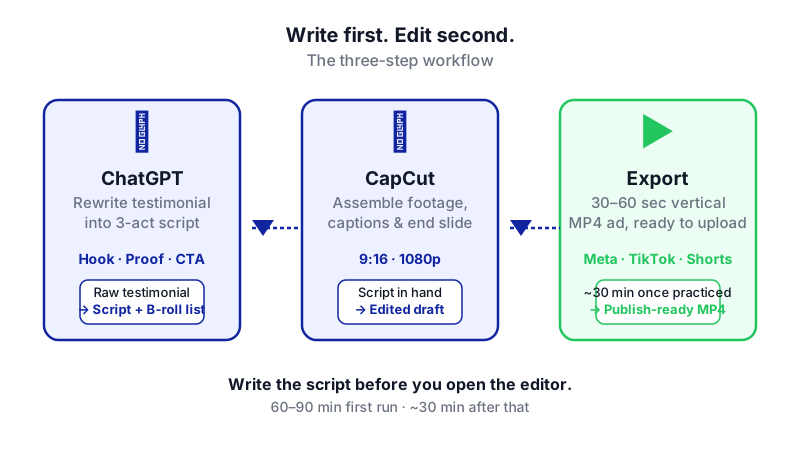
By the end of this tutorial you'll have a 30–60 second video ad built from one of your real customer testimonials, with on-screen captions, suggested B-roll, and a branded call-to-action slide. Budget about 60–90 minutes the first time, and closer to 30 once you've done it twice.
Last verified: November 2026, against the tools' own documentation. AI tools change often — if a step no longer matches, check the sources at the end.
Who this is for, and what you'll get
This is for a marketing coordinator (or founder wearing that hat) at a small e-commerce brand who has a folder of glowing reviews — written, emailed, or recorded on a customer's phone — and no editor, agency, or production budget to turn them into ads.
You'll walk away with:
- A tight three-act ad script (hook, proof, CTA) rewritten from a raw testimonial
- A list of specific B-roll shots that match each line of the script
- A finished vertical video in CapCut with auto-generated captions and a branded end slide
- An exportable 1080p MP4 ready to upload to Meta Ads, TikTok, or YouTube Shorts
The one thing most tutorials get wrong
Most video-ad tutorials tell you to open the editor first. Don't. The reason customer-testimonial ads usually feel flat is that the raw quote gets slapped over some stock footage with a logo at the end. The fix is to use ChatGPT before you open CapCut, to rewrite the testimonial into a proper three-act ad structure: a hook that stops the scroll, proof that earns trust, and a CTA that tells the viewer exactly what to do. Everything that happens in CapCut after that is assembly, not writing.
What you need
| Tool | Plan needed | Cost | Why |
|---|---|---|---|
| ChatGPT | Free tier is fine for scripting | Check the current plan on OpenAI's pricing page | Rewrites the testimonial into a structured ad script and generates B-roll + CTA copy |
| CapCut (desktop or web) | Free works for 1080p; Pro ($19.99/month or $179.99/year) needed for Auto Captions | Free, or Pro from $19.99/month per capcut.com | Edits the video, adds captions, overlays B-roll, applies end slide |
Important plan note: CapCut moved Auto Captions to the paid Pro tier during its 2025 pricing restructure. If you're on the free plan, that button will be greyed out. You can still type captions by hand — it just takes longer. The rest of the workflow works on free.
Also useful: the customer's original testimonial (text, email, or video file), your brand logo as a PNG, and your brand's primary colour hex code.
Step-by-step
Collect the raw testimonial in one place. Paste the written review into a plain text document, or if it's a video, transcribe it (you can drop the video into CapCut and use Auto Captions to generate a transcript, then export it as SRT or TXT — only auto-recognised captions can be exported this way, not manually typed ones). You need the customer's actual words as your source material.
Use ChatGPT to rewrite the testimonial into a three-act script. This is the step that separates a produced ad from a quote slapped on video. Open ChatGPT and paste this prompt, swapping in your own details:
You are a direct-response video ad copywriter for a DTC e-commerce brand. I will paste a customer testimonial below. Rewrite it into a 45-second vertical video ad script with three clearly labelled acts:
ACT 1 — HOOK (0–3 seconds): one scroll-stopping line in the customer's voice that names the problem.
ACT 2 — PROOF (3–35 seconds): 2–3 short lines showing the specific result or transformation, using the customer's real language wherever possible.
ACT 3 — CTA (35–45 seconds): one line telling the viewer what to do next.
Keep every line under 12 words. Keep it conversational, not corporate. Do not invent claims the customer did not make. My brand is [BRAND NAME], we sell [PRODUCT], and the CTA should drive to [LANDING PAGE URL or ACTION].
Testimonial:
"[PASTE RAW TESTIMONIAL HERE]"Read what comes back carefully. If any line adds a claim the customer didn't actually make, cut it or regenerate.
Ask ChatGPT for B-roll suggestions line by line. In the same chat, follow up with:
For each line of the script above, suggest one specific B-roll shot I could film on a phone or pull from stock footage. Keep shots simple: product close-ups, hands using the product, unboxing, before/after, lifestyle. Return as a two-column list: script line | B-roll shot.
This gives you a shot list. You now know exactly what footage you need before you open the editor.
Gather your footage. You have three options: ask the customer for a short selfie-style video reading the script (best), film product B-roll yourself on a phone (second best), or use CapCut's Script-to-Video feature to auto-generate a draft with stock footage matched to your script. Script-to-Video pastes your script, segments it into scenes, matches footage, and drops a draft timeline into the editor — but it will not give you a publish-ready video. You'll still edit it.
Create a new vertical project in CapCut. Open CapCut desktop or web, start a new project, and set the aspect ratio to 9:16 for TikTok, Reels, and Shorts (or 1:1 for feed placements). Drop your A-roll — the customer talking, or your voiceover of the script — onto the main timeline.
Layer B-roll on an overlay track. Drag your B-roll clips onto a track above the main clip, matching each shot to the line it illustrates. You can also cut B-roll directly into the timeline between A-roll segments. Keep each B-roll shot on screen for 1.5–3 seconds — short cuts hold attention.
Add captions. If you have CapCut Pro: open the Captions panel, choose Auto Captions, select the spoken language, and click Generate. Captions appear on the timeline within a minute (processing happens on CapCut's servers, so you need an active internet connection). If you're on free, add a text layer manually for each line of the script — tedious but free. Style captions large, bold, and centre-bottom; around 80% of social video is watched on mute.
Build a branded end slide. Open CapCut's template library and search for an outro or end-screen template. Pick one, drop it at the end of your timeline, and replace its placeholder text with your CTA copy (ask ChatGPT for 3 variations of a 6-word CTA if you're stuck), your social handles, and your logo. If the template is Pro-locked, pick a free one to avoid a watermark.
Check for watermark triggers. On the free plan, watermarks appear only when you use Pro-locked templates, effects, or stock assets. Scan your timeline — anything with a small crown icon is Pro. Swap it out or upgrade. Also delete the default CapCut logo end-clip if the editor added one.
Export. Export at 1080p (free plan maximum; 4K and HDR require Pro). There's no export count limit on free, so you can render variations. Save the MP4, review it once on your phone with sound off, then once with sound on, and ship it.
A worked example
Say you sell a reusable silicone food storage bag. Your customer Priya emailed:
"I was spending like $15 a month on ziploc bags and feeling guilty every time I threw one out. I bought your 6-pack two months ago and I literally haven't bought a single plastic bag since. They go in the dishwasher, they don't leak, my husband even takes them with his lunch. Honestly best $30 I've spent this year."
You paste that into ChatGPT with the prompt above. A good output looks like:
HOOK: "I was spending $15 a month on ziploc bags."
PROOF: "Bought the 6-pack two months ago." / "Haven't touched a plastic bag since." / "Dishwasher-safe, leak-proof, husband-approved."
CTA: "Get your 6-pack at [brand].com."
B-roll suggestions: close-up of a ziploc box in a bin, hands sealing a silicone bag, bags coming out of a dishwasher, a packed lunch bag, a shot of your website homepage. You film four of those on a phone in 20 minutes, assemble in CapCut, add captions, slap on the end slide, export. Done.
Limits and gotchas
- ChatGPT cannot generate video. It writes the script and shot list only. Every pixel of your ad is assembled in CapCut.
- Auto Captions is Pro-only now. Budget for one month of Pro ($19.99) if you plan to make several ads in a sprint, then downgrade.
- AI B-roll uses credits. CapCut's in-app AI video generation runs on Seedance 2.5 and is metered by credits even on paid plans. Don't assume unlimited AI clips.
- Script-to-Video is a draft, not a finished ad. It gets you 40% of the way there; the other 60% is still your judgement on pacing, cuts, and tone.
- Human check the script. ChatGPT can smooth language so much it invents claims the customer never made. Compare each line back to the original testimonial. If in doubt, cut it.
- Get permission. Even if the customer sent a glowing review, ask in writing before using their words or likeness in a paid ad.
- Cloud storage changed. Since March 2026, free CapCut no longer includes cloud storage for new spaces — back your project files up locally.
- Prices vary. App Store checkout can run a few dollars higher than capcut.com web checkout.
When not to use AI for this
If your testimonial is for a regulated product (supplements, finance, health claims), don't let ChatGPT rewrite it at all. Use the customer's exact words verbatim or get legal sign-off on any edit. If your brand has a highly polished visual identity (fashion, premium beauty), a $500 freelance editor will out-perform CapCut templates — the look matters more than the words. And if you only have one testimonial and it's your hero asset, hire a human editor once; the ceiling is higher.
Honest alternatives: Descript (better for long-form talking-head editing with transcript-based cuts), Adobe Premiere Rush (if you already pay for Creative Cloud), or a $200–$500 freelance editor on a platform like Fiverr or Upwork for a one-off hero ad.
Frequently asked questions
Can I do this entirely on my phone?
Yes. CapCut mobile has the same core features, though some menu paths differ — on the older mobile UI, Auto Captions sits under Text → Auto Captions rather than in a dedicated Captions panel. ChatGPT also has a mobile app. The desktop/web version of CapCut is faster for layering B-roll on overlay tracks, so most people prefer it for the edit.
What if my customer only sent a written review, not a video?
You have two options. Record yourself (or a colleague) reading the script as a voiceover and lay it under B-roll — totally normal for ads. Or use CapCut's Script-to-Video feature to generate a draft with AI voiceover and stock footage. The voiceover route feels more authentic; always disclose if the voice isn't the customer's.
How many ads can I make from one testimonial?
At least three. Ask ChatGPT to generate three hook variations from the same testimonial, then swap only the first 3 seconds of your edit for each version. There's no export limit on the free plan, so you can ship all three and let the ad platform find the winner.
Will my video have a CapCut watermark?
Not automatically. On the free plan, watermarks only appear if you use Pro-locked templates, effects, or stock assets. A project built from your own footage and free editor features exports clean. Delete the default CapCut end-clip if the editor added one.
What if I need captions but can't afford Pro?
Type them manually as text layers, one per line of your script. It takes about 15 extra minutes for a 45-second ad. Alternatively, generate an SRT file with a free transcription tool like otter.ai or Whisper and import it into CapCut.
When this workflow outgrows off-the-shelf tools — say you need to produce 50 testimonial ads a month with brand-consistent templates and automatic ad-platform uploads — a custom build (which CodeNicely does) is an option.
Sources & further reading
- Can ChatGPT Make Videos? What Actually Works in 2026 — framesurfer.com
- How Do I Recognise Subtitles? — CapCut Help Centre
- CapCut Auto Captions: How to Add & Style Subtitles in CapCut (2026) — typito.com
- CapCut captions aren't free anymore — descript.com
- CapCut Pricing 2026: Free, Standard, Pro & Team Plans — socialrails.com
- CapCut Pricing 2026 — costbench.com (verified Nov 4, 2026)
- Is CapCut Free? CapCut Free vs Paid in 2026 — pexo.ai
- Is CapCut Free? Watermarks, Limits and the 7-Day Trial (2026) — professionalstoolkit.com
- Script to Video AI: Skip Filming with CapCut App Magic — capcut.com
- CapCut AI Video Generator Review (2026) — fluxnote.io
Get one practical guide a week
Costs, AI tools, partner selection — written for people who make the decision. No spam, unsubscribe anytime.
Thanks — you're on the list. One practical guide a week, nothing else.
That didn't work — please check the email address and try again.
Building something in Video & Content?
CodeNicely partners with founders and tech teams to ship AI-native products that move metrics. Tell us about the problem you're solving.
Talk to our team Book a 30-min call