_1751731246795-BygAaJJK.png)

Score and Prioritize Your Sales Leads with ChatGPT and Excel

 Published by CodeNicely, the product studio founded by Meghal Agrawal and Ujjwal Agrawal in 2017
For: A sales manager at a 15-to-40-person B2B SaaS company who receives a raw list of 50–200 inbound or outbound leads each week and wastes hours manually deciding which ones to chase first
In this guide
By the end of this tutorial you'll have a ranked, scored lead list with every prospect tagged Hot, Warm, or Cold, ready to hand to a rep. Allow around 45 minutes the first time you build your scoring rubric; after that, scoring a fresh weekly list takes 10 to 15 minutes.
Last verified: October 2026, against the tools' own documentation. AI tools change often — if a step no longer matches, check the sources at the end.
Who this is for, and what you'll get
This is for a sales manager at a 15 to 40-person B2B SaaS company who gets a weekly list of 50 to 200 leads from inbound forms, event scans, outbound tools or data vendors — and currently decides who to chase first by eyeballing the sheet.
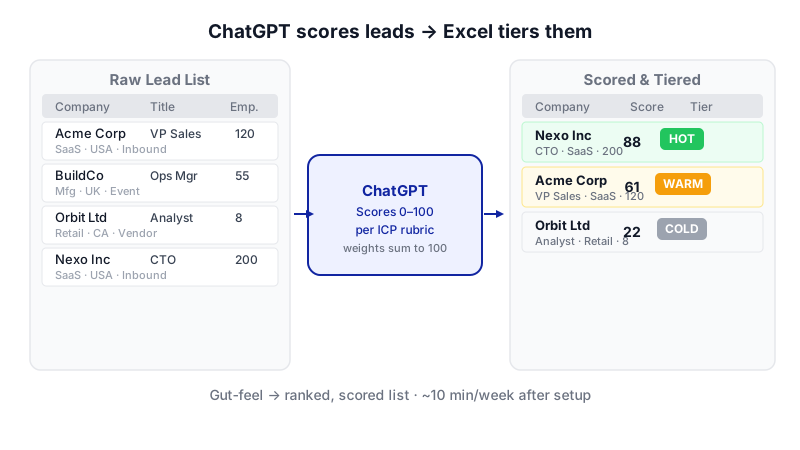
Most tutorials on ai for sales lead generation focus on producing more leads. That's rarely the real bottleneck. The daily time sink is deciding which of the leads you already have deserve the first call. This guide uses ChatGPT to build a reusable scoring rubric and Excel to apply it, so the decision stops being gut-feel.
You'll finish with:
- A written scoring rubric tuned to your ideal customer profile (ICP).
- An Excel sheet with a numeric
Score, aTier(Hot/Warm/Cold) and aRankcolumn. - A CSV or XLSX export your reps can act on today.
What you need
| Tool | Plan needed | Cost | Why |
|---|---|---|---|
| ChatGPT | Go or Plus (or higher) for full Advanced Data Analysis. Free plan has limited access. | Go: $8/month. Plus: $20/month (billed monthly). | Advanced Data Analysis (formerly Code Interpreter) is the feature that lets ChatGPT open your spreadsheet and score each row. |
| Microsoft Excel | Excel 2019, 2021, 2024 or Microsoft 365 (for the IFS function). Earlier versions work with nested IF. |
Check your existing Microsoft licence. | You'll apply the tier labels and ranking locally, so sensitive lead data doesn't need to live in ChatGPT after scoring. |
Your lead file must be a CSV or Excel file under about 50 MB — that's the documented cap for spreadsheets in Advanced Data Analysis. A 200-row lead list is a tiny fraction of that, so you're safe.
Step-by-step
-
Clean your lead list in Excel first. Open your weekly export and make sure the first row is column headers (e.g.
Company,Website,Industry,Employees,Country,Job Title,Source,Notes). Delete empty columns. Save it asleads-week-of-[date].xlsx. Clean inputs make scoring far more reliable.
Writing your ICP in plain English before opening any tool is the step most people skip — and the one that determines scoring quality. -
Write down your ICP in plain English. Before you touch ChatGPT, jot a short note describing your best-fit customer: company size, industry, geography, buyer title, obvious disqualifiers. This becomes the rubric input. If you skip this, ChatGPT will invent a generic scoring model that doesn't match your pipeline.
-
Start a new ChatGPT conversation and ask it to build the rubric. In a Go or Plus (or higher) account, open a new chat and paste the prompt below, filling in the bracketed parts.
You are helping me build a lead scoring rubric for a B2B SaaS company that sells [one-sentence product description] to [buyer persona]. Our ideal customer is [industry/size/geography]. Hard disqualifiers are [list]. Signals we care about: [e.g. uses a competing tool, has raised funding in last 12 months, team of 20-200, decision-maker job title]. Design a 0-100 scoring rubric with weighted criteria that sum to 100. For each criterion, list the field it maps to, the weight, and how to score it from a typical lead record (company name, website, industry, employee count, country, job title, source, notes). Then propose score thresholds for Hot, Warm and Cold tiers. Return the rubric as a clean table.
Why: forcing weights that sum to 100 keeps the model honest and makes the rubric auditable. You can argue with the weights before you apply them.
-
Review and adjust the rubric. Push back on anything that doesn't match reality. For example: "Drop the funding criterion — we sell to bootstrapped teams too" or "Weight job title higher; VP+ matters more than company size for us." Ask ChatGPT to regenerate the table. Repeat until you'd be comfortable showing it to your best rep.
-
Upload your lead file. In the same chat, attach your
leads-week-of-[date].xlsx. ChatGPT Plus allows up to 80 file uploads per rolling 3-hour window, Free users get 3 per day, and each account has a 25 GB storage cap — none of which you'll hit with a weekly lead file. -
Ask ChatGPT to apply the rubric and return a scored file. Use a prompt like this:
Using the rubric we agreed above, score every row in the attached file. Add three new columns: Score (0-100 integer), Score_Reasoning (one short sentence citing which criteria drove the score), and Tier (Hot / Warm / Cold using the thresholds in the rubric). Do not drop or reorder any existing columns. Return the result as a downloadable .xlsx file. If a field is missing for a lead, score only on available data and note the gap in Score_Reasoning.
Why: naming the exact output columns and format stops you getting a chatty answer instead of a file. Advanced Data Analysis will run Python in its sandbox to produce the spreadsheet.
-
Download the scored file immediately. ChatGPT does not persistently store output files, and uploads are auto-deleted after a plan-specific window. Click the download link in the chat and save it locally before you close the tab.
-
Add a Rank column in Excel. Open the downloaded file. In the first empty column (say column L), add a header
Rankin L1. In L2, enter:=RANK.EQ(G2, $G$2:$G$201, 0)Replace
Gwith your actual Score column letter and201with the last row of your data. The0at the end means descending — highest score gets rank 1. Copy the formula down to the last row. Note:RANK.EQgives tied scores the same rank and skips the next number (two leads tied at rank 2, then the next lead is rank 4). If you'd prefer tied leads to share an average rank, useRANK.AVGinstead. -
(Optional) Re-apply tiers locally with IFS as a sanity check. If you want to verify ChatGPT's tier assignments against your thresholds, add a
Tier_Checkcolumn:=IFS(G2>=75,"Hot",G2>=50,"Warm",TRUE,"Cold")Adjust 75 and 50 to match the thresholds in your rubric. If you're on an older Excel without
IFS, use nestedIF:=IF(G2>=75,"Hot",IF(G2>=50,"Warm","Cold"))Filter the sheet for rows where
TierandTier_Checkdisagree — there should be none. If there are, your thresholds and the rubric drifted apart; fix the rubric prompt next week. -
Sort, filter and hand off. Sort by
Rankascending. FilterTier = Hotand send those rows to reps for same-day outreach. Warm goes into the standard cadence. Cold gets a nurture sequence or no touch at all this week. -
Export the final list. Go to File > Save As, pick a destination, and in the Save as type dropdown choose either Excel Workbook (*.xlsx) or CSV UTF-8 (Comma delimited) (*.csv) depending on where it needs to go (your CRM import probably wants CSV UTF-8).
-
Save the rubric for next week. Copy the final rubric table from ChatGPT into a plain text file called
lead-scoring-rubric.mdon your drive. Next week, paste it into a fresh chat along with the new lead file — you skip steps 2 through 4 entirely.
A worked example
Say you run sales at a 25-person SaaS company selling a project management tool to agency operations leaders. Your ICP note might read:
We sell to digital and creative agencies with 20-150 staff, mostly in the US, UK and Canada. Buyer is a COO, Head of Ops or Studio Manager. Disqualifiers: freelancers, non-agency companies, agencies under 10 people. Strong signals: job title contains Operations/Studio/Delivery; agency size 20-150; came in via demo request or referral (not generic newsletter signup).
Good rubric output from ChatGPT would look something like a table with: Job title fit (30 pts), Company size fit (25 pts), Industry match: agency (20 pts), Country (10 pts), Source quality (15 pts), with thresholds Hot ≥ 75, Warm 50–74, Cold < 50.
A good scored row for "Acme Studio, 40 employees, London, Head of Studio Operations, source: demo request" should land around 90-95 and be tagged Hot, with a Score_Reasoning like "Perfect title match, ideal size, agency, UK, high-intent source." A lead with a missing job title should score lower and the reasoning should flag the gap, not guess.
Limits and gotchas

- Human spot-check the top and bottom. Before any rep calls Hot leads, scan the first 10 rows and the first 10 Cold rows. If a Cold lead is obviously a dream customer, the rubric needs fixing — not the lead.
- Garbage in, garbage out. If your
Industryfield is blank for half the list, industry weight is meaningless. Fix the source data or drop that criterion for the week. - ChatGPT can't verify facts about a company. It scores based on what's in your file. It is not checking LinkedIn or company websites unless you explicitly ask it to and provide those inputs.
- File retention. Uploads and generated outputs are auto-deleted on a plan-dependent schedule. Download the scored file in the same session; don't rely on going back tomorrow.
- Privacy. You're uploading prospect names, emails and company data to a third-party service. Check your company's data policy and your prospects' expectations. For regulated industries or EU personal data, run it past whoever owns compliance before making this a weekly habit.
- Advanced Data Analysis access. The free plan lists this feature as Limited. If scoring fails or the file button is missing, you're probably on free — upgrade to Go ($8/mo) or Plus ($20/mo), or check the current plan on chatgpt.com/pricing.
- Rubric drift. Review the rubric monthly against closed-won and closed-lost deals. If your Hot leads aren't converting, the thresholds are wrong.
When not to use AI for this, and honest alternatives
Skip this workflow if:
- You have fewer than ~20 leads a week. Just read them. The setup time isn't worth it.
- Your CRM already has lead scoring you trust. HubSpot, Salesforce and Pipedrive all have native scoring. Use what's there before adding another step.
- Your lead data is extremely sparse (just name + email). There's nothing for a rubric to score on. Enrich first, then score.
- You sell to a tiny named-account list. With 30 target accounts, scoring is theatre. Build a plan per account instead.
Honest alternatives: your CRM's built-in scoring, a simple weighted spreadsheet formula you maintain yourself, or a dedicated tool like Clearbit/HubSpot/Apollo scoring. The ChatGPT + Excel approach wins when you want a rubric you can edit in English every week without touching admin settings.
Frequently Asked Questions
Which ChatGPT plan do I actually need?
You need Advanced Data Analysis, which is listed as full access on Go ($8/month) and Plus ($20/month) and above, and Limited on the free plan. For a weekly 200-row list, Go is usually enough. Check current plans on chatgpt.com/pricing before paying.
Is it safe to upload customer and prospect data to ChatGPT?
That depends on your company's policy and the sensitivity of the data. Prospect name, company and job title from public sources is usually low risk; attaching private notes, pricing or regulated personal data is a different conversation. Talk to whoever owns data governance before you make this a standing weekly process.
Why use Excel for the ranking and tiering instead of letting ChatGPT do it all?
ChatGPT does assign the tier during scoring, but doing RANK.EQ and an IFS tier check in Excel keeps the audit trail local, lets you tweak thresholds without re-running the model, and gives you a sanity check that the rubric and the output agree.
Can I use the same rubric every week?
Yes — that's the point. Save the final rubric as a text file and paste it into a fresh ChatGPT chat each week with the new lead file. Review and update it roughly monthly against your actual closed-won and closed-lost outcomes so the scoring stays honest.
What if my lead file is huge?
Spreadsheets in Advanced Data Analysis are capped at roughly 50 MB, which comfortably covers hundreds of thousands of rows of typical lead data. If you're pushing that limit, split the file by region or source and score each piece separately — and consider whether a CRM-native scoring engine is a better fit at that volume.
When a weekly scoring workflow outgrows ChatGPT and Excel — for example, when you want it running automatically against your CRM every night — a small custom build (which CodeNicely does) is a reasonable next step.
Sources & further reading
- ChatGPT Plans and Pricing — chatgpt.com (Official OpenAI Pricing Page)
- File uploads with GPTs and Advanced Data Analysis in ChatGPT — OpenAI Help Center
- What is ChatGPT Go? — OpenAI Help Center
- IFS function — Microsoft Support (Official)
- Import or export text (.txt or .csv) files — Microsoft Support (Official)
- RANK Function: Rank Scores, Sales & Performance Metrics — ExcelGuru
- ChatGPT Plus Upload Limit: File Sizes and Rolling Caps — Fast.io
- ChatGPT Data Analysis Limit: 512MB, ~50MB CSV — InfiniSynapse
- IFS Function — ExcelJet
- RANK vs. RANK.EQ vs. RANK.AVG — How-To Geek
Get one practical guide a week
Costs, AI tools, partner selection — written for people who make the decision. No spam, unsubscribe anytime.
Thanks — you're on the list. One practical guide a week, nothing else.
That didn't work — please check the email address and try again.
Building something in Sales?
CodeNicely partners with founders and tech teams to ship AI-native products that move metrics. Tell us about the problem you're solving.
Talk to our team Book a 30-min call