_1751731246795-BygAaJJK.png)

Draft an Employee Privacy Policy in 30 Minutes with Claude

 Published by CodeNicely, the product studio founded by Meghal Agrawal and Ujjwal Agrawal in 2017
For: An operations manager at a 35-person SaaS startup who owns HR admin and compliance tasks but has no legal background and no budget to immediately engage outside counsel for every policy document
In this guide
By the end of this tutorial you'll have a draft employee data privacy policy — covering what you collect, where it's stored, who can access it, and how long you keep it — that is specific to your actual HR tools and ready to hand to a lawyer or adopt internally. Budget about 30 minutes of focused work, plus whatever time your legal reviewer needs afterward.
Last verified: October 2026, against the tools' own documentation. AI tools change often — if a step no longer matches, check the sources at the end.
Who this is for, and what you'll get
This is written for an operations or people manager at a small company (think 20–100 people) who owns HR admin without a legal background. You're the person who gets asked "do we have a privacy policy for employee data?" during a security questionnaire or a new-hire onboarding and realises the honest answer is no.
You'll walk away with:
- A structured draft policy covering collection, storage, access, rights, and retention
- Plain-English language that your team can actually read
- A version stored in Notion so you can track edits and comments
- A clean export you can send to a lawyer for a focused review (which is far cheaper than asking them to draft from scratch)
What you will not get: legal advice, or a document you should publish without a qualified human reviewing it. Think of this as giving your lawyer an 80% draft instead of a blank page.
What you need
| Tool | Plan | Cost | Why |
|---|---|---|---|
| Claude | Free is enough; Pro helps for long sessions | $0, or $20/month (Pro) | Drafts the policy in Artifacts so you can edit section by section |
| Notion | Free works for storage | $0; Business is $20/user/month billed annually if you want AI editing and DOCX export via Notion Agent | Stores the draft, tracks comments from reviewers, and exports to PDF |
The whole workflow runs on Claude Free + Notion Free for one person. You only need to pay if you want Opus-class models in Claude, longer uninterrupted sessions, or Notion's AI and DOCX features.

Step-by-step
List your actual HR data flows first. This is the step most tutorials skip, and it's the one that makes the output useful. Before you touch Claude, spend five minutes writing down, in a Notion page, every tool that touches employee data. For each tool, note what data goes in, who has access, and (if you know) how long it's kept.
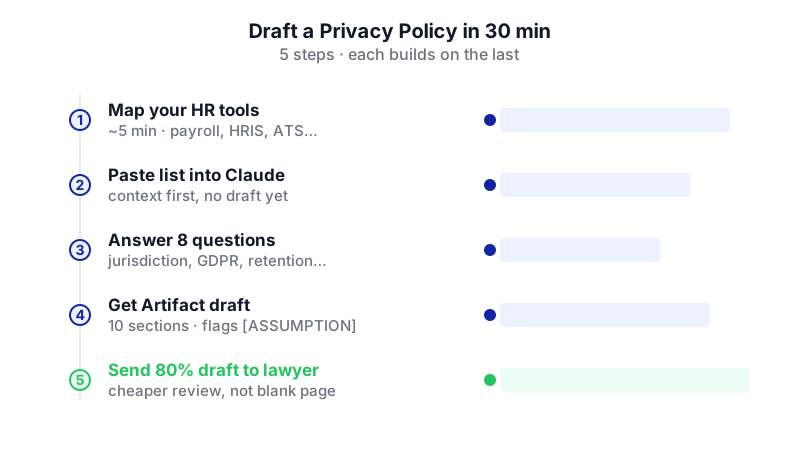
Watch each step activate in order — the key insight is that mapping your real HR tools before prompting is what makes the final draft specific enough to actually hand to a lawyer. Open a new Claude conversation and give it the context. Paste the list from step 1 into Claude as your opening message. You're not asking for a policy yet — you're loading the facts.
I'm the operations manager at a 35-person SaaS company based in [country]. I need to draft an employee data privacy policy. Before you draft anything, here is our actual HR and employee-data stack. Please read it, then ask me up to 8 clarifying questions before writing anything.
HR tools and data:
- [Payroll tool]: name, address, bank details, salary, tax ID. Accessed by finance lead and me.
- [HRIS]: contact info, emergency contact, employment contract, performance reviews. Accessed by me and the CEO.
- [Applicant tracking system]: CVs, interview notes, references. Accessed by hiring managers.
- [Slack/email]: work communications. Accessed by IT admin for recovery only.
- [Laptop MDM]: device inventory, installed apps. Accessed by IT.
- [Health insurance portal]: dependents, basic health plan selection. Accessed by me only.Answer Claude's clarifying questions. It will typically ask about your jurisdiction, whether you have EU or UK employees (GDPR), whether you do background checks, how long you keep records after someone leaves, and whether you use any monitoring software. Answer honestly, even if the answer is "I don't know yet." Writing "I don't know" is better than guessing, because Claude will flag unknowns in the draft.
Ask Claude to draft the policy as an Artifact. Artifacts put the document in a separate pane so you can edit sections without burning through context on every change. Artifacts are available on the Free plan.
Now draft a full employee data privacy policy as an Artifact, based on everything above. Structure it with these sections:
1. Purpose and scope
2. What personal data we collect (grouped by category)
3. Why we collect it and the legal basis
4. Where it is stored and who has access
5. How long we keep it (retention periods per category)
6. Employee rights (access, correction, deletion, portability, complaint)
7. How to make a request
8. Security measures
9. International transfers (if applicable)
10. Policy changes and version history
Rules:
- Plain English, 8th-grade reading level
- Where you had to assume something I didn't tell you, mark it [ASSUMPTION: ...] in bold
- Where legal advice is clearly needed, mark it [LEGAL REVIEW NEEDED: ...]
- Reference the actual tools I named, not generic placeholdersReview the Artifact and request targeted edits. Read the full draft. For each section that feels off, ask Claude for a focused rewrite instead of regenerating the whole document. For example: "Rewrite section 5 so retention periods are in a table, with columns Data Category, Retention Period, and Reason."
Challenge the assumptions. Scroll through every [ASSUMPTION] tag. For each one, either confirm it, correct it, or tell Claude to replace it with a [LEGAL REVIEW NEEDED] flag. This is where you turn a generic draft into something that actually describes your company.
Copy the final Artifact into Notion. Create a new Notion page called "Employee Data Privacy Policy — Draft v1." Paste the content. Notion will preserve the markdown structure (headings, lists, tables).
Share the Notion page for comments. Invite your CEO, head of engineering (for the security section), and finance lead as commenters. Ask them to leave inline comments on anything inaccurate. This is cheaper than paying a lawyer to find out your HRIS is misnamed.
Export for legal review. From the ••• menu at the top-right of the Notion page, choose Export. On Free and Plus you can export the single page as PDF, HTML, or Markdown. Send the PDF to a lawyer with a short note: "This is a draft I generated and reviewed internally. Please flag anything that is wrong for our jurisdiction, missing, or legally risky." If you need a Word document and you're on Notion Business, you can ask the Notion Agent to generate a DOCX; otherwise, convert the exported Markdown to DOCX using any free converter.
Version the final. Once your lawyer returns edits, apply them in the Notion page, duplicate it as "v1.0 — Adopted [date]," and lock the original draft page as a historical record.
A worked example
Say you're Priya, ops manager at a 35-person SaaS company with employees in India and two contractors in Germany. Your stack: Razorpay Payroll, Keka HRIS, Lever ATS, Google Workspace, Jamf MDM, and ICICI Lombard group health.
Your opening message to Claude lists each tool with the data it holds and who accesses it. Claude asks eight questions, including: "Your two Germany-based contractors mean GDPR likely applies to their data — do you want the policy to cover them under a separate section, or apply GDPR-level protections to everyone?" You answer: "Apply GDPR-level protections to everyone — simpler."
Claude's draft comes back with a retention table like:
| Data Category | Retention | Reason |
|---|---|---|
| Payroll records | 7 years after employment ends | [LEGAL REVIEW NEEDED: confirm Indian tax law requirement] |
| Interview notes (unsuccessful candidates) | 6 months | Defence against discrimination claims |
| Performance reviews | 3 years after employment ends | [ASSUMPTION: typical practice; confirm with legal] |
Good output looks like this: specific tool names from your stack, honest flags where the AI is guessing, and a structure your lawyer can review in one hour instead of five.
Limits and gotchas

- Claude is not a lawyer. Jurisdiction-specific rules — Indian IT Rules, GDPR, CCPA, state-level US laws — change constantly. Every [LEGAL REVIEW NEEDED] flag is a real one.
- Usage caps on Free. Claude's free plan caps usage at roughly 15–40 messages per 5-hour window. If you hit the cap mid-session, you'll have to wait or upgrade to Pro ($20/month, or $17/month billed annually).
- Output length per response. A single Claude response in claude.ai is capped at roughly 4,000–8,000 tokens (around 3,000–6,000 words), which is enough for a typical privacy policy. If yours runs longer, ask Claude to continue in a second message.
- Notion's export limits. Native Notion export is PDF, HTML, or Markdown & CSV — there is no built-in DOCX option. Subpage and full-workspace PDF export are gated to Business and Enterprise plans. For DOCX, either use the Notion Agent on the Business plan (which can generate downloadable DOCX files as of the July 2026 update) or convert the Markdown export yourself.
- Data you paste is data you've shared. Don't paste employees' names, salaries, or personal details into Claude. Describe the categories ("salary data") rather than the records.
- Hallucinated regulations. AI tools for legal compliance sometimes cite statutes or clause numbers that don't exist. If Claude cites a specific law, verify it before trusting it.
When not to use AI for this
Skip this workflow and go straight to a lawyer if: you're in a heavily regulated industry (health, finance, defence), you've just had a data breach, you're responding to a regulator, or you have employees in more than three jurisdictions. The cost of a bad policy in those situations is much higher than legal fees.
Honest alternatives to drafting with AI include: buying an employee data privacy policy template from a reputable legal publisher in your jurisdiction, using the free templates many data protection authorities publish, or asking your existing employment lawyer for a fixed-fee policy package. Using ChatGPT for legal compliance and ethics work has the same caveats as Claude — treat the output as a draft, not advice.
Frequently Asked Questions
Can I really do this on Claude's free plan?
Yes, for a single policy drafting session. The free plan runs Claude Sonnet 5.5 and Haiku 5.5, supports Artifacts, and allows file uploads. You may bump into the 15–40 messages per 5-hour cap if you do a lot of revisions in one sitting, in which case either take a break or upgrade to Pro for $20/month.
Do I still need a lawyer if the draft looks good?
Yes. The point of this workflow is to make legal review faster and cheaper, not to skip it. A lawyer reviewing a well-structured draft that reflects your actual tools will typically bill a fraction of what they'd charge to draft from scratch.
Should I upload our existing HR documents to Claude?
You can — Claude's free plan supports up to 20 files per conversation at 500 MB each — but strip out personal data first. Upload the structure (an org chart template, a blank onboarding checklist) rather than filled-in employee records.
Why Notion instead of just emailing the Word doc around?
Comments and version history. When five people review a policy in email, you end up with five conflicting drafts. In Notion, comments stay attached to the exact sentence they refer to, and you keep one source of truth.
How often should I update the policy?
Review it once a year, and any time you add or remove a tool that handles employee data. The whole point of grounding it in your real stack is that the policy should change when the stack changes.
If this workflow eventually outgrows off-the-shelf tools — say you need policy generation tied into your HRIS and ticketing system — a custom internal tool is an option, and it's the kind of build CodeNicely does.
Sources & further reading
- Is Claude AI Free? Limits, Models & Free Tier 2026 — FelloAI
- Is Claude Free? What You Really Get Without Paying in 2026 — fast.io
- Claude AI Pricing 2026: Plans, API Costs, Claude Code, and Limits — LLM Guides
- Claude's 4K Output Problem: Why 200K Context Doesn't Help Long-Form Writing
- Claude for Writing Review 2026: Best AI for Long-Form Content — Build Fast With AI
- Notion AI Pricing (2026): Plans, Credits and Real Team Costs — Sentra
- Notion AI Pricing 2026: Every Plan, Cost, and the Add-On Change Explained — FelloAI
- Notion AI Pricing in 2026: What It Costs — Coworker.ai
- How to Export a Notion Page (2026 Guide) — Carly
- Notion Export: PDF, Excel, Word & Slides (2026) — Matthias Frank
Get one practical guide a week
Costs, AI tools, partner selection — written for people who make the decision. No spam, unsubscribe anytime.
Thanks — you're on the list. One practical guide a week, nothing else.
That didn't work — please check the email address and try again.
Building something in Legal & Compliance?
CodeNicely partners with founders and tech teams to ship AI-native products that move metrics. Tell us about the problem you're solving.
Talk to our team Book a 30-min call