_1751731246795-BygAaJJK.png)

Run a Competitor Analysis in 1 Hour with ChatGPT and Copilot

 Published by CodeNicely, the product studio founded by Meghal Agrawal and Ujjwal Agrawal in 2017
For: A marketing manager at a 30-person B2B SaaS company who needs to brief the leadership team on the competitive landscape before a quarterly strategy meeting but has no research budget and no analyst on staff
In this guide
By the end of this tutorial you will have a structured competitor analysis of up to five rivals — positioning, pricing, strengths, weaknesses, and the gaps your product can exploit — in a format you can paste straight into a slide deck. Budget about an hour from blank page to shareable report.
Last verified: October 2026, against the tools' own documentation. AI tools change often — if a step no longer matches, check the sources at the end.
Who this is for, and what you'll get
You're a marketing manager at a small B2B SaaS company. Leadership wants a competitive readout before the quarterly meeting, there's no money for a consultant, and you don't have an analyst. You need something defensible, not perfect.
You'll finish with a single document that contains, for each competitor: a one-line positioning statement, their public pricing, three strengths, three weaknesses, their likely target buyer, and a short list of gaps where your product has room to win. The trick that makes this work in an hour is forcing the AI to answer the same questions in the same order for every rival, so patterns become visible instead of being buried in prose.
What you need
| Tool | Plan used here | Cost | Why |
|---|---|---|---|
| ChatGPT | Free works; Plus is better | $0 or $20/month | Structured drafting, Deep Research for sourced findings, and file uploads if you have competitor PDFs |
| Microsoft Copilot (free, copilot.microsoft.com) | Free tier | $0 | Live, Bing-grounded web lookups for pricing pages and recent news |
| Microsoft 365 Premium (optional) | Premium | $19.99/month | Only needed if you want Copilot's Researcher agent or Copilot inside Word to finish the document for you |
A few things to know up front. ChatGPT Free allows only 3 file uploads per day; Plus allows up to 80 uploads per rolling 3-hour window, with a 512 MB and 2-million-token cap per file. Deep Research is available on every ChatGPT tier including Free, but the Free and Go tiers get "limited access" on a rolling 30-day counter. The free Copilot tier gives you AI chat with live web search, but it does not accept file uploads and does not include the Researcher agent — that was moved behind Microsoft 365 Premium on 18 August 2026.
Step-by-step
Pick your five competitors and lock the schema. Before you touch any AI tool, write down the names and homepage URLs of up to five rivals in a plain text file. Then decide the fields you want for every one of them. A workable schema: Positioning (one sentence), Target buyer, Pricing (public tiers), Top 3 strengths, Top 3 weaknesses, Notable recent moves (last 6 months), Gaps we can exploit. Using the same seven fields for every competitor is the whole reason this exercise finishes in an hour instead of a day.
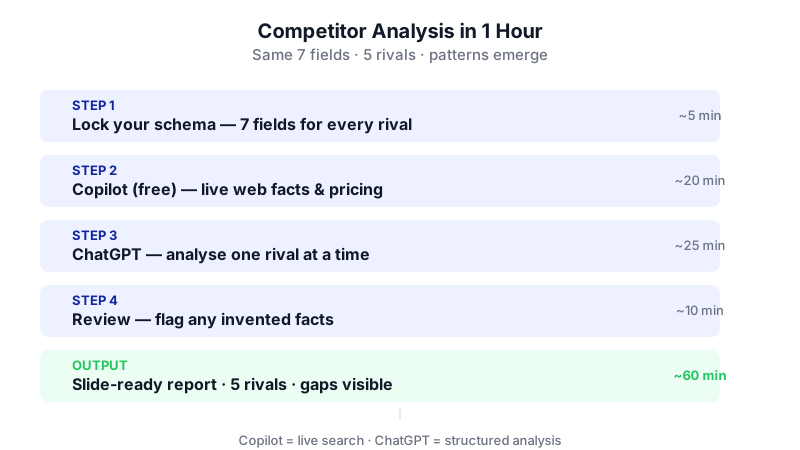
Notice how splitting the work between Copilot (live web facts) and ChatGPT (structured analysis) is what makes the full competitor report fit inside one hour. 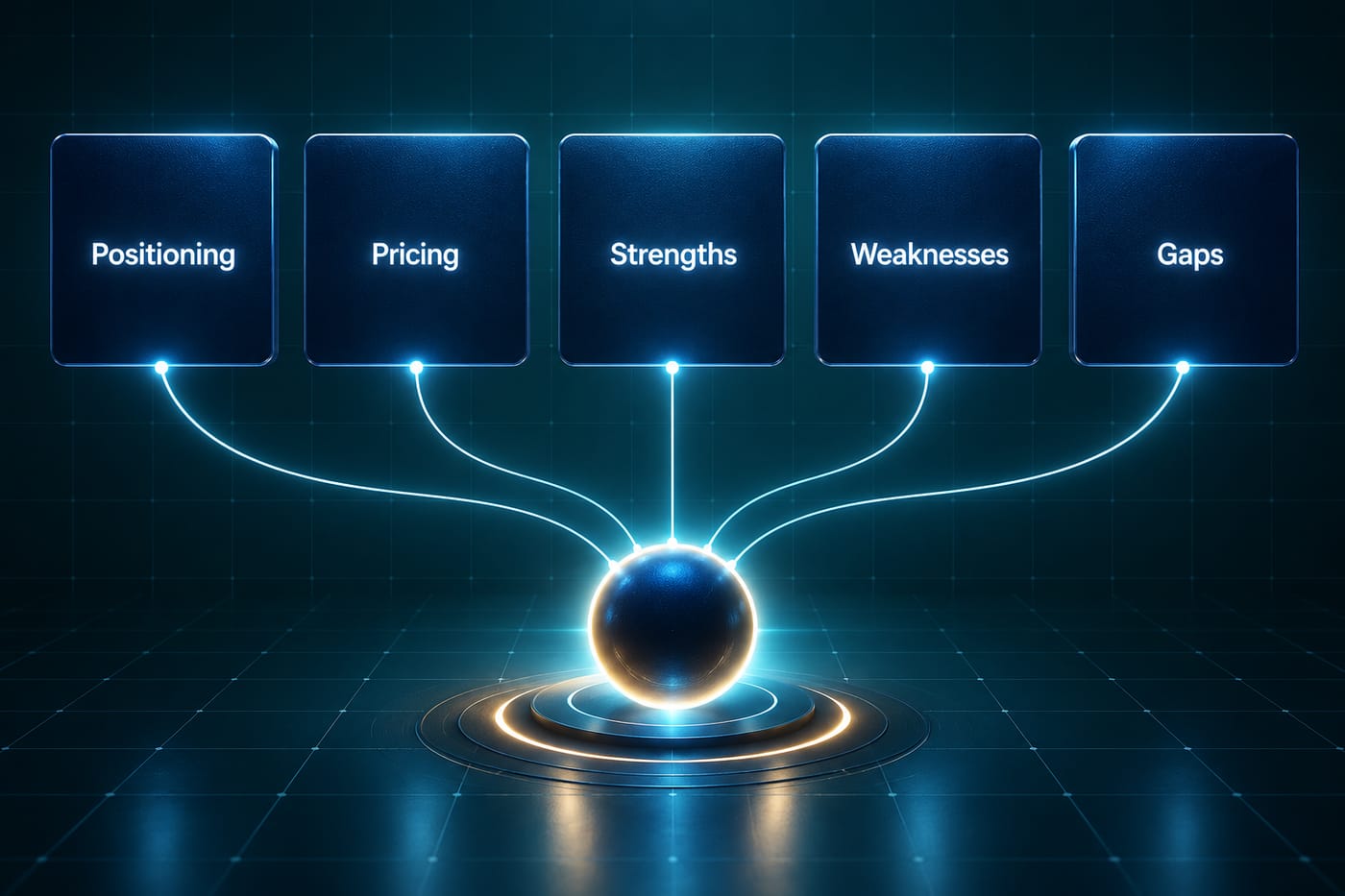
Locking the same schema for every rival is what makes patterns visible in under an hour. Use Microsoft Copilot (free) to pull current public facts. Open copilot.microsoft.com. For each competitor, run a grounded lookup so you have fresh pricing and recent news to feed into the analysis step.
Using live web results, give me the following for [Competitor Name], with a source URL for each item:
1. Their current public pricing tiers and prices
2. Their homepage tagline or hero headline, word for word
3. Any product launches, funding, or leadership changes in the last 6 months
Keep it factual. If something isn't on their site or in a credible source, say "not found" rather than guessing.Copy each answer into your text file under that competitor's name. Do this for all five. You now have a clean fact pack. The reason to do this in Copilot rather than ChatGPT: the free Copilot tier does live Bing search by default, which matters for pricing pages that change often.
Switch to ChatGPT and set up the analysis container. If you have Plus or higher, create a Project (left sidebar) so your prompts and context stay together — Free users get up to 5 files in a Project, Go and Plus 25, Pro and above 40. If you're on Free and don't see Projects, just start a new chat; the method still works. Paste in your schema from Step 1 and the fact pack from Step 2 as the first message, then say:
You are helping me build a competitor analysis for a B2B SaaS company. I will give you raw notes on up to five competitors. For every competitor, you will output exactly the same seven fields in the same order, using the schema I just gave you. Do not add commentary, do not merge competitors, do not skip fields. If a field has no data, write "insufficient data" — do not invent.
Run the analysis one competitor at a time. Paste the notes for Competitor 1 and ask ChatGPT to produce the seven-field block. Review it, then do Competitor 2, and so on. Doing them one at a time (not all five in one prompt) keeps the output tighter and makes it easier to catch hallucinations — if ChatGPT invents a pricing tier that wasn't in your Copilot fact pack, you'll spot it immediately.
Here are my notes on [Competitor Name]. Produce the seven-field block exactly as specified. For "Gaps we can exploit," use only what the strengths/weaknesses imply — do not speculate about their roadmap.
Ask ChatGPT to run a cross-competitor pattern pass. This is where the structured schema pays off. Once all five blocks are in the chat, prompt:
Looking across all five competitor blocks you just produced, answer:
1. What are the 3 positioning themes that appear in more than one competitor?
2. What price band do most of them cluster in, and who are the outliers?
3. Which weaknesses show up repeatedly — i.e. category-wide gaps my company could own?
4. Which single competitor is closest to us and why?
Be specific and cite which competitor each point refers to.The output of this prompt is usually the most useful page of your whole report, because it does the synthesis your leadership team actually wants.
Optionally run a Deep Research pass to firm up anything shaky. If any competitor's weaknesses or recent moves felt thin, open a new ChatGPT chat and enable Deep Research. Ask a single focused question such as "What are the most-cited complaints about [Competitor] from G2, Reddit, and Trustpilot reviews in the last 12 months, with source links?" Deep Research reports can be downloaded directly as PDF, Word, or Markdown from the report view — this is the only place in ChatGPT where that export exists on a normal account.
Assemble the final document. ChatGPT has no PDF or Word export for ordinary conversations. You have three realistic options:
- Copy–paste into Google Docs or Word yourself. Fastest. The schema is already clean, so formatting takes 10 minutes.
- Use Microsoft Copilot inside Word (available with Microsoft 365 Premium or Microsoft 365 Copilot for business, $21/user/month annually for up to 300 seats, or $30/user/month on enterprise). Paste your blocks into a blank Word doc, then ask Copilot in Word to restructure them into an executive summary followed by one page per competitor. Save as PDF via File → Save As → Download a Copy.
- If you ran Deep Research in Step 6, download that report as Word and paste your other blocks into it.
A worked example
Imagine you sell project-management software to construction firms, and your five rivals are Procore, Buildertrend, Fieldwire, Autodesk Construction Cloud, and CoConstruct. Your Copilot fact pack for Buildertrend might come back as:
Pricing: Essential $499/month, Advanced $799/month, Complete $1,099/month (first 2 months discounted). Hero headline: "Construction management software built for home builders and remodelers." Recent moves: not found in last 6 months.
Fed into ChatGPT, the seven-field block for Buildertrend might read:
Positioning: An all-in-one platform aimed specifically at residential home builders and remodelers. Target buyer: Owner-operator residential builders doing $1M–$20M in annual revenue. Pricing: $499–$1,099/month flat (not per-seat). Strengths: Vertical focus, flat pricing, strong homeowner-facing portal. Weaknesses: Narrow fit for commercial, higher entry price than per-seat tools, limited field-first mobile workflow. Recent moves: insufficient data. Gaps we can exploit: Commercial GCs, pay-as-you-grow seat pricing, mobile-first field crews.
Repeat five times, run the pattern pass, and you have the body of your report.
Limits and gotchas

- Hallucinated pricing is the #1 risk. AI models often guess at tiered prices. Trust only what Copilot's live search returned with a source URL, and have ChatGPT mark anything else as "insufficient data."
- Deep Research quotas are not fully published. OpenAI states Free and Go have "limited access," Plus has "expanded access," Pro has "maximum access," but doesn't publish a single monthly number. Don't plan to run 20 deep reports on the free tier.
- Free Copilot can't take uploads. If you have a competitor's PDF datasheet, upload it to ChatGPT, not Copilot's free tier.
- Human review is mandatory on three things: prices, direct quotes from competitor websites, and the "gaps we can exploit" section. Treat the gaps as a hypothesis to pressure-test with sales, not fact.
- Privacy: don't paste anything confidential about your own product (unreleased pricing, win-loss notes with customer names) into free consumer tiers. Use your Business or Enterprise workspace if you have one.
When not to use AI for this
Skip this workflow — or treat it as a first draft only — when the stakes are a pricing repositioning, an acquisition decision, or a board-level strategic bet. For those, the right move is primary research: 10–15 win/loss interviews with recent prospects, a paid analyst report (Gartner, Forrester, G2 category data), or a specialist like Klue or Crayon that monitors competitors continuously. AI is excellent at structuring and summarizing public information; it is not a substitute for talking to actual buyers.
Frequently Asked Questions
Do I need paid plans for ChatGPT and Copilot to make this work?
No. The free tier of ChatGPT plus the free tier of Microsoft Copilot can get you through the entire workflow, as long as you stay within 3 file uploads per day in ChatGPT and don't need the Researcher agent in Copilot. Paid plans mainly buy you more Deep Research runs, more upload capacity, and the ability to let Copilot build the final Word document for you.
Why use two tools instead of just one?
Because they're good at different things. The free Copilot tier runs live Bing searches by default, which is the right tool for grabbing today's pricing page or last month's funding announcement. ChatGPT is better at holding a long structured conversation and applying a consistent schema across five competitors. Using each for what it does best is faster than forcing one to do both.
Can ChatGPT export my final report as a PDF or Word doc?
Only in one specific case: a Deep Research report can be downloaded directly as PDF, Word, or Markdown from the report view. For ordinary chats, there is no export button on any plan — you'll copy-paste into Google Docs or Word, or use Microsoft Copilot inside Word (on a Microsoft 365 Premium or Microsoft 365 Copilot business plan) to format and save the file.
How often should I rerun this?
For most B2B SaaS companies, quarterly is enough for a full redo. Between quarters, just rerun Step 2 (the Copilot live-search fact pack) monthly to catch pricing changes and launches — that takes about 15 minutes and keeps your deck current.
What if my competitor hides their pricing?
Mark the field "not public" and move on. Don't let ChatGPT guess. If the price matters for your strategy, the honest path is to request a demo through a dummy email or ask a friendly customer of theirs — AI won't surface what isn't published.
If this quarterly ritual becomes a weekly need across multiple product lines, a custom workflow that watches competitor sites, extracts changes, and drops a structured brief into your inbox is the natural next step — the kind of build CodeNicely does when off-the-shelf tools stop keeping up.
Sources & further reading
- ChatGPT Pricing in 2026: Every Plan, Tier, and Hidden Cost Explained
- ChatGPT File Upload Limits 2026: Size, Count and Plans (citing OpenAI Help Center, October 2026)
- ChatGPT Deep Research Limits: Plan Quotas and Reset Rules
- ChatGPT Deep Research – Wikipedia (citing OpenAI Help Center)
- How to Save ChatGPT as PDF: Export Any Conversation (2026)
- Microsoft Copilot Pricing in 2026: Plans, Free Tier & Cost
- Microsoft Copilot Pricing & Licensing Guide for Business
- Microsoft Copilot Rollout Starts: Free Deep Research Retired in Four Days
- Is Copilot Free? Microsoft's Free Tier Explained (2026)
- Export & Download from Copilot: Complete Guide for Microsoft 365
Get one practical guide a week
Costs, AI tools, partner selection — written for people who make the decision. No spam, unsubscribe anytime.
Thanks — you're on the list. One practical guide a week, nothing else.
That didn't work — please check the email address and try again.
Building something in Research & Analysis?
CodeNicely partners with founders and tech teams to ship AI-native products that move metrics. Tell us about the problem you're solving.
Talk to our team Book a 30-min call