
Build a Sales Call Prep Sheet in Minutes with ChatGPT

 Published by CodeNicely, the product studio founded by Meghal Agrawal and Ujjwal Agrawal in 2017
For: An account executive at a 30-person B2B SaaS company who carries a full pipeline and spends more time on admin than actually selling
In this guide
By the end of this tutorial you will have a repeatable workflow that turns a prospect's LinkedIn bio, website copy and a job posting into a one-page call prep sheet — company context, likely pain points, a tailored talk track and three discovery questions — in roughly five minutes per call. You can run the whole thing on the free tiers of ChatGPT and Notion.
Last verified: November 2026, against the tools' own documentation. AI tools change often — if a step no longer matches, check the sources at the end.
Who this is for, and what you'll get
You are an account executive at a 30-person B2B SaaS company. Your calendar is stacked with discovery and demo calls, and the honest truth is that half of them get 10 minutes of hurried research in the Zoom waiting room instead of the 30 minutes they deserve.
This workflow gives you a one-page prep sheet in Notion, every time, that looks like this:
- Company context — what they do, who they sell to, what has changed recently
- Likely pain points — informed guesses based on their stage, stack and hiring
- Tailored talk track — three to five talking points you can actually say out loud
- Three discovery questions — specific to this prospect, not generic MEDDIC fill-ins
It takes about five minutes per prospect once you have the prompt saved, and it scales to however many calls you have that day.
The thing most ChatGPT-for-sales tutorials get wrong
Most guides tell you to paste a company name into ChatGPT and ask it to "research this prospect." That is the worst way to use it. ChatGPT is not a live research tool in that mode — it will hedge, guess, or produce bland summaries you could have written yourself.
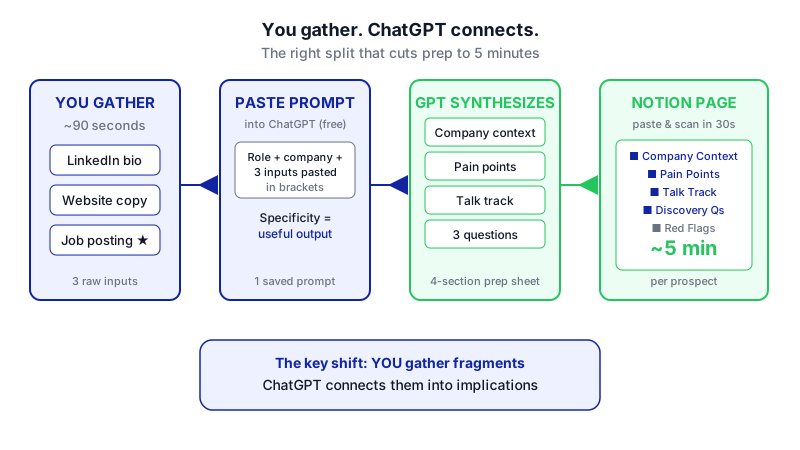

ChatGPT's real leverage for call prep is synthesis and anticipation. You do the 90 seconds of gathering — the LinkedIn bio, a paragraph of website copy, one open job posting — and you let ChatGPT connect the dots into implications, likely objections and questions worth asking. That is the shift that actually shortens your call cycle.
What you need
| Tool | Plan needed for this tutorial | Cost |
|---|---|---|
| ChatGPT | Free | $0. The Free plan supports unlimited everyday text chat, which is all this workflow needs. If you want a larger context window or more file uploads, ChatGPT Plus is $20/month. |
| Notion | Free | $0. You are only using Notion as a document store for pasting prep sheets. Notion AI is not required here (and the standalone AI add-on was retired in May 2025 — full Notion AI now requires the Business plan at $20/member/month billed annually). |
You also need, for each prospect, roughly 90 seconds of raw material you gather yourself:
- The prospect's LinkedIn "About" section or headline
- One or two paragraphs copied from their company website (homepage or product page)
- One open job posting from the company, if you can find one — this is the single highest-signal input
Step-by-step
-
Create a reusable "Call Prep" page in Notion. In Notion, create a new page titled
Call Prep — Template. Add headings for Company Context, Pain Points, Talk Track, Discovery Questions and Red Flags. You will duplicate this page before every call. Why: having the structure pre-built means you paste ChatGPT output into a format your eyes already know, so you can scan it in 30 seconds before dialing in.
The whole workflow lives in your hands: 90 seconds of gathering, then paste and prompt. -
Gather your 90 seconds of raw input. Open the prospect's LinkedIn profile and copy their headline and "About" section. Open the company website and copy one or two paragraphs that describe what they actually do. Open their careers page and copy one job posting — ideally in a function adjacent to what you sell (if you sell to RevOps, grab a RevOps or Sales Ops role). Why: the job posting reveals what the company is building, hiring for, and struggling with, more honestly than any marketing page.
-
Open ChatGPT and paste the master prompt below. Open chat.openai.com, start a new chat, and paste this prompt. Fill in the bracketed sections with what you gathered. The prompt is deliberately long because specificity is what separates a useful prep sheet from generic filler.
You are helping me prepare for a 30-minute discovery call. I am an account executive at [YOUR COMPANY], which sells [ONE SENTENCE ON WHAT YOU SELL AND TO WHOM].
My prospect is [NAME], [TITLE] at [COMPANY]. Here is what I know:
LinkedIn: [PASTE LINKEDIN HEADLINE + ABOUT SECTION]
Company website excerpt: [PASTE 1–2 PARAGRAPHS]
Open job posting at the company: [PASTE JOB POSTING]
Based only on what I've given you (do not invent facts about the company), produce a one-page call prep sheet with these sections:
1. Company Context (3 bullets, max 15 words each) — what they do, who they serve, what stage/signal the job posting suggests they're in.
2. Likely Pain Points (3 bullets) — pains a company like this probably has, grounded in the job posting and website language. Be specific; no generic "scaling challenges."
3. Tailored Talk Track (3–5 bullets) — things I can say in the first 10 minutes to show I've done my homework. Each bullet should reference something concrete from the inputs.
4. Three Discovery Questions — open-ended, specific to this prospect's situation, not reusable on any other call.
5. Red Flags / What I Don't Know (2 bullets) — gaps in my research I should fill before the call or ask on the call.
Keep the whole output under 350 words. Use Markdown headings and bullet points.
Why: this prompt does three things most sales prompts skip — it tells ChatGPT not to invent facts, it anchors every output to the inputs you provided, and it forces a Red Flags section that keeps you honest about what you still don't know.
-
Review the output critically. Read it once as if a junior rep gave it to you. Delete any bullet that feels generic, and if a pain point doesn't tie back to something in your inputs, challenge it. Ask ChatGPT in the same chat: "Rewrite pain point #2 — it's too generic. Tie it directly to the job posting." Why: the first draft is usually 80% right. The follow-up turn is where you get to 95%.
-
Copy the output into your Notion prep page. Duplicate the
Call Prep — Templatepage, rename it to the prospect's company, and paste the ChatGPT output directly in. Notion's editor automatically converts pasted Markdown — headings, bullets, bold — into native Notion blocks. No reformatting needed. If you prefer, save the ChatGPT output as a.mdfile and use the three-dot menu on a Notion page → Import → Markdown & CSV, which creates a new page with native blocks. -
If you're on mobile, use the Share button instead of copy-paste. There is a known issue where copying from ChatGPT and pasting into Notion on iOS or Android only pastes the first line. The workaround: in the ChatGPT mobile app, tap the Share button on the response and select Notion as the destination.
-
Save your master prompt as a reusable snippet. Keep the prompt in a Notion page called
Promptsor in your notes app. Next call, you copy the prompt, swap the bracketed inputs, and you're done in minutes. Why: the compounding value comes from reusing the same prompt — you stop reinventing structure and only think about the prospect.
A worked example
Say you sell a revenue analytics tool to RevOps leaders at Series B SaaS companies. Your 3pm call is with Priya Shah, Head of RevOps at a company called Fieldwire (hypothetical — this is an example).
Your inputs, gathered in 90 seconds:
- LinkedIn: "Head of RevOps at Fieldwire. Previously Sales Ops @ Gong. Building the systems layer for a scaling GTM org."
- Website excerpt: "Fieldwire helps field service teams schedule, dispatch and invoice from a single mobile-first platform. Trusted by 400+ mid-market contractors."
- Job posting: "Senior Salesforce Admin — You'll own our Salesforce instance as we migrate from HubSpot, build reporting for a sales team growing from 12 to 30 AEs this year, and partner with RevOps on territory design."
What good ChatGPT output looks like:
The Company Context bullets should say something like "mid-market field service SaaS, 400+ customers, mobile-first." The Pain Points should not say "they probably want to grow revenue" — they should say "mid-migration from HubSpot to Salesforce means reporting is likely broken or duplicated right now" and "doubling the AE team in a year will strain territory design and quota setting." The Talk Track should reference Priya's Gong background as a credibility hook and acknowledge the migration pain. The Discovery Questions should sound like: "Where are you in the HubSpot-to-Salesforce migration, and what reporting have you lost in the transition?" — not "What are your top priorities this quarter?"
If your output looks more generic than that, your inputs were too thin. Go grab the job posting.
Limits and gotchas
- ChatGPT will hallucinate facts if you let it. The prompt explicitly says "do not invent facts about the company" — keep that line in. If it still invents a funding round or a customer count, call it out and ask for a rewrite.
- Free plan file uploads are limited. ChatGPT Free caps file uploads at three per day, and may be lower at peak times. This workflow uses pasted text, so you're fine — but don't try to upload 10 PDFs of prospect research.
- Context window matters for long inputs. ChatGPT Free's context window is roughly 27K tokens; Plus and Go offer about 54K. For a single prep sheet with three short inputs, 27K is more than enough. If you ever try to feed in a 50-page annual report, you'll hit the ceiling.
- No native export from ChatGPT to Notion. OpenAI's account export produces HTML and JSON files that Notion cannot import cleanly. Stick with copy-paste or the Markdown import route.
- Privacy: don't paste anything confidential. LinkedIn bios, public job postings and website copy are all public. Do not paste internal CRM notes, deal values, or anything covered by an NDA into a consumer ChatGPT account.
- The sheet is a starting point, not a script. Read it, internalize it, and then close the tab before the call. Reading from a prep sheet live is worse than being underprepared.
When not to use AI for this
Skip this workflow when:
- It's a warm intro from a mutual contact. The intro email is better context than anything ChatGPT can synthesize. Read it twice instead.
- It's a renewal or expansion call. Your CRM notes, past call recordings, and support tickets are the real prep. ChatGPT doesn't have access to any of that.
- You know the prospect well already. If this is call three or four, you're past the "show you did homework" stage. Spend the time on the demo or the proposal instead.
Honest alternatives: Gong or Chorus for call recordings and coaching, Clay or Apollo for enriched prospect data, and your own CRM notes — none of which this workflow replaces.
Frequently Asked Questions
Do I need ChatGPT Plus for this?
No. The Free plan handles unlimited text chat and the inputs for a single prep sheet are small, so the Free context window of around 27K tokens is plenty. Upgrade to Plus ($20/month) only if you also want it for longer documents, image generation, or voice features.
Can I automate this so it runs on every calendar invite?
Not with ChatGPT and Notion alone out of the box. True automation — calendar trigger → pull prospect data → generate prep sheet → deliver to Notion — requires either a workflow tool like Zapier or Make, or a custom build. For most reps, the manual five-minute version is faster to adopt and gives you better output because you're reviewing it in real time.
Why not just ask ChatGPT to look the company up itself?
Because synthesis beats search for this task. When you give ChatGPT the raw material you've already chosen as relevant (the job posting, the LinkedIn bio), it produces sharper, more grounded output than when it tries to describe a company from memory — where it can hedge or hallucinate. Treat ChatGPT as the smart analyst, not the researcher.
What if the prospect's company is tiny and has no job postings or website content?
Lean harder on the LinkedIn profile — especially past roles and recent posts — and on any funding announcement or press mention you can find. If there is genuinely nothing to paste in, this workflow won't help much, and you should spend the time on one well-crafted opening question instead.
Can my whole team share one prompt?
Yes. Put the master prompt in a shared Notion page so every AE on the team uses the same structure. Consistent inputs mean consistent prep sheets, which means sales managers can coach on the output instead of on "did you prep?"
When this workflow outgrows copy-paste — for example, when you want prep sheets generated automatically from your CRM and delivered into Slack before every meeting — that's the point where a custom build makes sense, and it's the kind of thing we do at CodeNicely.
Sources & further reading
- What is ChatGPT Plus? — OpenAI Help Center
- ChatGPT Free Plan Guide (2026) — penchan.co
- ChatGPT Usage Limits by Plan: Free, Go, Plus, Pro and Resets
- ChatGPT Message Limit: Free, Plus, Pro Tiers — ChatAI Guide
- Notion Pricing Plans: Free, Plus, Business & Enterprise — Notion Help
- Notion AI pricing: the real per-seat math — CloudZero
- Notion AI Pricing: What Each Plan Includes and Costs — primonotes.com
- Introducing Notion AI for Work — Notion official blog
- Export ChatGPT to Notion, Obsidian & Google Docs (2026) — ai-toolbox.co
- Notion ChatGPT Integration: 5 Easy Ways to Automate (2026 Guide) — fwdslash.ai
Get one practical guide a week
Costs, AI tools, partner selection — written for people who make the decision. No spam, unsubscribe anytime.
Thanks — you're on the list. One practical guide a week, nothing else.
That didn't work — please check the email address and try again.
Building something in Sales?
CodeNicely partners with founders and tech teams to ship AI-native products that move metrics. Tell us about the problem you're solving.
Talk to our team Book a 30-min call