
Build a Personalized Sales Pitch Deck with ChatGPT and Canva

 Published by CodeNicely, the product studio founded by Meghal Agrawal and Ujjwal Agrawal in 2017
For: An account executive or sales manager at a 15–50 person B2B SaaS or services company who handles their own deck creation and spends 2–3 hours customizing a pitch for every new prospect
In this guide
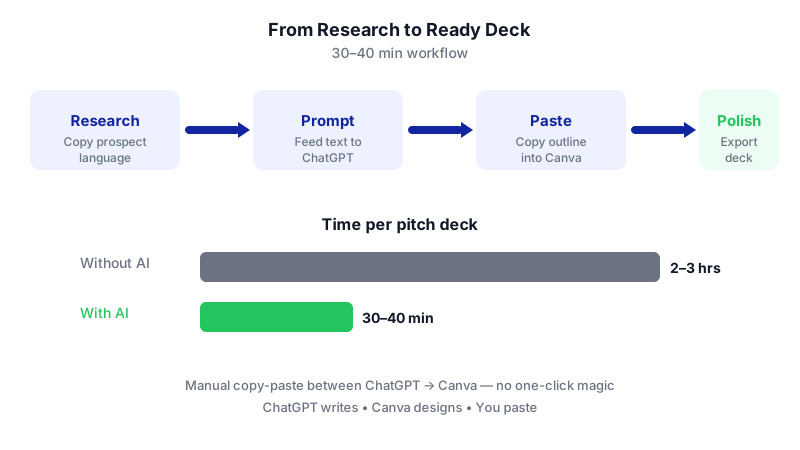
By the end of this tutorial you'll have a tailored 8–10 slide pitch deck for a specific prospect — with their pain points, their language, and your branding — ready to present or send. If you have your prospect research already in a browser tab, plan on about 30–40 minutes end to end.
Last verified: November 2026, against the tools' own documentation. AI tools change often — if a step no longer matches, check the sources at the end.
Who this is for, and what you'll get
This is for account executives and sales managers at a 15–50 person B2B SaaS or services company who build their own decks and currently lose 2–3 hours per prospect to rewriting slides and reformatting visuals.
You'll get:
- A repeatable research → prompt → paste → polish workflow.
- A deck outline where the prospect hears their own words reflected back at them (the piece most tutorials skip).
- A ready-to-export Canva presentation you can send as PDF or PPTX.
The important honest bit: ChatGPT writes the content, Canva designs the slides, and you copy and paste between them. Canva does not natively pull from ChatGPT, so no one-click magic — but the workflow still cuts hours off every pitch.
What you need
| Tool | Minimum plan for this workflow | Why |
|---|---|---|
| ChatGPT | Free works; Plus ($20/month) recommended | Free generates the deck text fine. Plus gives you expanded messages and uploads so you can feed in the prospect's website copy, PDFs, or job descriptions. |
| Canva | Free works; Pro ($12/month billed yearly, or $18 month-to-month) recommended | Free lets you use Magic Design and export PPTX. Pro unlocks up to 5 Brand Kits (so your deck is on-brand without manual restyling), a bigger AI allowance, and on-brand AI image generation via Dream Lab. |
Check current pricing on openai.com/chatgpt/pricing and canva.com before you buy — plan details move.
Heads up on Canva's AI limits: Free plans share a pool of up to 20 Standard/Premium AI uses per month and can't use Ultra AI tools at all. Pro lifts this to roughly 200 Premium and 20 Ultra AI uses per month. If you're pitching weekly, Pro pays for itself.
Step-by-step
-
Gather the prospect's own words (10 minutes). This is the step that separates a generic deck from one that lands. Open three tabs on the prospect: their homepage, their careers/jobs page, and the LinkedIn profile of the person you're meeting. Copy and paste into a scratch doc:

The research step — lifting the prospect's exact language — is what separates a tailored deck from a generic template. - The headline and sub-headline from their homepage.
- Two or three "what we do" paragraphs.
- One active job posting (especially the "responsibilities" and "challenges" sections — this is where real pain language lives).
- The buyer's LinkedIn headline and recent posts, if any.
Why: ChatGPT can only reflect the prospect's language back to them if you feed it the prospect's language. Generic prompts produce generic decks.
-
Give ChatGPT the context in one message. Open ChatGPT (Plus is easier here because you can also attach a PDF of the prospect's annual report or product brochure if you have one). Paste the scratch doc, then prompt:
You are helping me prep a pitch for [Prospect Company Name]. Below is text I copied from their website, a current job posting, and their VP of [Function]'s LinkedIn. Read it carefully and list, in their own words where possible: (1) the top 3 business priorities they appear to care about this year, (2) the specific pain phrases they use to describe problems, (3) the vocabulary and tone of their brand (e.g., formal, playful, technical). Quote directly from the text wherever you can. Do not invent anything not in the source. [Paste text]
Review the output. If anything looks made up, push back: "Which sentence in the source did that come from?" This is also the core move behind how to use ChatGPT for sales prospecting — you're letting the model synthesize, not fabricate.
-
Ask ChatGPT to draft the deck outline. In the same conversation, prompt:
Now draft an 8-slide sales pitch deck outline for my meeting with [Prospect Company]. My company is [Your Company], we sell [one-sentence description], and we typically help clients [one-sentence outcome]. Use this structure: 1) Title slide, 2) Their world today (use their own pain phrases from the research above), 3) Why this matters now, 4) A better way, 5) How we do it, 6) Proof (leave bracketed placeholders for 1–2 of my case studies), 7) What working together looks like, 8) Next step / CTA. For each slide give me: a slide title, 3–5 bullet points, and a 2–3 sentence speaker talking point I can say out loud. Mirror their vocabulary and tone. Do not invent statistics, customer names, or market figures — use [BRACKETED PLACEHOLDERS] where I need to fill in real data.
Those bracketed placeholders matter. ChatGPT will cheerfully generate plausible-sounding numbers if you let it; forcing placeholders keeps the fiction out.
-
Refine with one or two follow-ups. Read the draft out loud. If slide 2 doesn't sting, say: "Slide 2 feels generic. Rewrite it using the exact phrase '[pain phrase]' from their job posting, and make the first bullet an uncomfortable question." This kind of back-and-forth is where the best ChatGPT prompts for sales reps earn their keep.
-
Fill in your real proof. Replace every bracketed placeholder with real case studies, real numbers, real logos from your own records. Never ship a deck with ChatGPT-generated statistics — it invents them.
-
Open Canva and generate a base deck with Magic Design. In Canva, start a new Presentation. Use Magic Design (part of Magic Studio) to generate a themed deck from a short prompt like:
An 8-slide B2B sales pitch deck for a [industry] company, professional tone, [your brand colors if no Brand Kit], clean modern layout with room for bullet points and one image per slide.
Magic Design will produce a populated deck with layouts, images, and placeholder text. You'll replace the text with your ChatGPT output in the next step. If you have Canva Pro and have set up a Brand Kit (fonts, colors, logo), apply it so every slide is on-brand from the start.
-
Paste your ChatGPT text into each slide. This is manual — Canva does not auto-pull from ChatGPT. Go slide by slide: paste the slide title, paste the bullets, and keep the talking points in your speaker notes (Canva's notes panel beneath each slide). Delete any Magic Design slides you don't need.
-
Swap in prospect-specific visuals. Add the prospect's logo to the title slide. Replace any generic stock image on slide 2 ("their world today") with something that visually echoes their industry. On Canva Pro you can use Dream Lab with your Brand Kit photos to generate on-brand AI images; on Free, use Canva's stock library.
-
Do a 5-minute human pass. Read every slide. Check: Are the numbers real? Does the prospect's name appear correctly? Does the tone match their brand? Is there anything a competitor or a lawyer would raise an eyebrow at? AI tools for sales and marketing are drafters, not publishers — you're the publisher.
-
Export and send. In Canva, click Share (top-right) → Download → choose your file type → Download. For emailing: PDF Standard (96 dpi) keeps file size small; PDF Print (300 dpi) if they'll print it. For presenting in PowerPoint: choose Microsoft PowerPoint (.pptx). One warning from Canva's own help docs: PPTX files may look different when opened in PowerPoint, and animations and embedded videos won't carry over. If the deck uses Pro-only premium elements and you're on Free, those assets may export watermarked.
A worked example
The scenario: You're an AE at a 30-person B2B SaaS company selling workflow automation to operations teams. Your meeting on Thursday is with the VP of Operations at a mid-market logistics company called (for example) "Northwind Freight."

What you paste into ChatGPT: Northwind's homepage headline ("Reliable freight, zero surprises"), two paragraphs about their service network, one job posting for an Operations Analyst that mentions "manual exception handling," "spreadsheet-based reporting," and "growing customer escalations," plus the VP's LinkedIn headline ("Scaling operations without scaling headcount").
What good ChatGPT output looks like for Slide 2 ("Their world today"):
- Title: Scaling operations without scaling headcount
- Bullets: Manual exception handling eats analyst hours • Spreadsheet-based reporting slows decision-making • Customer escalations are growing faster than the team • Every new lane adds operational drag
- Talking point: "You've told the market you want to scale operations without scaling headcount — and your own job postings make it clear where the friction is: manual exceptions, spreadsheet reporting, and rising escalations. That's exactly the pattern we help ops teams break."
Notice three of those phrases came straight from the prospect's own site and job posting. That's the whole point.
Limits and gotchas
- ChatGPT invents numbers. Any market size, competitor stat, or prospect-specific figure must be independently verified. Treat ChatGPT output as a draft, not a source.
- Canva ↔ ChatGPT is manual. There's no native integration. Budget time for copy-paste.
- PPTX export quirks. Fonts, animations, and embedded videos may not survive. If the client wants PowerPoint, open the .pptx yourself and spot-check before sending.
- Free-plan AI limits. Canva Free caps you at 20 Standard/Premium AI uses per month across all tools, with no access to Ultra AI. If you build 2+ decks a week, Pro is the realistic floor.
- Brand Kit is Pro-only at scale. Free gives you 1 Brand Kit; Pro gives you up to 5. If you sell for multiple product lines, you'll feel the ceiling fast.
- Privacy. Don't paste a prospect's confidential documents (NDAs, unreleased financials) into ChatGPT Free or Plus. For sensitive accounts, use ChatGPT Business or Enterprise, or strip sensitive data before pasting.
When not to use AI for this, and honest alternatives
Skip this workflow when:
- The deal is seven-figure and strategic. Hand-craft it. The hours are worth it.
- You already have a tight, high-converting template and you're pitching the same ICP ten times a week. A duplicated Canva template with four find-and-replace fields is faster than any AI loop.
- The prospect expects your company's exact brand system. If your brand team owns the deck template, use theirs and only use ChatGPT for the messaging layer.
Alternatives worth knowing: your existing CRM may have deck templates tied to opportunity fields; some sales-enablement tools (Gamma, Tome, Pitch) generate decks from a prompt natively, though the design control and brand fidelity vary.
Frequently Asked Questions
Can I do this entirely on free plans?
Yes. ChatGPT Free generates the deck text, and Canva Free supports Magic Design plus PPTX export. You'll hit Canva's 20 AI uses/month ceiling quickly and you won't get Brand Kit at scale, but for one or two decks a month, Free works.
How is this different from asking ChatGPT for "a sales pitch"?
Generic prompts produce generic decks. The unlock in this tutorial is feeding ChatGPT the prospect's own language — pulled from their website, job postings, and LinkedIn — so the deck reflects their words back at them. That's what dramatically improves relevance and how to use ChatGPT for sales outreach well.
Why not just use Canva's AI to write the slides too?
You can, and for a rough first pass it's fine. But ChatGPT gives you more control over tone, structure, and the quality of the research synthesis — especially when you're pasting in several sources at once and iterating with follow-up prompts.
Will the PPTX look exactly like my Canva design?
Not always. Canva's own help page warns that PPTX files may look different in Microsoft PowerPoint, and animations and embedded videos aren't supported in the export. Open the file in PowerPoint and check before sending — especially fonts and any Pro-only premium elements if you're on Free.
Is it safe to paste prospect information into ChatGPT?
Public information (website copy, public job postings, public LinkedIn posts) is fine. Do not paste confidential documents into Free or Plus. For regulated industries or sensitive accounts, use Business or Enterprise plans with the appropriate data controls, or strip identifying information before prompting.
When this workflow starts to creak — multiple brands, dozens of reps, CRM-driven personalization — that's usually the signal to build a custom tool that generates on-brand decks from your own data; that kind of build is something CodeNicely does.
Sources & further reading
- ChatGPT Plans and Pricing — OpenAI Official
- ChatGPT Plans and Pricing (chatgpt.com) — Official
- Canva Pricing: Compare Free, Pro, Business and Enterprise plans — Canva Official
- Canva Enterprise vs Business vs Pro: what's the difference? — Canva Official
- About Canva Teams — Canva Help Center
- About Canva Business — Canva Help Center
- Upgrade to Canva Pro or Canva Business — Canva Help Center
- Choose the right download file type for your Canva design — Canva Help Center
- Create on-brand images with AI — Canva Help Center
- Canva Presentations — Free PowerPoint Alternative (Official)
Get one practical guide a week
Costs, AI tools, partner selection — written for people who make the decision. No spam, unsubscribe anytime.
Thanks — you're on the list. One practical guide a week, nothing else.
That didn't work — please check the email address and try again.
Building something in Sales?
CodeNicely partners with founders and tech teams to ship AI-native products that move metrics. Tell us about the problem you're solving.
Talk to our team Book a 30-min call