
Build a Marketing Campaign Brief with ChatGPT and Notion

 Published by CodeNicely, the product studio founded by Meghal Agrawal and Ujjwal Agrawal in 2017
For: A marketing manager at a 30-person SaaS company who owns campaign planning solo, has no dedicated strategist, and wastes hours in blank-doc paralysis every time a new campaign kicks off
In this guide
By the end of this tutorial you'll have a complete, stakeholder-ready marketing campaign brief — goals, audience, messages, channels, and success metrics — drafted in ChatGPT and published as a shareable Notion page. Budget about 45 minutes the first time, and closer to 20 minutes on every campaign after that.
Last verified: November 2026, against the tools' own documentation. AI tools change often — if a step no longer matches, check the sources at the end.
Who this is for, and what you'll get
This is written for the solo marketing manager at a small SaaS company — the person who owns campaigns end-to-end, has no dedicated strategist to lean on, and loses a week every launch to blank-doc paralysis and Slack back-and-forth.
What you'll walk away with:
- A one-page campaign brief with sections for objective, target audience, positioning, key messages, channel plan, timeline, and success metrics.
- A reusable prompt pattern you can rerun for every future campaign.
- A published Notion URL you can send to your CEO, sales lead, or agency without asking them to create an account.
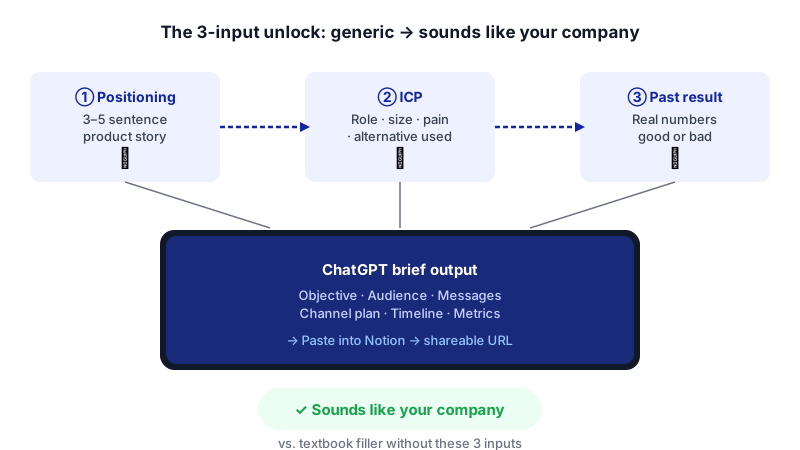
The trick most tutorials miss: prompting ChatGPT for "a campaign brief" gives you textbook filler. The real unlock is feeding it your actual product positioning, your ICP, and one past campaign result before you ask for the brief. That's what makes the output sound like your company instead of a marketing textbook.
What you need
| Tool | Plan needed | Cost | Why |
|---|---|---|---|
| ChatGPT | Free is enough; Plus is nicer | Free $0, Plus $20/month | Free now supports unlimited everyday text chat, which covers an iterative brief session. Plus gives you a stronger model and a larger context window (~32K tokens vs ~8K on Free) if your source material is long. |
| Notion | Free or Plus | Free $0, Plus from $10/user/month annually | You only need the page editor, sharing, and export. Notion AI is not required for this workflow — that's bundled into Business ($20/user/month annually) and isn't needed here. |
If you're a solo user on Notion Free, you get unlimited blocks, so one brief page is no problem. The 1,000-block cap only kicks in once a second member joins the workspace.
Step-by-step
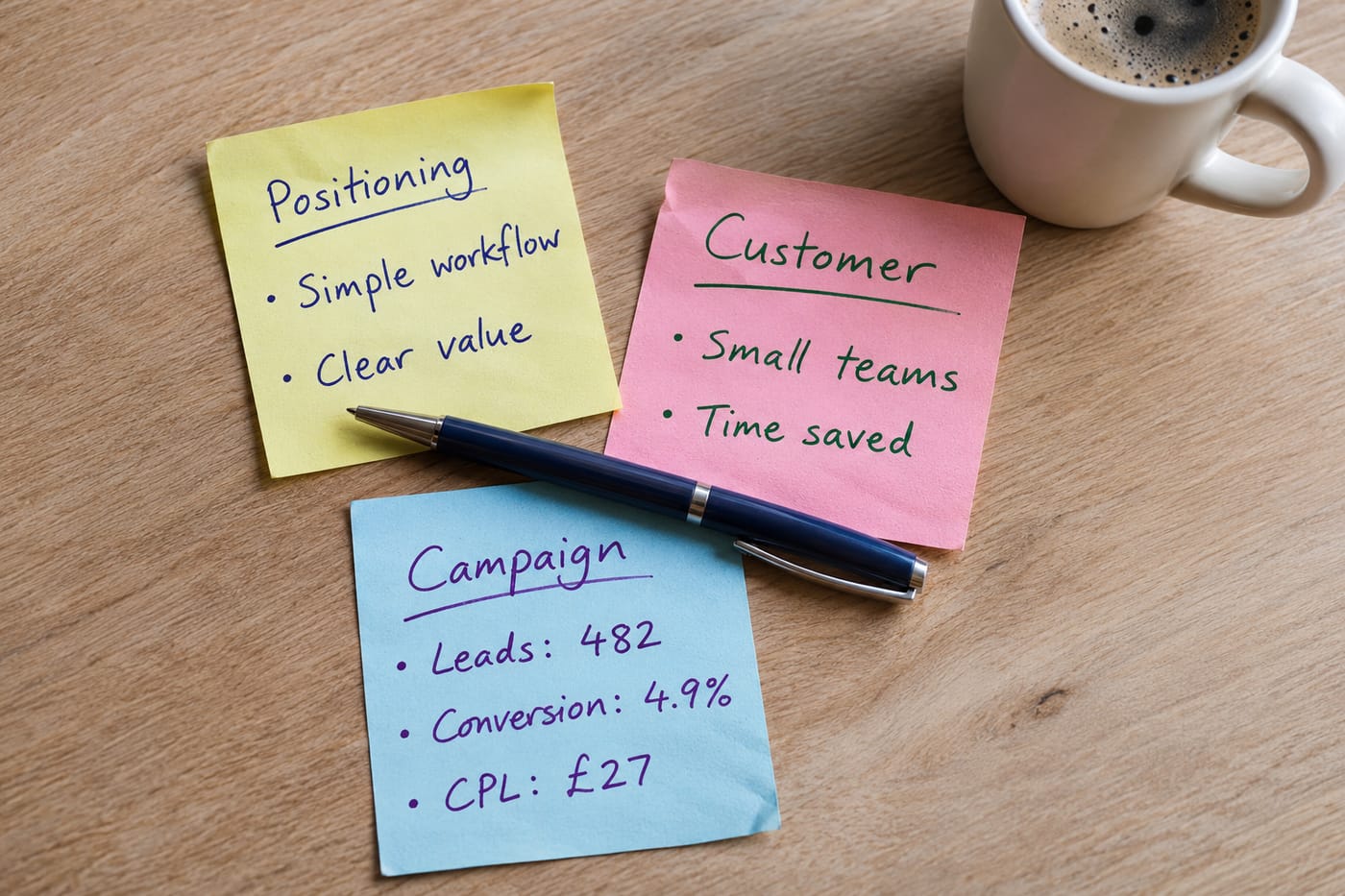
- Gather three pieces of input before you open ChatGPT. This is the step that separates generic output from useful output. You need: (a) your product positioning in 3–5 sentences, (b) a description of your ideal customer profile including job title, company size, and the pain you solve, and (c) one past campaign with its actual result (good or bad). Paste these into a scratch doc so you can drop them into ChatGPT in one go.
- Open ChatGPT and prime it with your context. Don't ask for a brief yet. First, give the model the raw material so every later answer is grounded in your business.
You are helping me plan a B2B SaaS marketing campaign. Before I ask you anything, read the following context and acknowledge it. Do not write a brief yet.
Read its summary carefully. If it got your ICP or positioning wrong, correct it now — every later step builds on this.
PRODUCT POSITIONING:
[paste your 3–5 sentence positioning]
IDEAL CUSTOMER PROFILE:
[paste ICP: role, company size, industry, main pain, current alternative they use]
PAST CAMPAIGN EXAMPLE:
Campaign: [name and goal]
What we did: [channels, offer, timing]
Result: [actual numbers — leads, pipeline, conversion rate, or "flopped because X"]
Reply with a 5-bullet summary of what you understand about my business so I can correct anything wrong. - Define the campaign objective in a single prompt. Vague objectives produce vague briefs. Force a specific, measurable goal before anything else.
I need to plan a new campaign. Here's what I know so far: [one-line description of the campaign idea, e.g. "launching our new Salesforce integration to existing customers and lookalike prospects"]. The timeline is [X weeks] and I have a budget of roughly [$Y] plus my own time.
Pick one. Paste it back into the chat so the model locks onto it.
Propose 3 possible primary objectives for this campaign, each written as a SMART goal tied to a business metric (pipeline, signups, expansion revenue, etc.). For each, note the main trade-off. - Generate the full brief in structured sections. Ask for the sections you actually need, in the order you want them, so you can paste directly into Notion without reshuffling.
Now draft a complete campaign brief for the objective we just chose. Use these exact section headings, in this order:
The
1. Campaign Summary (2–3 sentences)
2. Primary Objective & Success Metrics (the SMART goal plus 2–3 leading indicators)
3. Target Audience (segment, role, pain, what they currently do instead)
4. Core Positioning & Key Messages (one positioning statement, then 3 message pillars with supporting proof points drawn from my product)
5. Channel Plan (table: channel, asset, owner, week)
6. Timeline & Milestones (week-by-week)
7. Risks & Dependencies
8. Out of Scope
Base everything on the positioning, ICP, and past campaign I gave you earlier. Where you make an assumption, mark it with [ASSUMPTION] so I can verify.[ASSUMPTION]tag is the most important instruction here. It turns the brief into a checklist of things you need to confirm, instead of a confident-sounding document hiding guesses. - Pressure-test the draft. Don't accept the first version. Ask the model to argue against it.
Act as a skeptical head of sales reviewing this brief. What are the 5 weakest assumptions, and what would you push back on in a planning meeting? Then suggest a sharper version of the weakest key message.
Merge the useful critiques into the draft. Discard the rest. This single step is usually the difference between a brief that gets approved and one that gets a dozen comments. - Create the Notion page. In your Notion workspace, create a new page titled with your campaign name and date. Paste the brief in. Notion preserves markdown formatting from ChatGPT fairly well — headings, bullets, and tables usually come through. Clean up anything that doesn't, and fill in the
[ASSUMPTION]items with real answers (or convert them into open questions for your stakeholders). - Share it for approval. At the top of the page, click Share, switch to the Publish tab, and click Publish. You'll get a public
notion.siteURL that anyone can open without a Notion account. Send that link in Slack or email with a specific ask ("Any objections by Thursday EOD?") rather than a vague "thoughts?". - Export a frozen copy for the record. Once the brief is approved, click the ••• menu at the top right of the page, choose Export, and pick PDF. Save that PDF somewhere permanent — your drive, the campaign folder, wherever your team keeps closed artifacts. Notion also supports HTML and Markdown exports if you'd rather keep it editable; there's no native Word export, so if someone insists on .docx, export to HTML and convert.
A worked example
Say you're Priya, the solo marketer at a 30-person SaaS company selling a workflow automation tool to RevOps leaders at Series B–D SaaS companies. You're launching a new HubSpot integration.

Context you'd paste into ChatGPT:
- Positioning: "We help RevOps teams at growing SaaS companies cut manual CRM cleanup by 80%. Unlike generic iPaaS tools, we ship pre-built playbooks for pipeline hygiene, so teams get value in a week, not a quarter."
- ICP: "RevOps Manager or Director, 100–500 employee SaaS, uses HubSpot or Salesforce, currently relies on Zapier + spreadsheets, frustrated by stale deal data."
- Past campaign: "Q1 webinar on 'Pipeline hygiene for RevOps.' 320 registrations, 110 attendees, 14 demos booked, 3 closed deals ($42K ARR). Worked because the title was specific; underperformed on demo conversion because the CTA was vague."
What good output looks like: the Channel Plan section should name HubSpot's own community forums, a specific podcast your ICP listens to, and a co-marketing play with HubSpot — not "LinkedIn, email, and content marketing." Key messages should reference pipeline hygiene (because your past campaign proved that phrase lands), not "boost productivity." Success metrics should include demo-to-opportunity conversion, because that's where last campaign fell short.
If your output is vague or generic, your context was vague. Go back to step 2 and add more detail.
Limits and gotchas
- ChatGPT doesn't connect to Notion directly. There's no self-serve integration that pushes a draft from ChatGPT into a Notion page. Copy-paste is the real workflow. Don't waste time hunting for a button that isn't there.
- Every number needs human verification. If ChatGPT writes "expect a 3% conversion rate," treat it as a placeholder. It has no access to your funnel data unless you give it to you, and benchmark numbers it invents are not reliable.
- Don't paste customer PII or unreleased financial data. Your past-campaign example should use aggregate numbers, not customer names. If your company has a data policy about third-party AI tools, follow it.
- Notion Free has a 5 MB per-file upload cap and 7-day page history. For a text brief this is fine; if you plan to attach large creative assets, Plus raises the file cap and extends history to 30 days.
- Published Notion pages are public. Anyone with the
notion.siteURL can read them. For confidential campaigns, use regular Share permissions and invite specific people instead of publishing. - The
[ASSUMPTION]tags are only useful if you actually resolve them. A brief full of unresolved assumptions is worse than a short, honest one.
When not to use AI for this, and honest alternatives
Skip this workflow when:
- The campaign is a major launch tied to repositioning. If you're changing how the company talks about itself, you need real stakeholder conversations, not a drafted-in-an-hour brief. Use AI to prep questions for those conversations instead.
- You don't yet have clear positioning or ICP. Garbage in, garbage out. Fix the positioning first — that's a workshop, not a prompt.
- Regulated industries with strict claims review. If every message pillar has to go through legal, draft them in your compliance-approved tooling from the start.
Honest alternatives: a one-page template in Google Docs that you fill in manually works fine if you already know your answers. A 30-minute whiteboard session with your CEO beats any AI draft when the campaign is strategic enough to warrant their time.
Frequently Asked Questions
Do I need ChatGPT Plus for this, or is Free enough?
Free is enough for a single campaign brief. As of August 2026, the Free plan supports unlimited everyday text chat, which covers the iterative prompting this tutorial needs. Plus ($20/month) gives you a stronger model and a larger context window, which helps if you're pasting a lot of source material or running many briefs per week.
Do I need Notion AI or the Business plan?
No. The drafting is done in ChatGPT; Notion is just where the brief lives and gets shared. Notion Free or Plus is fully sufficient. Full Notion AI features are bundled into the Business plan ($20/user/month annually), but they aren't required for this workflow.
Can ChatGPT push the brief into Notion automatically?
No, not on any self-serve plan. There's no built-in connector between them. Copy-paste from ChatGPT into a new Notion page is the standard workflow, and markdown formatting carries over reasonably well.
How do I share the brief with someone who doesn't use Notion?
Click Share at the top of the page, open the Publish tab, and click Publish. You'll get a public notion.site link that works in any browser without a login. For a frozen copy, use the ••• menu and choose Export → PDF.
How do I keep the brief from sounding generic?
The quality of the output tracks the quality of the context you give in step 2. Specific positioning, a sharply described ICP, and one real past-campaign result with actual numbers are what make the brief sound like your company. Skip that step and you'll get a textbook; include it and you'll get something worth sending.
When this workflow starts hitting its limits — for example, if you want briefs auto-populated from your CRM data or routed through an approval system — that's the point to consider a custom build, which is the kind of thing CodeNicely does.
Sources & further reading
- ChatGPT Plans and Pricing — OpenAI Official
- OpenAI ChatGPT Pricing (learn.chatgpt.com)
- ChatGPT Usage Limits 2026: Free, Plus and Pro Message Caps — AI Toolbox
- ChatGPT Usage Limits (Free, Plus, Pro) — AI Plan Finder
- Is ChatGPT Free? Unlimited Chats and Plan Limits 2026 — FelloAI
- Notion Pricing 2026: Plans, Team Costs & Is It Worth It — Plaky (verified Oct 13, 2026)
- Notion Pricing in 2026: Every Plan — Rock.so (verified Sep 2, 2026)
- Notion AI Pricing: Which Plan Is Right for You? — Kipwise (updated 2026)
- Notion AI 2026: 5 Features, Pricing & Real Uses — Dan Cumberland Labs
- Export Your Notion Content — Notion Official Help Centre
Get one practical guide a week
Costs, AI tools, partner selection — written for people who make the decision. No spam, unsubscribe anytime.
Thanks — you're on the list. One practical guide a week, nothing else.
That didn't work — please check the email address and try again.
Building something in Marketing?
CodeNicely partners with founders and tech teams to ship AI-native products that move metrics. Tell us about the problem you're solving.
Talk to our team Book a 30-min call