
Turn Any Vendor Contract into a Risk Summary with Claude

 Published by CodeNicely, the product studio founded by Meghal Agrawal and Ujjwal Agrawal in 2017
For: Operations manager at a 40-person SaaS company who receives 3–5 vendor contracts a month, has no in-house legal team, and must decide whether to escalate to outside counsel or flag issues for the CEO before a signing deadline
In this guide
By the end of this tutorial you'll have a one-page, plain-English risk summary of a vendor contract — flagging liability gaps, auto-renewal traps, and missing data-protection clauses — ready to send to your CEO or outside counsel. Budget about 45 to 60 minutes the first time you do it, and roughly 20 minutes once it becomes routine.
Last verified: November 2026, against the tools' own documentation. AI tools change often — if a step no longer matches, check the sources at the end.
Who this is for, and what you'll get
You're the operations manager at a small SaaS company. Three to five vendor contracts a month land in your inbox — a new CRM, an analytics tool, a payroll processor — and someone needs to decide whether to sign, negotiate, or hand it to a lawyer. You don't have in-house legal, and outside counsel at $400/hour isn't justified for every $500/month SaaS renewal.
What you'll get from this workflow:
- A structured risk summary covering liability, termination, auto-renewal, data protection, and payment terms
- Direct quotes from the contract tied to each flagged issue, so leadership can see the actual language
- A clear recommendation: sign as-is, negotiate specific clauses, or escalate to a lawyer
- A shareable Notion page or PDF your CEO can read in five minutes
What you need
| Tool | Plan needed | Cost | Why |
|---|---|---|---|
| Claude | Free works; Pro recommended | $0 Free, or $20/month (Pro) | Reads the contract and drafts the risk analysis. The 200,000-token context window on Pro comfortably handles a full contract PDF. |
| Notion | Free is enough for this task | $0 | Hosts the final summary page and lets you share it as a public link or export to PDF. Full Notion AI features require the Business plan at $20/member/month annually, but you don't need them here. |
Claude's document analysis works on every tier including Free, with the same upload limits: 500 MB per file, 20 files per chat, and up to 1,000 pages per PDF. The one caveat: Claude only runs full visual analysis (charts, diagrams, signature blocks as images) on PDFs of 100 pages or fewer. Pages 101 to 1,000 are read as text only, which is fine for almost every vendor contract you'll see.

Step-by-step
The common mistake with contract review in Claude is dumping the whole PDF into one prompt and asking "what are the risks?" You'll get a generic, hedged answer. Claude's analysis gets noticeably sharper when you (a) tell it who you are and what size company you run, and (b) walk it through the contract section by section with targeted prompts.
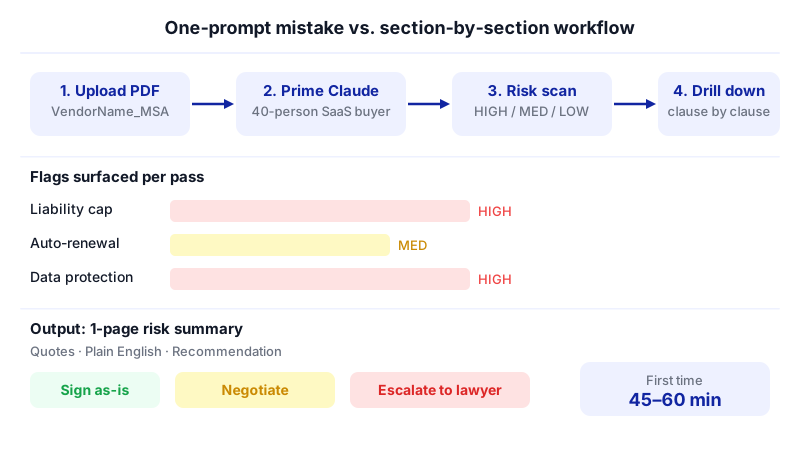
Save the contract as a PDF in one place. Rename it clearly:
VendorName_MSA_2026-03.pdf. If the vendor sent a DOCX, open it and export to PDF — Claude accepts both, but PDFs preserve page numbers you'll want to cite in the summary.Start a new Claude chat and upload the contract. Attach the PDF to the chat. Don't ask anything yet. First, prime Claude with context about your business so the analysis is calibrated to your risk tolerance.
I'm the operations manager at a 40-person B2B SaaS company based in [country]. We have no in-house legal team. I'm about to review a vendor contract — the PDF is attached. Before I ask you anything, confirm you've received the document, tell me how many pages it is, and list the main sections or articles with their headings and page numbers. Do not analyze anything yet.
This single step prevents hallucinated section names later and gives you a table of contents to work from.
Ask for a first-pass risk scan. Now you want the headline issues before you dig into specifics.
Give me a first-pass risk scan of this contract from the perspective of a 40-person SaaS buyer. For each issue, quote the exact clause (with page number), explain in plain English what it means, and rate the risk as HIGH, MEDIUM, or LOW. Focus on: unlimited liability for the buyer, auto-renewal terms, termination notice periods, indemnification, data protection and sub-processors, IP ownership of our data, and payment/late-fee terms. If a standard protection is missing entirely, flag that too.
Drill into each HIGH and MEDIUM flag, one at a time. This is where section-by-section prompting beats the "paste it all" approach. For each flagged clause, ask a follow-up that pushes Claude to compare the language to what's typical.
Look at the liability cap clause you flagged on page 7. Compare it to what's typical in SaaS vendor contracts for a buyer our size. Specifically: is the cap mutual? Does it carve out breaches of confidentiality or data protection obligations? What specific wording change would I ask the vendor for, and why?
Repeat for auto-renewal (how many days' notice to cancel, and when does the window open?), data protection (is there a DPA referenced, are sub-processors listed, is there breach notification language?), and termination (can the vendor terminate for convenience? can you?).
Ask Claude to draft the one-page summary. Once you've worked through the flags, consolidate.
Draft a one-page risk summary of this contract for our CEO. Structure it as: (1) Vendor and contract overview — 2 sentences; (2) Recommendation — SIGN AS-IS, NEGOTIATE, or ESCALATE TO COUNSEL, with one-sentence rationale; (3) Top 3 risks with the clause quoted, the plain-English meaning, and the suggested action; (4) Lower-priority items as a bulleted list; (5) Deadline and next step. Keep it under 500 words. Use plain English — no legal jargon unless you quote the clause directly.
Create the Notion page. In Notion, create a new page titled
[Vendor Name] — Contract Risk Summary — [Date]. Paste Claude's summary in. Add a link or attachment to the original contract PDF at the top so leadership can jump to the source if they want.Share it with leadership. You have two clean options:
- Public link: Click Share in the top-right of the Notion page, open the Publish tab, and click Publish to web. This generates a notion.site URL anyone can open — no Notion account required. Good for forwarding to outside counsel.
- PDF: Click the ••• three-dot menu on the page and choose Export. Notion offers PDF, HTML, and Markdown & CSV. Pick PDF for an email attachment. (Native DOCX export isn't available in Notion — if your CEO insists on Word, open the PDF in Word, or copy the content across manually.)
Both options work on Notion Free.
Keep the Claude chat open until the deal closes. If the vendor comes back with redlines, paste the revised clause into the same chat and ask Claude whether the new language resolves the original concern. Context from the earlier conversation makes those follow-ups much faster.
A worked example
Say you've just received a Master Services Agreement from a marketing analytics vendor. $1,800/month, 12-month term. Your CEO wants to sign by Friday.

You upload the 23-page PDF to Claude with the priming prompt from step 2. Claude confirms it has the document, lists 14 sections, and notes the DPA is referenced as "Exhibit B" but no exhibit is attached — your first red flag, caught before you've even analyzed anything.
The first-pass scan surfaces four issues: an auto-renewal clause requiring 90 days' written notice to cancel (unusually long for SaaS), a liability cap limited to "fees paid in the prior three months" (very low for a vendor handling customer data), no breach-notification timeline, and a clause giving the vendor the right to use your company name and logo in marketing without approval.
Your one-page summary to the CEO lands as: Recommendation: NEGOTIATE before signing. Three specific asks — attach the DPA, raise the liability cap to 12 months of fees with a carve-out for data breaches, and change the logo-use clause to "with prior written approval." Nothing here needs a lawyer yet. If the vendor refuses on the liability cap, then escalate.
Total time from PDF to shared Notion link: about 40 minutes.
Limits and gotchas
- Claude is not a lawyer. This workflow produces a well-structured first read, not legal advice. For anything high-value (contracts above a dollar threshold your board sets), anything involving regulated data, or any clause Claude rates HIGH risk, send it to a qualified attorney.
- Visual elements beyond page 100 are text-only. If a contract exhibit is a scanned image or a complex table past page 100, Claude processes it as text. For most vendor MSAs this doesn't matter, but check if your contract includes image-based signature pages or scanned schedules.
- Hallucinated citations are possible. Always spot-check: open the PDF, go to the page number Claude cited, and confirm the quoted clause actually says what Claude says it says. This takes two minutes and catches the rare fabrication.
- Data privacy. You're uploading a vendor contract to Anthropic's servers. If the contract itself is marked confidential or contains third-party personal data, check your own obligations before uploading. Many vendor contracts explicitly permit sharing with advisors — AI tool use is a grey area worth clarifying with the vendor if the contract is sensitive.
- Notion sharing is public once published. "Publish to web" creates a URL anyone with the link can open and search engines may index. For sensitive summaries, use PDF export and email instead, or share the Notion page with specific people only.
When not to use AI for this, and honest alternatives
Skip this workflow and go straight to a lawyer when: the contract value is material to the business (your board probably has a threshold — often $50k+/year), the vendor is handling regulated data (health, financial, children's data), you're the one drafting the contract rather than reviewing someone else's, or there's a dispute, breach, or termination in progress.
Honest alternatives worth knowing: dedicated AI contract-review tools (Ironclad, Spellbook, Robin AI) are purpose-built for this and integrate with Word, but they're priced for legal teams, not 40-person ops functions. A fractional general counsel on a monthly retainer is often cheaper than hourly outside counsel if your contract volume is steady. And for recurring vendor types (standard SaaS subscriptions, NDAs), having a lawyer write you a one-page checklist of "what to look for" is a one-time spend that pays off for years.
Frequently asked questions
Does this work on Claude's Free plan?
Yes. Document analysis, the 500 MB file size limit, and the 1,000-page PDF cap are the same on Free and paid tiers. The main reason to upgrade to Pro ($20/month) is longer conversations and higher message limits — useful if you review contracts weekly, less critical if it's monthly.
Can Claude compare two versions of the same contract?
Yes. Upload both PDFs in the same chat (you can attach up to 20 files per chat) and ask Claude to list every substantive change between v1 and v2, grouped by clause. This is especially useful after a vendor returns redlines.
Should I use Notion AI instead of Claude for the analysis?
For this specific task, no. Full Notion AI requires the Business plan at $20/member/month annually, and Claude's dedicated chat interface gives you better control over multi-turn contract analysis. Use Notion here just as the shareable output surface — which works on Free.
What if my contract is longer than 1,000 pages?
Split it. Export the PDF in chunks (for example, pages 1–500 and 501–1,000+) and upload them as separate files in the same Claude chat. Then prompt Claude to treat them as one document. In practice, vendor contracts almost never approach this limit — a typical SaaS MSA is 15 to 40 pages.
How do I handle the signature deadline pressure?
Run this workflow the day the contract arrives, not the day before signing. If the summary flags HIGH risks and you need more time, email the vendor asking for a 5–7 day extension to "complete internal review." Vendors expect this and almost always grant it. A rushed signature is how businesses end up locked into bad terms.
When a workflow like this starts handling dozens of contracts a month and you need something more automated — pulling clauses into a database, triggering alerts, routing to counsel — a custom build on top of these same APIs is an option, and it's the kind of thing CodeNicely does.
Sources & further reading
- Claude Pricing in 2026: Plans, API Costs & Claude Code — Lindy.ai
- Claude Pricing in 2026: Free vs Pro vs Max — AItomation Academy
- Claude Attachment Limit: File Caps, Sizes, and Retrieval — fast.io
- How Many Files Can You Upload to Claude? Chat vs Projects — fast.io
- Claude File Upload Limit in 2026: Size, PDF, Project & Attachment Rules — Spinbot
- Claude file upload limits in 2026: 500 MB per file, 20 files per chat — Data Studios
- Claude Projects Token Limit and Knowledge Capacity (2026) — fast.io
- Notion AI Pricing 2026: The $10 Add-On Is Gone — Krater.ai
- Notion AI Pricing (Oct 2026): Plans, Credits, Team Cost — Sentra
- Notion AI Pricing in 2026: What It Costs — Coworker.ai
Get one practical guide a week
Costs, AI tools, partner selection — written for people who make the decision. No spam, unsubscribe anytime.
Thanks — you're on the list. One practical guide a week, nothing else.
That didn't work — please check the email address and try again.
Building something in Legal & Compliance?
CodeNicely partners with founders and tech teams to ship AI-native products that move metrics. Tell us about the problem you're solving.
Talk to our team Book a 30-min call