
Turn Your Meeting Notes into Action Plans with Copilot and Notion

 Published by CodeNicely, the product studio founded by Meghal Agrawal and Ujjwal Agrawal in 2017
For: An operations manager at a 30-person SaaS company who runs four or more recurring meetings per week and spends 20–30 minutes after each one manually typing up notes and chasing owners for follow-through
In this guide
By the end of this tutorial you will have a repeatable workflow that takes a Microsoft Teams meeting with Copilot and ends with a clean Notion page listing every action item, its owner, and its due date — ready to share with your team. Once your tools are set up, each meeting takes under 10 minutes of hands-on work to process.
Last verified: November 2026, against the tools' own documentation. AI tools change often — if a step no longer matches, check the sources at the end.
Who this is for, and what you'll get
You run four or more recurring meetings a week — standups, customer syncs, sprint reviews, leadership check-ins. Right now you spend 20–30 minutes after each one rewriting notes, trying to remember who agreed to what, and chasing people on Slack three days later.
The output of this workflow is a Notion page per meeting that looks the same every time: a short summary at the top, then a table of action items with Owner, Due date, and Next step columns. It is shareable, searchable, and specific enough that nobody can say "I didn't know that was mine."
The honest architecture: why this needs three tools, not two
Most tutorials imply you can connect Microsoft Copilot and Notion and have action items flow between them automatically. That is not currently true, and it is worth being clear about why before you set anything up.
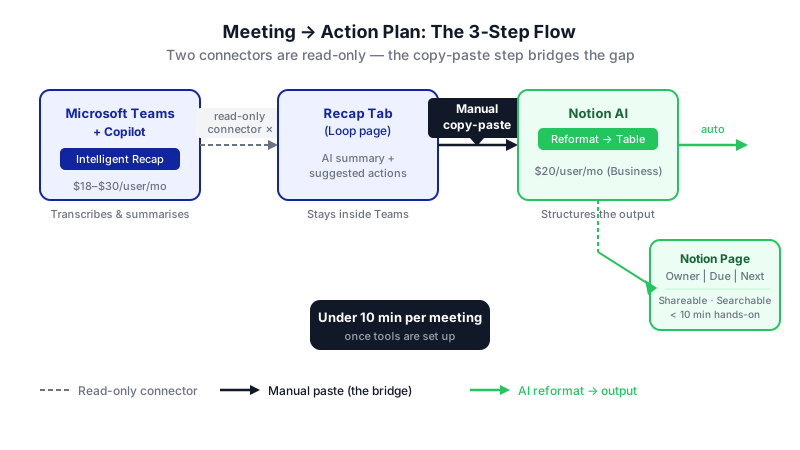

- Microsoft Copilot in Teams (Intelligent Recap) produces the AI summary and suggested action items, but it stores them inside the Teams Recap tab and a Microsoft Loop page — not in Notion.
- The official Copilot–Notion connector is read-only. Copilot can search your Notion workspace, but it cannot create or edit Notion pages.
- The official Notion AI Connector for Microsoft Teams is also read-only. It lets Notion AI search Teams messages; it does not push structured notes into Notion.
So the realistic workflow is: let Copilot do what it is good at (recap and action-item extraction from a live meeting), then move that output into Notion. You have two reasonable ways to do that move:
- Manual paste — copy the Copilot recap into a Notion page and let Notion AI reformat it into a structured action table. Zero extra tools, under 10 minutes per meeting.
- Automated bridge — use a workflow tool like Power Automate, Zapier, or Make (or a dedicated meeting-intelligence tool with a native Notion integration) to push the recap into Notion automatically.
This tutorial walks through option 1 in detail because it works today with no extra subscriptions beyond Copilot and Notion, and then shows how to upgrade to option 2 when you want to remove the manual step.
What you need
| Tool | Plan required | Price (verify on vendor site) | Role in workflow |
|---|---|---|---|
| Microsoft 365 Copilot (with Teams) | Microsoft 365 Copilot license, or Teams Premium add-on | Microsoft 365 Copilot Business: $18/user/month on current promotional pricing (originally $21), billed annually. Enterprise add-on: $30/user/month. | Transcribes the meeting, generates the AI summary and suggested action items in the Recap tab. |
| Notion | Business plan (required for full Notion AI, including AI Meeting Notes and action item extraction) | Reported at $20/user/month billed annually; confirm on notion.com/pricing. The standalone $10/user AI add-on was retired in May 2025. | Hosts the final action plan. Notion AI reformats pasted notes into a structured table. |
| Optional: Power Automate, Zapier, or Make | Any paid tier that supports Microsoft 365 and Notion | Check the vendor's current pricing page | Removes the copy-paste step if you want full automation later. |
Important Copilot limits to know up front: Intelligent Recap requires the meeting to be at least 5 minutes long and transcribed in a supported language. AI notes are currently only available for meetings transcribed in English. Free Teams has no AI meeting summary tier.
Step-by-step: from meeting end to shareable Notion page
Before the meeting: turn on transcription and recording in Teams. Intelligent Recap only works if the meeting is transcribed. Set this as the default on your recurring meeting series so you never have to remember.

The manual paste step is the hinge of the whole workflow — messy input goes in, a clean action table comes out. Run the meeting normally. You do not need to type notes while you talk. Copilot is listening. If you want cleaner output, verbally confirm decisions out loud — "so Priya owns the pricing page update by Friday" — because Intelligent Recap picks up speaker-attributed highlights.
Open the recap. In Teams, go to Calendar → open the finished meeting → Recap → AI summary. You will see the AI-generated summary, suggested action items, speaker highlights, and meeting chapters. The underlying notes live in a Microsoft Loop page linked from the same tab.
Copy the recap content. Select the summary and the suggested action items from the Recap tab (or open the linked Loop page and copy from there). You want the raw text — don't worry about formatting.
Create a new page in Notion from your meeting template. In your Notion workspace, open the database you use for meeting notes (create one if you don't have it — properties: Meeting name, Date, Attendees, Status). Add a new page and paste the Copilot output into the body.
Ask Notion AI to restructure it with owners and due dates. This is the step most tutorials skip. Don't just ask for a summary — tell Notion AI to assign an owner and a date to every single action item. Highlight the pasted notes, open Notion AI, and use a prompt like this:
You are my meeting notes assistant. Below are raw notes and suggested action items from a Teams meeting. Do three things: (1) Write a 3-sentence summary of what was decided. (2) Extract every action item into a table with these columns: Action, Owner, Due date, Next step. (3) If an owner or due date is missing or ambiguous, write "CONFIRM" in that cell — do not guess. Attendees were: [list names]. Today's date is [date].
Giving Notion AI the attendee list and today's date is what makes owners and deadlines usable instead of vague.
Review the "CONFIRM" cells. This takes two minutes. Anywhere Notion AI flagged uncertainty, you make the call: assign the owner, pick a date, or delete the row because it was never a real action item.
Convert the action table into tracked tasks (optional but recommended). If you keep a central Notion tasks database, turn each row into a linked task so owners see it in their own view. In Notion, you can do this by converting the inline table to a linked database view, or by copying rows into your tasks database.
Share the page. Share the Notion page in the meeting's Teams channel or email it. Because the structure is identical every week, people stop reading the summary and jump straight to "what did I agree to?"
Later: automate the paste step. Once you have run this manually for 2–3 weeks and the Notion template is stable, build a Power Automate or Zapier flow that triggers on a new Teams meeting recap and creates a Notion page with the recap content pre-pasted. You will still do the Notion AI prompt and the review step, but the copy-paste disappears.
A worked example
You run a Thursday growth sync with four people: you (Jordan, ops), Priya (marketing), Sam (sales), and Alex (product).
Raw Copilot recap you paste into Notion:
Summary: Team reviewed Q4 pipeline. Priya noted the pricing page is converting below target. Sam flagged that three enterprise deals are stuck waiting on security docs. Alex will prioritize SOC 2 page updates. Group agreed to launch the webinar in two weeks.
Suggested action items:
- Update pricing page copy
- Get security docs to stuck deals
- Prep webinar
- Review Q4 forecast next week
Your Notion AI prompt: the template above, with attendees Jordan, Priya, Sam, Alex and today's date filled in.
What good output looks like:
| Action | Owner | Due date | Next step |
|---|---|---|---|
| Rewrite pricing page copy | Priya | Next Thursday | Draft three headline options, share in #marketing |
| Send security docs to three stuck enterprise deals | Sam | CONFIRM | Pull SOC 2 report and NDA templates |
| Update SOC 2 page | Alex | CONFIRM | Audit current page against latest report |
| Prep Q4 webinar | CONFIRM | Two weeks from today | Decide topic and speaker |
| Review Q4 forecast | Jordan | Next Thursday's sync | Pull latest numbers from CRM |
You spend two minutes resolving the CONFIRM cells, hit share, and you are done.
Limits and gotchas
- English only for Teams AI notes. Intelligent Recap's AI notes are currently only available for meetings transcribed in English. Notion AI Meeting Notes supports 16 languages, so if you record in another language, consider running the meeting through Notion AI directly instead.
- 5-minute minimum. Teams recap won't generate for very short meetings.
- No native write-back to Notion from Copilot. The Copilot–Notion MCP connector only reads. Any tutorial claiming otherwise is out of date.
- Owner and date accuracy need a human. AI will confidently assign the wrong owner if two people spoke about the same topic. The "CONFIRM" instruction in the prompt is what forces the model to flag uncertainty instead of inventing an answer. Always review before sharing.
- Data residency and privacy. Your meeting transcript lives in Microsoft 365 and the pasted copy lives in Notion. Check both vendors' data processing terms against your company's policy, especially for customer calls or anything covered by NDAs.
- Notion plan gate. The full Notion AI feature set (including AI Meeting Notes and AI Agents introduced in Notion 3.0) requires the Business plan. Free and Plus users get a one-time 20-response trial, which is not enough for weekly use.
When not to use AI for this, and honest alternatives
Skip this workflow — or run it with extra caution — in these cases:
- Legal, HR, or sensitive 1:1 conversations. A written AI transcript creates a durable record you may not want. Take handwritten notes instead.
- Meetings under 5 minutes or in unsupported languages. Copilot recap won't run. Write a three-line summary yourself.
- Highly ambiguous strategic discussions. If the meeting ends without clear decisions, the AI will manufacture false clarity. Let the ambiguity stay ambiguous and schedule a decision meeting.
Honest alternatives if this stack doesn't fit: dedicated meeting-intelligence tools like Spinach, Tactiq, Fathom, or Fireflies have native Notion integrations and may be cheaper than adding Copilot licenses if your team doesn't already use Microsoft 365. If you live in Google Workspace, Gemini's meeting notes feature plus a Zapier flow to Notion is the equivalent setup.
Frequently Asked Questions
Can I skip Microsoft Copilot and just use Notion AI?
Yes, if you are willing to record or transcribe the meeting another way. Notion AI Meeting Notes on the Business plan supports transcription, summarization, and action item extraction in 16 languages. The downside is that you need Notion open and recording during the call, whereas Copilot is already embedded in Teams.
Will the Copilot–Notion connector eventually write to Notion?
Possibly, but today it is strictly read-only via MCP. Build your workflow assuming you need either a manual paste or a Power Automate / Zapier / Make bridge, and treat any future write capability as a bonus.
What are the best ChatGPT prompts for work productivity if I want to use ChatGPT instead of Notion AI?
The structure matters more than the tool. Use the same three-part prompt: give the model the raw notes, the attendee list, today's date, and explicit instructions to flag uncertainty with "CONFIRM" rather than guess. That single instruction is what separates a useful action plan from a plausible-sounding fiction.
How much time will this actually save?
If you currently spend 25 minutes per meeting on notes and follow-up chasing, and this workflow takes 10 minutes, you save about an hour a week per four meetings. The bigger win is usually fewer dropped action items, not raw minutes.
Do I need the enterprise Copilot license or will the Business one do?
Microsoft 365 Copilot Business (for SMBs up to 300 users) at $18/user/month includes the Copilot features used here. The $30/user/month enterprise add-on is for larger organizations. Verify the current price and feature list on Microsoft's pricing page before you buy, since promotional pricing changes.
When this workflow outgrows copy-paste and off-the-shelf automations — for example, if you want action items to flow directly from Teams into your own internal task system with custom routing rules — a small custom integration is usually the right next step, and that is the kind of build CodeNicely does.
Sources & further reading
- Recap in Microsoft Teams — Microsoft Support
- Intelligent recap in Teams meetings without saving transcripts — Microsoft Learn
- Microsoft Copilot Plans and Pricing for Business — microsoft.com
- Notion AI Connector for Microsoft Teams — notion.com Help
- Microsoft 365 Copilot + Notion: What the Integration Can (and Can't) Do in 2026 — usecarly.com
- How to Sync Teams Meeting Notes and Action Items to Notion Automatically in 2026 — spinach.ai
- Notion AI Review 2026: Pricing, Features, and Verdict — fast.io
- Notion AI Pricing 2026 — get-alfred.ai
- Microsoft Copilot Meeting Notes: How It Works and What to Know — tactiq.io
- Microsoft 365 Copilot Transcription Limit Jumps from 300 to 30,000 Minutes — brightideasagency.com
Get one practical guide a week
Costs, AI tools, partner selection — written for people who make the decision. No spam, unsubscribe anytime.
Thanks — you're on the list. One practical guide a week, nothing else.
That didn't work — please check the email address and try again.
Building something in Productivity?
CodeNicely partners with founders and tech teams to ship AI-native products that move metrics. Tell us about the problem you're solving.
Talk to our team Book a 30-min call