
Summarize 20 Research Papers in 30 Minutes with ChatGPT

 Published by CodeNicely, the product studio founded by Meghal Agrawal and Ujjwal Agrawal in 2017
For: A strategy or insights manager at a 50-person SaaS company who needs to brief the leadership team on an emerging market trend but has a stack of academic and industry papers to get through and no research analyst to delegate to
In this guide
By the end of this tutorial you'll have a single, skimmable synthesis document that compares findings, methodologies, and contradictions across 20 research papers, ready to send to your leadership team. Budget about 30 minutes of active work once your PDFs are collected.
Last verified: November 2026, against the tools' own documentation. AI tools change often — if a step no longer matches, check the sources at the end.
Who this is for, and what you'll get
You're a strategy or insights manager at a small SaaS company. You have a stack of academic and industry PDFs on an emerging trend, a leadership briefing on the calendar, and no analyst to delegate to. You're not trying to produce a literature review for publication — you need a defensible, cited internal brief that captures what the field agrees on, what it disagrees on, and what matters for your business.
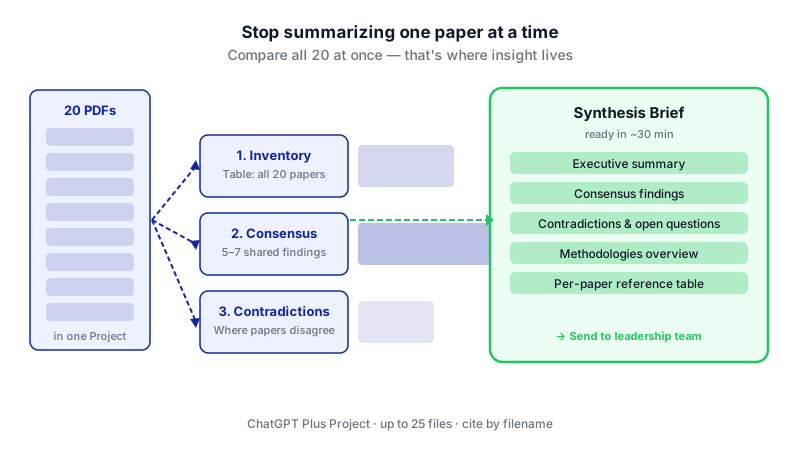
You'll finish with a Notion page containing: an executive summary, a consensus findings section, a contradictions and open questions section, a methodologies overview, and a per-paper reference table. The core trick is to stop summarizing one paper at a time and instead prompt ChatGPT to compare and cross-reference all the papers at once. That's where the real insight lives.
What you need
This workflow depends on specific plan tiers. The free tiers won't carry you through 20 papers in one session.
| Tool | Plan needed | Price | Why |
|---|---|---|---|
| ChatGPT | Plus (or higher) | $20/month | Free is capped at 3 file uploads per day. Plus supports Projects with up to 25 files, which fits 20 papers in one workspace. |
| Notion | Business plan for full Notion AI | $20/member/month annual, $24 monthly | Needed for the /summarize slash command and AI autofill. Free and Plus only receive a limited trial as of May 2025. If you don't need Notion AI, the Free plan works for assembly — but note Notion Free caps uploads at 5 MB per file. |
Also helpful: your 20 PDFs saved in one local folder. Each file must be under 512 MB (the ChatGPT per-file cap) and under roughly 2 million tokens of text — almost every real research paper fits comfortably.
Step-by-step
Collect and name your PDFs clearly. Rename each file to
FirstAuthor_Year_ShortTopic.pdf(e.g.Chen_2024_RetentionBenchmarks.pdf). ChatGPT will refer to files by name in its output, so clean names make the final report usable without re-labeling.
The core workflow: twenty separate sources feeding one cross-referenced synthesis, rather than twenty sequential summaries. Create a ChatGPT Project. In the ChatGPT sidebar, create a new Project and give it a descriptive name like "Vertical SaaS Pricing Trends 2024." Projects on Plus hold up to 25 files, which is why you want Projects rather than a plain conversation — the 10-files-per-message conversation limit would otherwise force you to split your upload awkwardly.
Upload all 20 PDFs to the Project. Click the attachment (paperclip) icon in the chat input bar and select your files. You may need to do this in two batches depending on your browser. Paid plans allow up to 80 file uploads per 3 hours, so 20 is well within limits — though OpenAI notes this rate can be lowered dynamically during peak hours.
Set the project instructions. In the Project's instructions field, paste a role definition so every chat in that Project behaves consistently:
You are a research analyst preparing an internal briefing for the leadership team of a 50-person SaaS company. When I ask you to analyze the uploaded papers, always: (1) cite the paper by filename, (2) distinguish empirical findings from author opinion, (3) flag sample size and study type for any statistic, (4) call out when papers contradict each other, and (5) write in plain business English — no academic jargon.
Run a cross-paper inventory first. Before asking for synthesis, make ChatGPT prove it has read everything. In a new chat inside the Project:
Across all 20 files uploaded to this Project, produce a table with one row per paper. Columns: filename, publication year, study type (empirical/review/opinion/industry report), core research question, primary finding in one sentence, sample size or data source, and one methodological limitation. Do not skip any file. If you cannot read a file, list it separately.
Review the output. If a paper is missing, re-upload it and re-run. This step prevents the common failure where the model silently ignores half your sources.
Prompt for consensus findings. This is where you move past per-paper summaries:
Looking across all 20 papers together, identify the 5–7 findings or claims that appear in three or more papers. For each consensus point, list which papers support it (by filename), and quote one representative sentence from one of them. Rank the consensus points by how strongly they are supported.
Prompt for contradictions. This is the highest-value output for a leadership brief:
Now identify every point where two or more papers directly disagree or report conflicting findings. For each disagreement: state the question at stake, list the papers on each side with their filenames, summarize each position in one sentence, and suggest what might explain the disagreement (different methods, samples, timeframes, definitions). Also list the top 3 open questions no paper fully answers.
Prompt for methodologies overview. Leadership will ask how trustworthy this evidence base is:
Summarize the methodologies used across the 20 papers. How many are empirical studies vs. literature reviews vs. industry reports vs. opinion pieces? What are the most common data sources? What are the biggest methodological weaknesses in this evidence base overall, and what should a skeptical reader keep in mind?
Ask for the executive summary last. Models write better executive summaries after they've done the detailed work:
Based on everything above, write a 200-word executive summary for a SaaS leadership team. Open with the single most important takeaway. Then cover: what the field agrees on, where it disagrees, and the two or three implications a 50-person SaaS company should act on. No hedging language, no "more research is needed."
Create the Notion page and paste in the sections. In Notion, create a new page titled with your topic and date. Create H2 headers for Executive Summary, Consensus Findings, Contradictions & Open Questions, Methodologies Overview, and Paper Inventory. Copy each ChatGPT output into the matching section. There is no native ChatGPT-to-Notion integration, so this is manual copy-paste.
Use Notion AI to tighten the final document. On the Business plan, type
/summarizeat the top of the page to generate a short abstract, or highlight any long section and choose Ask AI to shorten or rewrite for your specific audience. If you have the paper inventory in a Notion database, you can also add an AI Summary autofill property to generate a one-line description per paper.Spot-check three papers manually. Pick the three papers ChatGPT quoted most heavily. Open the PDFs and verify that the quoted claims actually appear and are described accurately. If any check fails, go back to step 6 and tighten the prompt (e.g. require direct quotes with page numbers).
A worked example
Suppose your topic is "usage-based pricing adoption in B2B SaaS." You've gathered 20 PDFs: eight academic papers from marketing and economics journals, seven industry reports from analyst firms, and five vendor-sponsored whitepapers.
After the consensus prompt, a good output looks like this (abridged):
Consensus 1 (supported by 11 papers): Usage-based pricing correlates with faster net revenue retention growth in companies with product-led motions. Supporting files:Chen_2024_RetentionBenchmarks.pdf,OpenView_2023_UBPReport.pdf,Kumar_2022_PricingModels.pdf…
Consensus 2 (supported by 7 papers): Sales-led enterprises face longer procurement cycles when switching from seat-based to usage-based pricing…
And a good contradictions output surfaces the real strategic question:
Disagreement: Does usage-based pricing increase or decrease customer churn in the first 12 months?
Decrease (3 papers):Chen_2024,OpenView_2023,Bessemer_2024— all draw on self-reported vendor data.
Increase (2 papers):Kumar_2022,MIT_2023_Pricing— both use third-party transaction data from mid-market SaaS.
Likely explanation: Vendor-sourced studies may select for successful UBP transitions; independent datasets include failed migrations.
That contradiction, with its methodological explanation, is exactly the kind of insight that makes a leadership brief useful — and it's invisible if you summarize papers one at a time.
Limits and gotchas

- Model misreads. ChatGPT can hallucinate statistics or misattribute findings. The spot-check in step 12 is not optional. For any number you plan to put in front of leadership, open the source PDF and confirm it.
- Scanned PDFs. If a paper is an image-only scan, ChatGPT may not extract the text reliably. Run those through OCR first or exclude them.
- Upload rate limits. Paid plans allow 80 uploads per 3 hours, but OpenAI can throttle this during peak hours. If an upload fails, wait and retry.
- File size caps. Each file is capped at 512 MB and 2 million tokens on ChatGPT. On Notion Free, uploads inside Notion itself are capped at 5 MB per file, which can block attaching full PDFs — paid Notion plans raise this.
- Storage caps. ChatGPT shared upload storage is capped at 25 GB per user and 100 GB per organization. Delete old Projects you no longer need.
- Confidentiality. Don't upload papers under NDA or embargo into ChatGPT consumer plans. Check your organization's data policy before uploading anything client-sensitive.
- No native Notion integration. You will copy and paste. If you need automation, that's a custom build, not an off-the-shelf flow.
When not to use AI for this
Skip this workflow when the stakes are regulatory, legal, or scientific publication — anywhere a misquoted statistic creates real liability. In those cases, read the papers or hire a human analyst. Also skip it when you only have three or four papers; the overhead of setting up a Project isn't worth it, and you'll get a better result by reading them yourself with ChatGPT helping on specific passages.
Honest alternatives include Elicit and Consensus (purpose-built for academic literature review with built-in citation handling), and traditional research databases like Google Scholar paired with a reference manager. If your team does this monthly, those tools may fit better than a general-purpose chatbot.
Frequently Asked Questions
Can I do this on ChatGPT Free?
No. The Free plan limits you to 3 file uploads per day, so you cannot get 20 papers into a single working session. You need Plus ($20/month) or higher, which also unlocks Projects with a 25-file capacity.
Why use a ChatGPT Project instead of just a regular chat?
Regular conversations enforce a hard limit of 10 files per message, so 20 papers would have to be split across multiple messages and the model may lose context between them. A Project keeps all 20 files available to every chat inside it, so cross-paper synthesis prompts actually work.
Do I really need Notion Business, or can I use a different tool?
You only need Notion Business if you want full Notion AI features like /summarize and database AI autofill — those require the Business plan at $20/member/month annual as of May 2025. If you're assembling the document manually, Notion Free (or Google Docs, or any editor) works fine. The standalone Notion AI add-on was discontinued in May 2025.
How accurate are ChatGPT's cross-paper comparisons?
Accurate enough to generate a strong first draft, but not accurate enough to publish unchecked. Expect the consensus and contradiction sections to be roughly right in substance, with occasional misattributed quotes or softened findings. Always spot-check the papers that drive your top three conclusions before sharing externally.
Can I automate the copy-paste from ChatGPT to Notion?
Not natively — there is no official ChatGPT-to-Notion integration, so the handoff is manual. Third-party automation tools can bridge them, but the setup usually isn't worth it unless you're running this workflow weekly or more.
If this becomes a recurring workflow for your team and the copy-paste starts to hurt, a custom pipeline that pulls papers, runs the synthesis, and writes directly into your knowledge base is a reasonable next step — that's the kind of thing CodeNicely builds.
Sources & further reading
- Uploading files and audio to ChatGPT (OpenAI Help Center)
- ChatGPT Business overview (OpenAI Help Center)
- Introducing ChatGPT Go, now available worldwide (OpenAI)
- About ChatGPT Pro tiers (OpenAI Help Center)
- OpenAI Business Pricing
- Notion AI Pricing (Oct 2026): Plans, Credits, Team Cost
- Notion AI Pricing in 2026: What's Free and What You Pay For
- Notion AI Pricing in 2026: Free, Plus, Business, and What's Actually Bundled
- ChatGPT File Upload Limits (2026): Size, Count, Storage
- How to Upload More Files to ChatGPT Projects
Get one practical guide a week
Costs, AI tools, partner selection — written for people who make the decision. No spam, unsubscribe anytime.
Thanks — you're on the list. One practical guide a week, nothing else.
That didn't work — please check the email address and try again.
Building something in Research & Analysis?
CodeNicely partners with founders and tech teams to ship AI-native products that move metrics. Tell us about the problem you're solving.
Talk to our team Book a 30-min call