_1751731246795-BygAaJJK.png)

Write a Month of LinkedIn Posts with ChatGPT and Notion

 Published by CodeNicely, the product studio founded by Meghal Agrawal and Ujjwal Agrawal in 2017
For: A solo marketing manager at a 15-person B2B SaaS company who owns LinkedIn as a channel but loses hours every week staring at a blank draft
In this guide
By the end of this tutorial, you'll have 20 LinkedIn posts drafted, organized by theme, and scheduled across a Notion calendar — roughly a month of content, built in one focused 60–90 minute session. The trick is a single brand-voice briefing prompt that gets ChatGPT sounding like your company before you ask it to write anything.
Last verified: October 2026, against the tools' own documentation. AI tools change often — if a step no longer matches, check the sources at the end.
Who this is for, and what you'll get
This is written for a solo marketing manager at a small B2B SaaS company who owns LinkedIn as a channel. You know the posts should be going out. You also know Monday morning will come around and you'll stare at a blank draft for 40 minutes and ship nothing.
What you'll have at the end:
- A Notion database of 20 LinkedIn post drafts, each tagged by theme and assigned a posting date.
- A Calendar view of that database so you can see the month at a glance.
- A reusable brand-voice prompt you can rerun next month in about 20 minutes.
You will not get an auto-publishing system — LinkedIn scheduling is a separate step, and this tutorial stops at "ready-to-publish drafts organized by date."
What you need
| Tool | Plan | Cost | Why |
|---|---|---|---|
| ChatGPT | Free is enough; Plus is smoother | Free, or $20/month for Plus | Free works but has a cap of around 10 flagship-model messages per 5-hour window; Plus raises that to around 160 messages per 3-hour window, so you can draft all 20 posts in one sitting. |
| Notion | Free | $0 | Free supports unlimited pages, all database view types (Table, Calendar, Board, etc.), and 250,000 rows per database — far more than you need. |
You do not need Notion AI for this workflow. Notion AI is only fully included on the Business plan ($20/user/month annually) and Enterprise; Free and Plus plans get a limited one-time trial of around 20 AI responses. All the writing happens in ChatGPT.
Step-by-step
-
Set up the Notion database first. Create a new page in Notion, add a database (Table view is a good starting point), and set up these properties:
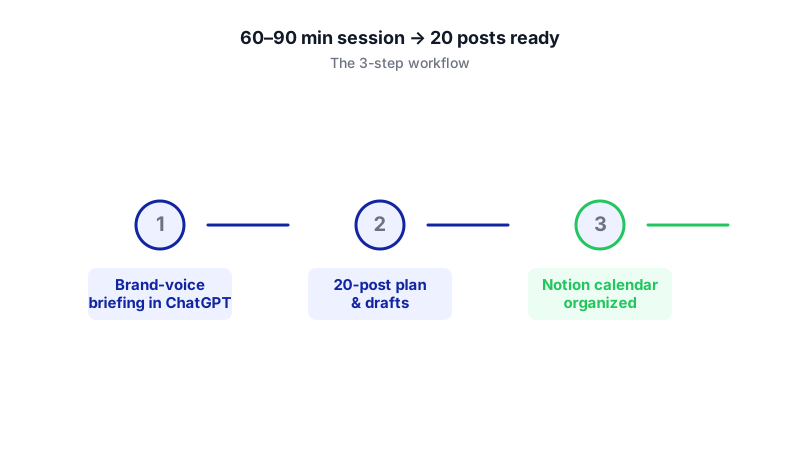
Watch each step activate in order — the brand-voice briefing is what unlocks the rest of the workflow. 
Mapping themes on paper first makes the database setup faster and the month easier to visualise. Post— the title property, used for a short internal label like "Post 01 — Onboarding mistake."Theme— a Select property with options like Product education, Customer story, Industry take, Behind the scenes, Hiring.Posting date— a Date property.Status— a Select property with Draft, Needs edit, Ready, Published.Hook— a Text property for the first line of the post.
The full post body will live in the page itself, not in a property. This keeps the table scannable.
-
Write your brand-voice briefing. This is the step most tutorials skip, and it's where almost all your editing time gets saved. Open a new ChatGPT chat and paste a single long message that gives it: who the company is, who you sell to, what you don't say, and three or four examples of posts you'd be happy to publish. Use the sample prompt in the worked example below as a template.
Don't ask ChatGPT to write anything yet. End the message with: "Confirm you've understood the voice, and summarize it back to me in five bullets before we start."
-
Check the voice summary and correct it. ChatGPT will summarize how it thinks your brand sounds. Read it. If anything is off — too formal, too jokey, name-drops competitors you don't want to mention — correct it in plain words:
Point 3 is wrong — we never talk about "synergy" or "transformation." We're blunt and we use short sentences. Rewrite point 3 and keep the rest.
Repeat until the summary genuinely sounds like you. This usually takes two or three rounds.
-
Ask for a themed content plan, not posts yet. With the voice locked in, ask ChatGPT for a plan of 20 post ideas spread across your themes. Request a table with columns for post number, theme, hook, and one-sentence angle. Review the plan, kill ideas you don't like, and ask for replacements.
-
Generate the posts in one batch, formatted as Markdown. Once the plan is approved, ask ChatGPT to draft all 20 posts. Request Markdown formatting explicitly — pasting raw ChatGPT output into Notion often flattens headings and breaks spacing, but Markdown pastes cleanly. Example instruction:
Now write all 20 posts in full, in the voice we agreed. Format the output as Markdown. For each post, use a level-2 heading with the post number and theme, then the full post body underneath. Keep each post between 90 and 220 words. No hashtags at the end — I'll add those myself.
On ChatGPT Free, you may hit the message cap partway through — just ask for posts 1–10 in one message and 11–20 in a second.
-
Move the posts into Notion. There is no official ChatGPT-to-Notion integration, so this is manual. For each post, create a new row in your database, fill in the properties (Theme, Hook, Posting date), open the page, and paste the post body. Notion accepts pasted Markdown and will render headings, bold, and lists correctly.
If you prefer, you can save the whole ChatGPT output as a
.mdfile and use Notion's Import → Markdown option, which creates a new page from the Markdown. Note that this creates a new page rather than inserting into an existing one, so it's useful as a holding page you then split into database rows. -
Assign posting dates. Decide on a cadence — a reasonable B2B SaaS pattern is three posts per week (say Tuesday, Wednesday, Thursday). Click into the Posting date property for each row and set the date. Spread the themes so you're not posting two customer stories back-to-back.
-
Add a Calendar view. At the top of your database, click + to add a new view, choose Calendar, and set it to display by Posting date. You now have a visual month view of your content.
-
Add a Board view grouped by Status. Add one more view, choose Board, and in the view settings (the settings icon at the top of the database) use Group to group by Status. This gives you a Draft → Needs edit → Ready → Published pipeline you can drag cards across as you work.
-
Do the human pass. Go post by post. Fix anything that sounds generic. Swap in a real customer name or a real metric where ChatGPT used a placeholder. Add hashtags if you use them. Move each row to Ready when it's done. This is where the 90% of time savings shows up — because the voice work was done upfront, this pass is usually 3–5 minutes per post, not 20.
A worked example
Say you work at a 15-person SaaS called Brightpost that sells an inbox tool for customer-success teams. Here's what the brand-voice briefing prompt might look like:
I'm the marketing manager at Brightpost. We sell a shared inbox for customer-success teams at B2B SaaS companies with 20–200 employees. Our buyer is a Head of CS who's drowning in Slack threads and losing track of renewals.
Our voice: blunt, specific, no jargon. We use short sentences. We mention real workflows, not "transformation." We don't use the words "revolutionize," "empower," "journey," or "synergy." We never mock competitors by name. We're happy to admit when something is hard.
Three posts I'd be happy to publish, as examples of the voice:
1. [paste a real post you like]
2. [paste another]
3. [paste a third]
I'm going to ask you to write 20 LinkedIn posts in this voice across these themes: Product education, Customer workflow, Industry take, Behind the scenes, Hiring. Before we start, confirm you've understood the voice and summarize it back to me in five bullets.
Good output after the briefing step looks like a summary that correctly names your banned words, your sentence length, and your buyer. If ChatGPT comes back with "Brightpost empowers CS teams to transform their customer journey," you know the briefing didn't land — correct it before moving on.
Good output in the drafting step looks like 20 posts where you find yourself editing a line here and there, not rewriting from scratch. If you're rewriting whole posts, the voice briefing wasn't strong enough — go back and add more examples.
Limits and gotchas

- ChatGPT Free message caps. Around 10 flagship-model messages per 5-hour window on Free, after which you fall back to a smaller model that's noticeably worse at voice. If you're on Free, split the work across two sessions, or do the voice briefing in the morning and the drafting in the afternoon.
- No real ChatGPT→Notion integration. You will be copy-pasting, or using a third-party extension (AI Chat Exporter, ChatCache) or automation (Zapier, Make). None of those are official. Build the manual version first; automate later if the workflow sticks.
- Formatting breaks on paste. Always ask ChatGPT for Markdown output. Pasting the default rich text into Notion flattens headings and can degrade code blocks and lists.
- Notion Free history is 7 days. If you edit a post heavily and want to roll back a week later, you can't on Free — Plus extends this to 30 days, Business to 90. For a content calendar, 7 days is usually fine.
- Facts and claims need a human. ChatGPT will cheerfully invent statistics, customer names, and product features. Every number, name, and feature claim in a post needs to be verified by you before it goes live.
- Privacy. Don't paste customer data, unreleased pricing, or anything under NDA into a ChatGPT prompt unless your plan and settings allow it. The example posts you use for voice training should be posts you've already published publicly.
When not to use AI for this
Skip this workflow when:
- You're announcing something sensitive — a layoff, a security incident, a major pricing change. Write those yourself. The voice needs to be unmistakably human and the stakes are too high for a draft-and-edit pass.
- You're the founder and your personal LinkedIn is the brand. People follow a founder for their actual thinking. AI-generated posts under a founder's name tend to get sniffed out, and the trust cost is high.
- You don't have 3–5 examples of posts you love. Without strong voice examples, the briefing step collapses and you're back to generic output. Spend a week collecting examples first.
Honest alternatives: hire a freelance LinkedIn ghostwriter (typically $1,500–$4,000/month, with real editorial judgement), or batch-record a 30-minute voice memo once a week and have a VA turn it into posts. Both produce more original thinking than any AI workflow. This tutorial is the right answer when the real alternative is "nothing gets posted."
Frequently Asked Questions
Do I need ChatGPT Plus, or is Free really enough?
Free is enough to complete this workflow if you're willing to split it across two sessions to work around the roughly 10-message-per-5-hour flagship-model cap. Plus ($20/month) raises that to around 160 messages per 3-hour window and lets you do the whole month in one sitting, plus unlocks projects and custom GPTs if you want to save the brand-voice setup for reuse.
Can Notion AI do all of this inside Notion instead?
Notion AI is only included as a full feature on the Business ($20/user/month annually) and Enterprise plans; Free and Plus plans get a limited one-time trial of around 20 AI responses, which won't cover 20 posts plus revisions. If you're already on Business, you can try it, but ChatGPT currently gives you more control over long voice briefings.
How do I get the posts from ChatGPT into Notion faster?
There's no official integration, so the two realistic options are: (1) copy-paste the Markdown output post by post, or (2) save the full output as a .md file and use Notion's Import → Markdown option to create a holding page, then split it into database rows. Third-party tools like Zapier or Make can automate parts of this, but they add setup complexity that usually isn't worth it for a monthly batch.
How often should I rerun this?
Once a month is a reasonable rhythm. The brand-voice briefing is the slow part the first time; after that, you can paste the same briefing into a new chat and go straight to the content plan step, which cuts the whole process to roughly 20–30 minutes plus your human editing pass.
Won't the posts all sound the same?
They will if you accept the first draft. The two things that break the sameness are: asking for a varied content plan upfront (mix hooks — questions, blunt statements, short stories, lists) and doing the human pass where you inject one real detail per post — a customer name, a specific number, a line a coworker actually said.
When a monthly batch workflow outgrows copy-paste and you need something more automated — pulling customer stories from your CRM, routing drafts through approvals, publishing on a schedule — a custom build is an option, and it's the kind of thing CodeNicely does.
Sources & further reading
- ChatGPT Pricing — Official OpenAI Pricing Page
- ChatGPT Free Tier FAQ — OpenAI Help Center
- ChatGPT Usage Limits 2026: Free, Plus and Pro Message Caps
- ChatGPT Free Plan Limits in 2026
- Database views, filters, sorts & groups — Notion Help Center
- Database properties in Notion — Notion Help Center
- Intro to databases — Notion Help Center
- Optimize Notion database performance — Notion Help Center
- Notion Pricing 2026: Plans, AI Features & Real Costs Breakdown
- Notion Pricing Plans Guide 2026
Get one practical guide a week
Costs, AI tools, partner selection — written for people who make the decision. No spam, unsubscribe anytime.
Thanks — you're on the list. One practical guide a week, nothing else.
That didn't work — please check the email address and try again.
Building something in Marketing?
CodeNicely partners with founders and tech teams to ship AI-native products that move metrics. Tell us about the problem you're solving.
Talk to our team Book a 30-min call