
Turn Competitor Websites into a Market Gap Report with ChatGPT

 Published by CodeNicely, the product studio founded by Meghal Agrawal and Ujjwal Agrawal in 2017
For: A product or strategy manager at a 30-to-150-person SaaS or e-commerce company who is asked to deliver a competitive landscape report every quarter but spends most of the time copy-pasting from websites rather than actually thinking
In this guide
By the end of this tutorial, you will have a structured market gap report covering five competitors — their positioning, weaknesses, and the openings you can exploit — assembled in a shareable Notion page. Budget about three to four focused hours the first time you run it, and closer to ninety minutes once you've used the prompts a couple of times.
Last verified: November 2026, against the tools' own documentation. AI tools change often — if a step no longer matches, check the sources at the end.
Who this is for, and what you'll get
You run product or strategy at a 30-to-150-person SaaS or e-commerce business. Every quarter, someone asks for an updated competitive landscape, and you lose three or four days copy-pasting from pricing pages into a Google Doc that nobody reads carefully.
This workflow replaces the copy-paste grind with a repeatable process: you collect live source material yourself, feed it to ChatGPT with structured prompts, and let Notion hold the final report so it's easy to update next quarter. The output is a single document with:
- A positioning summary for each competitor
- A side-by-side feature and pricing comparison
- Documented weaknesses pulled from their own language and public reviews
- Three to five concrete market gap hypotheses with evidence
- Suggested positioning angles for your product
What you need
Both tools are optional at the higher tiers, but you'll feel the squeeze on free plans. Check the vendor's pricing page before you buy — plans change.
| Tool | Plan needed | Cost (verified) | Why |
|---|---|---|---|
| ChatGPT | Plus (minimum) | $20/month | You need web browsing and enough file-upload headroom to process five competitors in one sitting. Free is capped at 3 file uploads per day. |
| ChatGPT | Pro (optional) | $100–$200/month | Only if you plan to run Deep Research mode heavily or upload many large source files. |
| Notion | Business (for AI features) | $20/member/month, billed annually | Needed if you want Notion's Research Mode, multi-page PDF export, and a durable home for the report. A free Notion workspace works fine if you only need the page as a document. |
You'll also need: a list of five competitor URLs, a browser, and about two hours of uninterrupted time for the first pass.
The mistake almost every tutorial makes
Most guides tell you to open ChatGPT and ask, "What are the weaknesses of Competitor X?" This is where the whole exercise collapses. ChatGPT's training data is stale, and even with browsing turned on, visiting specific URLs can return inconsistent results — dynamic content, logged-in pages, and modern JavaScript sites often don't render fully. You'll get a confident-sounding summary that's two years out of date.
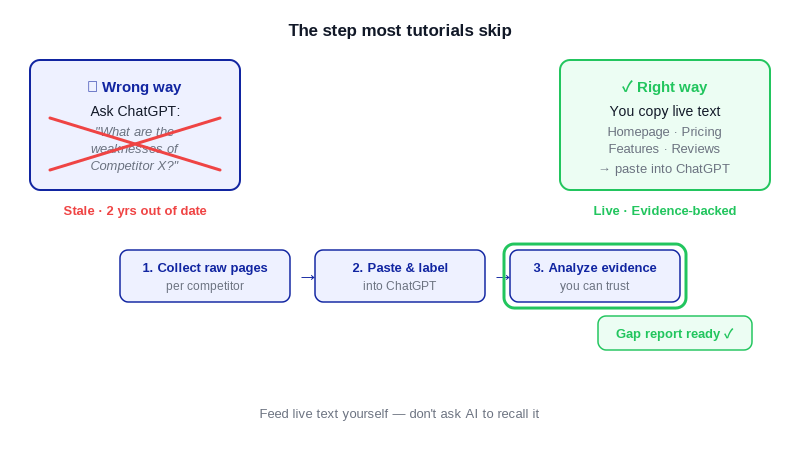

The workflow that actually works: you open each competitor's site in a browser, copy the live text from the pages that matter (homepage, pricing, features, about, a few product pages), and paste that current text into ChatGPT yourself. The model then analyzes evidence you can trust, not a half-remembered summary. This is the single biggest quality lever in AI tools for market research and analysis, and it's the one most people skip.
Step-by-step
Define your five competitors and the angle. Write down who you're comparing yourself to and why. Two direct competitors, two adjacent players, one wildcard is a good mix. Name the decision this report should inform (e.g., "Should we reposition around SMBs?") so the analysis stays pointed.
Collect raw source material from each competitor. For each competitor, open the homepage, pricing page, features/product pages, and the about page. Select all, copy, and paste into a plain text file or Notion page labelled with the competitor name and the date. Also grab:
- 5–10 recent G2 or Trustpilot reviews (copy the text, not screenshots)
- Any public changelog or "what's new" page
- Their LinkedIn "About" section
If you have access to Ahrefs, SEMrush, SimilarWeb or similar, export traffic and keyword data as CSV. Practitioners rely on these exports because live URL browsing in ChatGPT is inconsistent for structured metrics.
Open a new ChatGPT conversation and set the frame. Starting clean matters because the context window (roughly 128,000–200,000 tokens depending on the model) is finite. Beyond that, ChatGPT reads your material in fragments. Use this opener:
You are helping me produce a market gap analysis for [your company, one sentence of what you do]. I will paste source material from five competitors, one at a time. Do not analyze yet. After each paste, reply only with "Received: [competitor name], [page type]." Confirm you understand.
Feed source material in, one competitor at a time. For each competitor, paste their homepage copy, then pricing copy, then features copy, then the review quotes. Label each paste. Example:
Source: Competitor A — Pricing page, captured [date].
[paste text here]If you have exports (keywords, traffic), upload the CSV. Remember the practical caps: up to 10 files per message, and about 80 files per 3-hour window on Plus.
Run the positioning extraction prompt per competitor. After you've loaded one competitor's material, ask:
Based only on the source material I pasted for Competitor A (do not use prior knowledge), extract:
1. One-sentence positioning statement in their own language
2. Target customer (who they are explicitly addressing)
3. Top 3 claimed differentiators, with the exact phrase used
4. Pricing structure and lowest paid tier
5. Three weaknesses or unmet needs visible in the reviews
6. Any topic they conspicuously don't talk about
Return as a markdown table.Repeat for each competitor. Keep the answers in the same conversation so the model can compare across them later.
Run the cross-competitor gap prompt. Once all five are loaded and summarized, ask:
Now compare all five competitors using only the summaries you produced above. Identify:
1. Themes every competitor claims (table stakes — do not differentiate on these)
2. Themes no competitor mentions (potential white space)
3. Customer complaints that appear in reviews of 2+ competitors (shared weakness we could attack)
4. Pricing or packaging patterns and any outlier
5. Three to five market gap hypotheses, each with the specific evidence that supports it and a one-line positioning angle we could test.
Return as a structured report with headings.Pressure-test the output. Paste the report back in and ask:
For each gap hypothesis, tell me: what evidence in the source material contradicts it? What's the weakest link in the reasoning? Which hypothesis would you drop and why?
This single prompt removes most of the over-confident nonsense. Do not skip it.
Move the report into Notion. Create a new page titled "Market Gap Report — Q[X] [Year]". Paste the final cleaned-up report. If you're on the Notion Business plan, you can also use Research Mode to pull in supporting internal documents (previous reports, win/loss notes from Slack, product docs from Google Drive) and merge them into the same page. The AI-generated report saves as a regular Notion page you can edit.
Share or export. For a leadership read, share the Notion page link (read-only). For an offline distribution, use the Page ••• menu → Export → PDF for a single page. Multi-page PDF export is gated to Business and Enterprise plans. Notion also exports to HTML and Markdown & CSV; there is no native DOCX export, so if someone insists on Word, export HTML and open it in Word.
A worked example
Say you run product at a 60-person B2B scheduling SaaS, and your boss wants to know whether to reposition around enterprise HR teams. Your five competitors are Calendly, SavvyCal, Chili Piper, GoodTime, and Cal.com.

You spend about 45 minutes pulling text from each company's homepage, pricing, one feature page, and ten G2 reviews. You paste each batch into ChatGPT labelled clearly.
After running the positioning extraction per competitor, your cross-competitor prompt might return something like:
- Table stakes: round-robin routing, Google/Microsoft calendar sync, Salesforce integration — every competitor claims these.
- White space: none of the five pricing pages mention SOC 2 or data residency on the main page; HR-specific language (candidate experience, interviewer load balancing) only appears on GoodTime.
- Shared weakness: reviews across Calendly, SavvyCal, and Cal.com complain about reporting and admin visibility at scale.
- Gap hypothesis: "Scheduling built for HR ops: interviewer fatigue analytics + compliance posture on the pricing page." Evidence: GoodTime owns part of this message but doesn't lead with compliance; reviews of larger competitors show reporting pain.
Good output is specific, quotes the source material, and names which hypotheses are weakest. If ChatGPT returns generic phrases like "focus on better UX," push back with: "That's not grounded in the source material. Cite the specific review or page or drop it."
Limits and gotchas
- Context window is the real ceiling. The active reasoning window is roughly 128,000–200,000 tokens (about 200–300 pages). If you dump everything for ten competitors in one conversation, older content gets retrieved in fragments instead of read in full. Keep it to five competitors, or split into two conversations.
- Browsing is unreliable for structured data. Don't ask ChatGPT to "go read their pricing page." Paste the text yourself. For traffic, keyword, and ad-spend data, export from Ahrefs, SEMrush, or SimilarWeb and upload the CSV.
- Deep Research mode is useful but slow. On Plus and above, Deep Research performs multi-step live browsing over 5–30 minutes and produces a cited output. Good for a first-pass scan; still not a substitute for your own paste-ins on the competitors that matter most.
- Everything needs a human check. ChatGPT will occasionally misattribute a feature or misread pricing. Before you share, click through to each competitor's pricing page and verify the numbers.
- File upload limits. Free plan: 3 files per day. Plus: about 80 files per 3-hour window. All plans: max 10 files per message. Documents up to 512 MB, spreadsheets ~50 MB, images 20 MB.
- Privacy. You're pasting public competitor content and public reviews — generally fine. Do not paste your own confidential pricing, customer lists, or internal strategy docs into a standard ChatGPT conversation if your company hasn't approved it. For internal sources, Notion's Enterprise Search on the Business plan keeps things inside your workspace.
- Custom GPT for ongoing tracking? Tempting, but the knowledge base is capped at 20 files for the lifetime of that GPT. You'll outgrow it after two quarters.
When not to use AI for this
Skip this workflow if:
- Your competitors are private or stealth. There's no public source material to paste. Primary research (customer interviews, sales calls) will beat anything AI produces.
- The decision is high-stakes and legal. Pricing claims, patent landscapes, and anything that will end up in a lawsuit should be done by humans with citations you can defend.
- You already have strong qualitative data. If your sales team has 40 win/loss interviews from last quarter, reading those yourself is a better use of a day than scraping websites.
Honest alternatives: a two-week research sprint with a freelance analyst, a paid report from G2 or Forrester in your category, or a structured interview round with ten target customers. AI accelerates the desk-research half of competitive analysis — it does not replace talking to buyers.
Frequently Asked Questions
What are the best ChatGPT prompts for research and analysis of competitors?
The prompts that work ask for structured extraction (tables, named fields) grounded only in source material you've pasted, and explicitly tell the model not to use prior knowledge. The second high-leverage prompt is the pressure-test: asking the model to argue against its own output and identify the weakest hypothesis. Generic "tell me about Competitor X" prompts produce generic, outdated answers.
Can I do market gap analysis with AI on the free ChatGPT plan?
Partially. You can paste text and get analysis, but the 3-file-per-day upload cap on free makes it hard to process five competitors plus exported CSVs in one sitting. Browsing is also limited on free. For a quarterly report, the $20/month Plus plan pays for itself in the first use.
Do I need Notion Business, or will the free Notion plan work?
If you only need Notion as a document home, the free plan is fine — you can still paste the report, edit it, and export a single page to PDF. You need Business ($20/member/month, billed annually) for Notion's AI features like Research Mode and Enterprise Search, and for multi-page PDF export. Many teams run this workflow with ChatGPT Plus plus free Notion and are perfectly happy.
How often should I rerun this?
Quarterly is the sweet spot for most SaaS and e-commerce companies. Monthly is overkill unless you're in a fast-moving category. Keep the previous quarter's Notion page and ask ChatGPT what changed — that diff is usually more useful than a full rebuild.
Can ChatGPT just browse the competitor sites for me?
It can try, but results when visiting specific URLs are inconsistent and are not guaranteed to fully render dynamic or gated pages. The whole point of this workflow is that you control the source material, so the analysis is grounded in current, visible evidence rather than whatever fragment the browser tool happened to return.
When a quarterly report becomes a weekly live dashboard, off-the-shelf tools start creaking — that's the point where a custom build (which CodeNicely does) is worth considering.
Sources & further reading
- ChatGPT: Plans, Intelligence, Features & Price — Artificial Analysis
- ChatGPT Review & Pricing (2026) — theaidude.net
- ChatGPT Review — Features, Pricing & Alternatives — aimarketingcompare.com
- ChatGPT File Upload Limits (2026): Types, Size & Word Count — markdownconverters.com
- How Many Files Can You Upload to ChatGPT? (2026 Limits) — onefileapp.com
- Optimizing file uploads in ChatGPT Enterprise — OpenAI Help Center
- ChatGPT file upload limit: which one stops you — sakutto.ai
- ChatGPT File Uploading Capabilities — datastudios.org
- How to Run Competitor Analysis in ChatGPT — ailedgrowth.com
- 30+ ChatGPT Prompts for Competitor Analysis (2026) — Scale Growth Digital
Get one practical guide a week
Costs, AI tools, partner selection — written for people who make the decision. No spam, unsubscribe anytime.
Thanks — you're on the list. One practical guide a week, nothing else.
That didn't work — please check the email address and try again.
Building something in Research & Analysis?
CodeNicely partners with founders and tech teams to ship AI-native products that move metrics. Tell us about the problem you're solving.
Talk to our team Book a 30-min call