_1751731246795-BygAaJJK.png)

Write Any SOP in 20 Minutes with ChatGPT and Notion

 Published by CodeNicely, the product studio founded by Meghal Agrawal and Ujjwal Agrawal in 2017
For: An operations manager at a 30-person e-commerce brand who is the only person who knows how half the company's processes work and needs to get them out of her head and into documented SOPs before she hires her next team member
In this guide
By the end of this tutorial you will have one finished Standard Operating Procedure, written in your voice, formatted in Notion, and ready to share with your team via a link. Budget about 20 minutes per SOP once you have done it once.
Last verified: October 2026, against the tools' own documentation. AI tools change often — if a step no longer matches, check the sources at the end.
Who this is for, and what you'll get
You are the operations manager at a small e-commerce brand. Half the processes in the business live in your head: how returns get approved, how a new SKU gets added, how Monday's inventory count actually works. You know you need written SOPs before your next hire starts, but every time you try, you spend an hour on formatting instead of content.
This workflow fixes that. Instead of describing a process to ChatGPT and letting it guess, you will use a structured interview prompt that makes ChatGPT ask you the right questions first. Your answers become the raw material. ChatGPT structures them into a proper SOP. You paste the result into Notion, clean it up with a few slash commands, and share the link.
You will leave with: one finished SOP in Notion, a reusable prompt you can run for every future process, and a repeatable 20-minute routine.
What you need
| Tool | Plan needed for this task | Cost |
|---|---|---|
| ChatGPT | Free (logged in) is enough for a single SOP session. Plus if you plan to write many in one sitting. | Free; Plus is $20/month |
| Notion | Free is enough for one editor plus up to 10 shared guest viewers. Upgrade only if multiple teammates will edit the same workspace. | Free; Plus is $10/member/month (annual) or $12/month, Business is $20/member/month (annual) |
You do not need Notion AI, Canvas, Code Interpreter, or any paid add-on for this. If a tutorial tells you otherwise, ignore it.
Step-by-step: the 20-minute SOP workflow
The core idea: do not write the SOP yourself, and do not let ChatGPT write it from a one-line description. Instead, have ChatGPT interview you, then have it structure your answers.
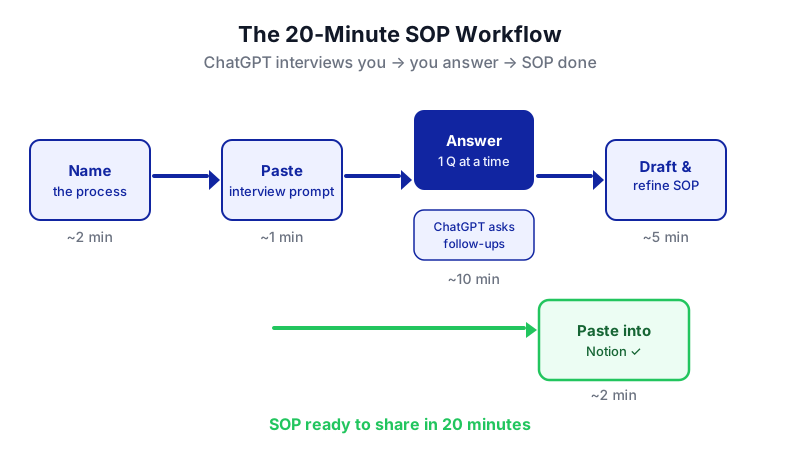
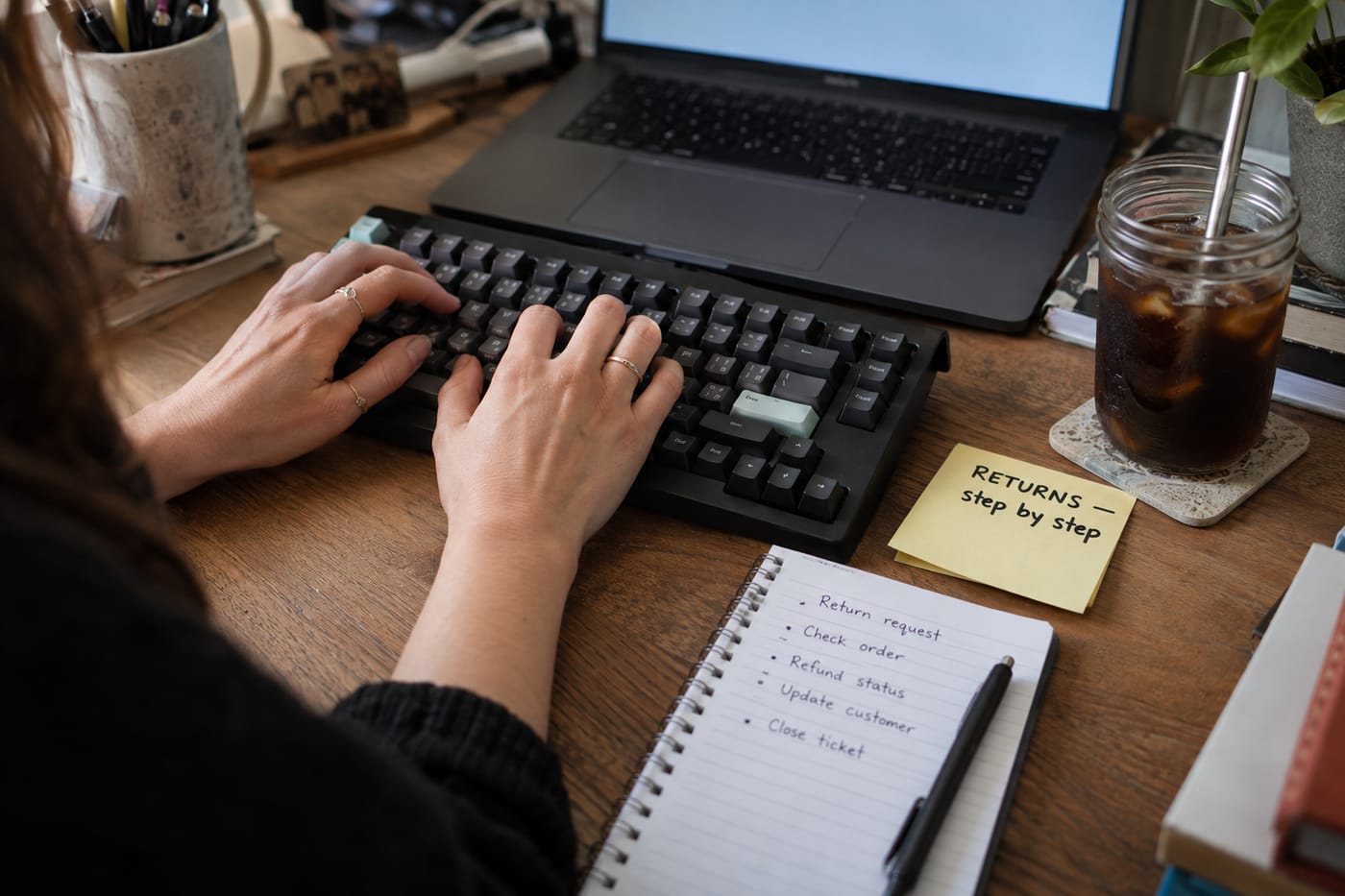
Pick one process and name it concretely. "How we handle customer refund requests for damaged items under $50" beats "Returns process." The narrower the scope, the sharper the SOP.
Open a new ChatGPT chat and paste the interview prompt. This is the thing most tutorials get wrong — they skip straight to "write me an SOP." You want ChatGPT asking questions, not guessing answers.
You are helping me, an operations manager at a 30-person e-commerce brand, document a Standard Operating Procedure for the following process: [name the process].
Do not write the SOP yet. First, interview me. Ask me one question at a time, in plain English, so I can answer quickly. Cover: the trigger that starts the process, who owns it, every step in order including decision points, the tools or systems involved, what "done" looks like, common mistakes and edge cases, and any approvals or handoffs. Ask follow-up questions when my answer is vague. When you have enough to write a complete SOP, say "I have what I need" and stop asking.Why one question at a time matters: if ChatGPT sends you a wall of 15 questions, you will skim, give short answers, and the output will be thin. One at a time keeps the quality high and takes about 10 minutes.
Answer honestly, including the messy parts. If step 4 only works because Priya in the warehouse always double-checks it, say so. If there is a Slack channel you ping, name it. The SOP is only useful if it reflects how the work actually happens, not how it is supposed to happen on paper.
Ask ChatGPT to draft the SOP in a structured format. Once it says "I have what I need," send:
Now write the full SOP. Use this structure, with clear headings:
1. Purpose (one sentence)
2. Scope (what this covers and what it does not)
3. Owner and roles involved
4. Tools and systems required
5. Trigger (when to start this process)
6. Step-by-step procedure (numbered, action-first verbs)
7. Decision points and edge cases
8. Definition of done
9. Common mistakes to avoid
10. Related SOPs or references
Write in plain, direct English. Second person ("you"). No corporate filler. Keep each step short enough to follow without re-reading.Read the draft out loud and ask for targeted fixes. You will catch things ChatGPT got wrong or softened. Push back directly:
Step 6 is wrong — the warehouse team does not approve refunds, finance does. Rewrite steps 5 through 8 with that correction, and add a note that refunds over $200 require the GM's sign-off in Slack.
Repeat until the draft matches reality. Two or three rounds is normal.
Create a new Notion page. In your Notion sidebar, add a new page called something like "SOPs," and inside it create a child page named after the process. If you already have an SOPs section, just add a page there.
Copy the final SOP from ChatGPT and paste it into the Notion page. One gotcha: if your SOP is very long and the paste is more than about 5,000 characters, ChatGPT's web interface may convert long reference material you paste into it into a file attachment. Going the other direction (ChatGPT to Notion) is fine — just copy the rendered text.
Format the page in Notion using slash commands. Type
/anywhere to open the block menu. The ones you will use most:/h1,/h2,/h3for section headings/numberedfor the step-by-step list/bulletfor sub-points/toggleto hide long edge-case notes behind a click/calloutfor warnings like "Never refund without a photo"
You can also use Markdown shortcuts (
##for H2,-for bullets) or highlight text to get the pop-up formatting toolbar. All of this is on the Free plan.Add a header block with the metadata your team will actually look for. At the top of the page, write out: Owner, Last updated, Review cadence (e.g., quarterly), and a link to related SOPs. This takes 60 seconds and saves confusion later.
Share the page. Click Share at the top-right of the Notion page. On the Free plan you can share with up to 10 external guests via a shareable link — enough for a 30-person team if most people only need to view. If more people need edit access, you will need to upgrade.
Optional: export a backup. Click the ••• icon at the top-right of the page, then Export. On the Free plan you can export the single page as PDF, HTML, or Markdown. Keep a PDF copy somewhere safe in case Notion ever goes down the day a new hire starts.
A worked example: the returns SOP
Say you want to document: "How we handle customer refund requests for damaged items under $50."
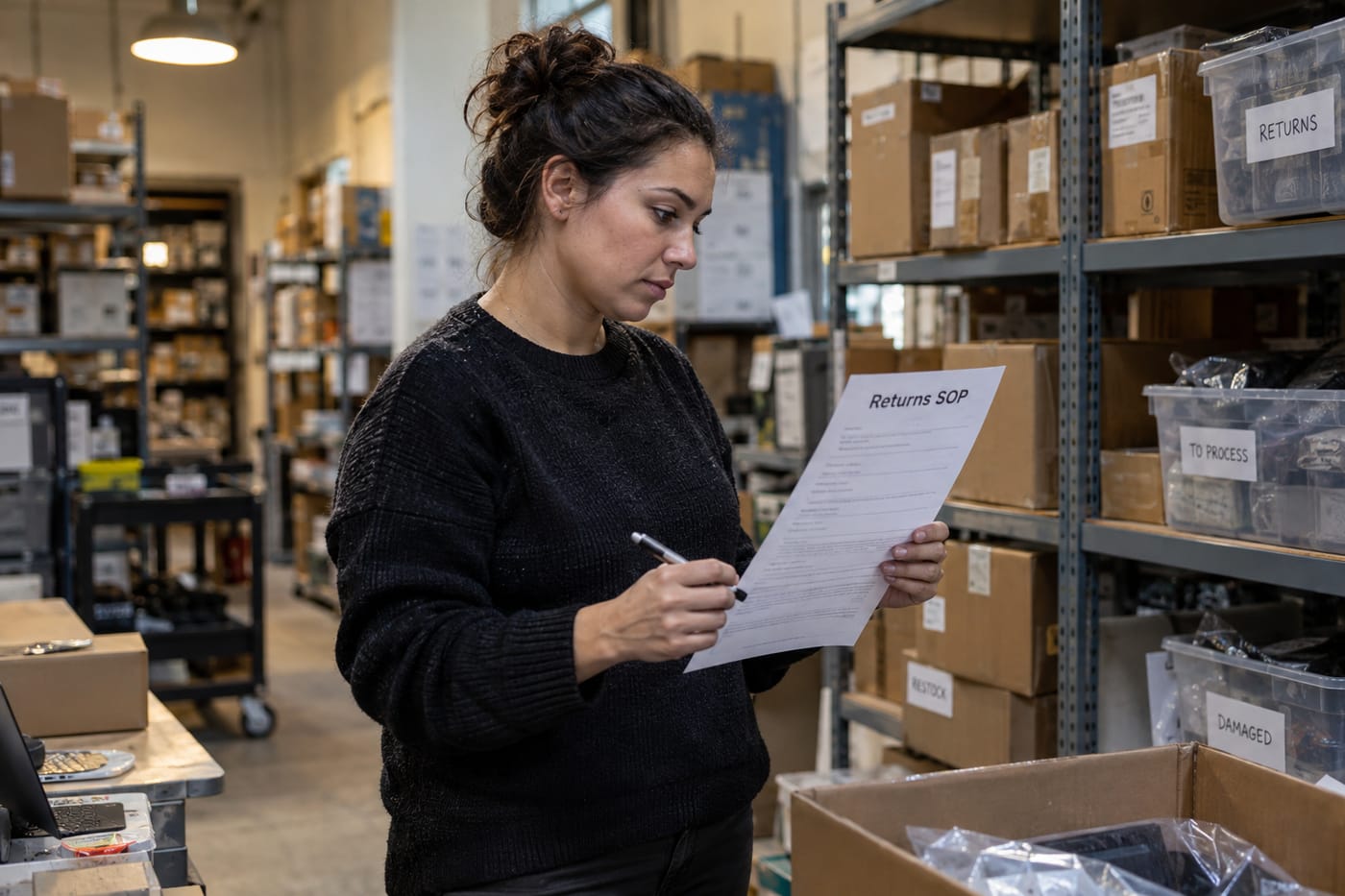
You open ChatGPT and paste the interview prompt with that title filled in. Here is roughly how it will go:
ChatGPT: What triggers this process — is it always a customer email, or do refund requests come through other channels too?
You: Mostly Gorgias tickets tagged "damaged," sometimes DMs on Instagram that CX forwards into Gorgias.
ChatGPT: Who owns the first response, and what is the SLA?
You: CX associate on shift. Four-hour response during business hours.
ChatGPT: What proof do you require from the customer before approving?
You: Photo of the damaged item and the packing slip. If missing, request within one reply.
...and so on, for maybe 8 to 12 questions. After about 10 minutes you say "that's everything," ChatGPT confirms, you ask for the structured SOP, and you get back something like:
Purpose: Resolve damaged-item refund requests under $50 within one business day while protecting margin.
Trigger: A Gorgias ticket is tagged "damaged," or CX forwards a social DM into Gorgias with that tag.
Steps:
1. Within 4 business hours, reply to the customer and request a photo of the item plus the packing slip, if not already attached.
2. Confirm the order in Shopify and check the delivery date — refunds are only valid within 30 days of delivery.
3. If the item is clearly damaged and under $50, issue the refund in Shopify and tag the ticket "refunded-damaged."
4. Log the SKU in the "Damaged SKUs" Airtable so ops can track quality issues...
You read it, notice ChatGPT invented a 30-day window you never mentioned, and tell it: "Our window is 14 days, not 30. Fix step 2." It regenerates. You paste the clean version into Notion, run /h2 on each section heading, /numbered on the steps, add a /callout that says "Never refund without a photo — no exceptions," and share the link in #ops. Twenty minutes, done.
Limits and gotchas
- ChatGPT Free message cap. The Free plan is capped at roughly 10 messages on the flagship model per 5-hour window before it downgrades to a smaller model. One SOP interview plus a few revisions fits inside that. If you want to write five SOPs back-to-back, Plus at $20/month is the honest answer.
- Long outputs may truncate. A single ChatGPT response is capped at roughly 4,096 to 16,384 tokens depending on your plan and model. Most SOPs fit comfortably, but if yours cuts off, just reply "continue."
- Long paste-ins become files. If you ever paste a reference doc of more than about 5,000 characters into ChatGPT, the web interface converts it to a file attachment. Not a problem for this workflow, but good to know. On Free, file uploads are capped at 3 per day; Plus allows 80 per 3-hour window.
- No ChatGPT-to-Notion integration. There is no "send to Notion" button in standard ChatGPT. You will copy and paste manually. Anyone promising a one-click integration is using a third-party tool, not a native feature.
- Notion Free plan collaboration limits. As soon as you add a second member to a Free workspace, the shared block allowance is capped at 1,000. If multiple ops people will co-author SOPs in the same workspace, plan to move to Notion Plus ($10/member/month annual).
- Notion file size and page history. On Free, uploaded files are capped at 5 MB each and page history is 7 days. For a text SOP this is fine; if you want video walkthroughs embedded, you will host them elsewhere (Loom, Vimeo) and link in.
- Guest limits. Free allows up to 10 external guest shares per workspace. For a 30-person team, publish SOPs to members of the workspace rather than relying on guest links.
- Workspace-level PDF export is being retired on a rolling basis through August 31, 2026. Page-level PDF export (the one you will use for a single SOP) is unaffected on all plans.
- Always human-check the final draft. ChatGPT will occasionally invent a step, a timeframe, or an approver. Read every SOP out loud before publishing. The interview prompt reduces this risk a lot, but it does not eliminate it.
- Privacy. Do not paste customer PII, payment data, or supplier contracts into ChatGPT. Keep examples generic ("a customer," "a supplier") in the interview.
When not to use AI for this
This workflow is excellent for text-based processes where the hard part is getting the knowledge out of your head and into a clean structure. It is less helpful when:
- The process is mostly visual. If your SOP is "how to use our Shopify admin to fulfil an order," a Loom screen recording of you doing it once will be more useful than any written doc. Use the written SOP as the index and link the video.
- The process is still changing weekly. Documenting an unsettled process locks in confusion. Stabilise first, then write it up.
- Compliance or legal review is required. AI-drafted SOPs for anything touching finance, HR termination, or regulated data must be reviewed by the appropriate expert before publishing. ChatGPT is a drafter, not a lawyer.
- You have a single trusted person who already does it well. Sometimes the fastest route is to pay them for two hours to write the first draft themselves, then run that draft through ChatGPT for structure only.
Honest alternatives: Loom for visual workflows, a shared Google Doc with a template for teams already living in Google Workspace, or a dedicated SOP tool like Trainual if you are managing more than ~50 procedures.
Frequently Asked Questions
Do I need ChatGPT Plus for this?
No. The Free plan handles one SOP interview and a few revision rounds comfortably within its ~10 flagship-model messages per 5-hour window. Upgrade to Plus ($20/month) only if you want to write several SOPs in one sitting or use features like Canvas, which are not required here.
Do I need Notion AI or the Business plan?
No. Full Notion AI features like Ask Notion and AI Agents require the Business plan at $20/member/month, but you are using ChatGPT to do the drafting and Notion only to format and share. The Free Notion plan supports unlimited pages, all the formatting blocks you need, PDF export, and up to 10 guest shares — plenty for one person documenting SOPs.
How do I keep SOPs updated once they are live?
Add a "Last updated" and "Review cadence" line at the top of every SOP page, and put a recurring quarterly reminder in your calendar to re-run the ChatGPT interview on the most-used SOPs. Processes drift; the doc should drift with them. Notion's 7-day page history on Free lets you recover recent edits, but for anything older, keep PDF exports as backups.
Can my team edit the SOP, or only read it?
On Notion Free with a single workspace member, you can share up to 10 external guest links for read or comment access — fine for a team to view. If multiple ops people need to co-edit, you will hit the 1,000-block collaborative cap quickly and should move to Notion Plus at $10/member/month (annual).
What if ChatGPT invents steps that are not true?
It will, occasionally. That is why the interview prompt matters — asking you first dramatically reduces hallucination, but does not eliminate it. Always read the final draft out loud and ask "would a new hire actually do it this way?" If not, tell ChatGPT exactly what is wrong and have it rewrite the affected section.
If your SOP library eventually grows past what Notion and copy-paste can handle gracefully — for example, when you want SOPs that auto-populate from your Shopify or Gorgias data — a custom internal tool is worth considering, and that is the kind of build CodeNicely does.
Sources & further reading
- ChatGPT Plans and Pricing — OpenAI Official
- ChatGPT Free vs Paid (2026) — Nexos AI
- Is ChatGPT Free? ChatGPT Free vs Paid Plans Compared (2026) — Gmelius
- Is ChatGPT Free in 2026? Models, Limits & Cost — GLB GPT
- ChatGPT Prompt Limit: Maximum Length and Input Caps Explained — Fast.io
- AI Prompt Character Limit (2026 Guide) — Text Character Counter
- Notion Pricing 2026 — Plaky (verified October 13, 2026)
- Notion Pricing 2026: Free vs Plus vs Business — Get Alfred AI (verified August 2026 against notion.com/pricing)
- Notion Pricing 2026: Every Plan Compared — SaaS CRM Review (verified 2026-08-25)
- Notion Pricing in 2026 — Rock.so (verified September 2, 2026 against notion.com/pricing)
Get one practical guide a week
Costs, AI tools, partner selection — written for people who make the decision. No spam, unsubscribe anytime.
Thanks — you're on the list. One practical guide a week, nothing else.
That didn't work — please check the email address and try again.
Building something in Operations?
CodeNicely partners with founders and tech teams to ship AI-native products that move metrics. Tell us about the problem you're solving.
Talk to our team Book a 30-min call