_1751731246795-BygAaJJK.png)

Screen 50 Resumes in 30 Minutes with ChatGPT

 Published by CodeNicely, the product studio founded by Meghal Agrawal and Ujjwal Agrawal in 2017
For: An HR coordinator at a 40-person SaaS company who is the sole recruiter, currently buried in 50+ applications for an open Account Executive role and spending hours copy-pasting resume details into a spreadsheet
In this guide
By the end of this tutorial you will have a ranked shortlist of your Account Executive applicants — each with a one-line summary and a pass/fail verdict — sitting in a Notion database you can share with the hiring manager. Budget 30 minutes of focused work once your tools and rubric are ready.
Last verified: October 2026, against the tools' own documentation. AI tools change often — if a step no longer matches, check the sources at the end.
Who this is for, and what you'll get
You are the only recruiter at a small SaaS company. You have 50-plus applications for one role, a hiring manager asking for a shortlist by end of day, and no appetite for another evening of copy-paste into a spreadsheet.
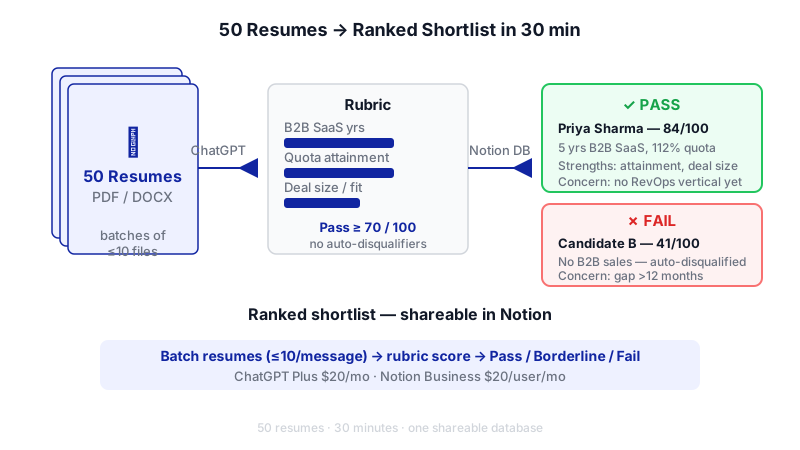
This workflow uses ChatGPT to read resumes against a scoring rubric you define, in batches, and Notion as the structured home for the output. You will finish with a shortlist table showing name, score, one-line summary, pass/fail verdict and the reasoning behind each call. It is defensible, shareable, and takes a fraction of the time of reading each resume cover to cover.
Most tutorials on ai tools for hr recruiter work tell you to paste resumes one at a time into ChatGPT. That wastes the whole point of the tool. The trick is to batch candidates with a structured rubric in a single prompt, then move the output into Notion as your source of truth.
What you need
You need paid tiers of both tools. The free tiers do not support this workload — ChatGPT Free is capped at roughly 3 file uploads per day, and Notion's Free and Plus plans give you only around 20 lifetime AI responses.
| Tool | Plan needed | Cost | Why |
|---|---|---|---|
| ChatGPT | Plus | $20/month (monthly billing only) | Raises the file upload cap to 80 files every 3 hours — enough for 50 resumes with room to retry. |
| Notion | Business | $20/user/month billed annually ($24 billed monthly) | Full AI features including database autofill. The old standalone Notion AI add-on was discontinued on May 13, 2025. |
A few hard limits to know up front, because they shape how you run the workflow:
- ChatGPT allows up to 20 files per message and up to 10 files per conversation. You cannot drop all 50 resumes into one chat.
- The per-file limit is 512 MB and 2 million tokens — resumes are nowhere near this, so you are safe.
- Supported formats include PDF, DOCX, TXT and PPTX.
- The active context window is roughly 128K–256K tokens depending on the model. If you overload a single message, ChatGPT can switch to retrieval mode and miss details spread across documents.
- Two-column PDF resumes are often misread — ChatGPT parses one column top to bottom, so sidebar skills get spliced into the middle of work history. Flag these for a manual look.
- Notion does not natively parse resume files. It is the destination for your structured output, not the parser.
Step-by-step
Collect all 50 resumes in one folder. Rename each file with the candidate name — for example
Priya-Sharma-AE.pdf. This matters because ChatGPT will reference files by name in its output, and you want to be able to find each person again instantly.
The core mechanic: unstructured résumé files enter a rubric-driven batch process and emerge as a ranked, color-coded shortlist. Write your rubric before you open ChatGPT. A good rubric is five or six criteria weighted roughly by importance. For an Account Executive role at a SaaS company it might be: years of B2B SaaS sales (25%), quota attainment history (25%), deal size experience (15%), industry/vertical fit (15%), tool fluency such as Salesforce/HubSpot (10%), communication quality in the resume itself (10%). Decide what counts as a pass: for instance, score ≥ 70/100 and no automatic disqualifiers.
Create a Notion database to receive the shortlist. Make a new full-page database with these properties: Candidate Name (title), Score (number), Verdict (select: Pass / Borderline / Fail), One-line summary (text), Strengths (text), Concerns (text), Resume file (file). This is where you will paste or import ChatGPT's output.
Open a new ChatGPT conversation and set the system context. Before uploading anything, paste in the role brief and rubric. This grounds every subsequent batch in the same criteria.
You are helping me screen candidates for an Account Executive role at a 40-person B2B SaaS company. Average deal size is $25K ARR, sales cycle 30–60 days, selling to RevOps leaders at mid-market companies.
Score each resume out of 100 using this rubric:
- B2B SaaS sales experience, years and relevance: 25
- Quota attainment history (specific numbers): 25
- Average deal size experience: 15
- Vertical/ICP fit (RevOps, mid-market): 15
- CRM and sales tool fluency: 10
- Resume clarity and communication: 10
Pass = score ≥ 70 with no automatic disqualifier. Automatic disqualifiers: no B2B sales experience, or employment gaps over 12 months with no explanation.
For each resume I upload, return a row with: candidate file name, score, verdict (Pass / Borderline / Fail), one-line summary (max 20 words), top 2 strengths, top 2 concerns. Return the output as a markdown table I can copy. Do not invent details — if something is not in the resume, say "not stated".Upload resumes in batches of 10. Attach 10 files to a message and send: "Here are resumes 1–10. Score each per the rubric and return the table." Because the per-conversation cap is 10 files, start a fresh conversation for the next batch — and paste the same rubric prompt at the top so the model stays consistent. You will run five conversations total for 50 resumes. This takes about 15–20 minutes of ChatGPT working time.
Spot-check two resumes per batch by hand. Open the actual resume and compare it to ChatGPT's row. You are looking for hallucinated numbers (invented quota figures), misread columns (sidebar content stuck in the wrong place), and dates that got garbled. If a batch looks unreliable, re-run it with the resumes converted to single-column PDFs or exported as DOCX.
Consolidate the five tables into Notion. You have two options. The simple way: copy each markdown table into a spreadsheet, save as CSV, and import into your Notion database using the Merge with CSV option on the database. The faster manual way: paste rows directly into the Notion database view. Once the data is in, sort by Score descending and filter Verdict = Pass to produce your shortlist.
Share the shortlist with the hiring manager. Create a filtered view in Notion showing only Pass and Borderline candidates, sorted by score. Share the Notion page. The hiring manager now has a one-screen view of your top candidates with the reasoning visible for each.
A worked example
Say you are screening for your AE role and you upload Jordan-Reyes-AE.pdf as part of batch two. A good output row looks like this:
| File | Score | Verdict | Summary | Strengths | Concerns |
|---|---|---|---|---|---|
| Jordan-Reyes-AE.pdf | 82 | Pass | 5 years B2B SaaS AE with 112% average quota attainment selling to RevOps buyers. | 1) Direct RevOps ICP match at previous role 2) Quota numbers stated clearly for 3 consecutive years | 1) Average deal size ($12K) below your $25K target 2) Only 1 year at most recent employer |
Notice what makes this row trustworthy: the quota numbers are specific (so you can verify them in the resume), the deal size concern is quantified against your criteria, and nothing is invented. If a row instead said something like "strong cultural fit" or "5+ years experience" without a figure, that is a sign the model is padding — go read the resume yourself.
Limits and gotchas
This is where how to use ai in hr work goes wrong most often. Please read before you ship a shortlist.

- Hallucination risk. ChatGPT occasionally invents numbers, dates or employer names, especially when a resume is sparse. Always spot-check, and tell the model explicitly to say "not stated" rather than guess.
- Two-column PDFs. If a resume uses a sidebar for skills, the parse will be messy. If a candidate seems unusually weak, open their resume before rejecting — they may have been misread.
- Context window spill. Keep batches at 10 files. Larger batches push ChatGPT into retrieval mode and it starts missing content.
- Bias. Any AI scoring reflects the patterns in your rubric and the model's training. Do not use ChatGPT to make the final hire/no-hire decision. Use it to triage so a human can spend time on the top of the pile.
- Candidate data and privacy. Resumes contain personal data. Check your company's data handling policy and candidate privacy notice before uploading to any third-party AI tool. In some jurisdictions (EU, UK, parts of the US) automated decision-making on candidates triggers specific disclosure obligations.
- Notion CSV export quirks. If you later export your shortlist from Notion, the ••• menu → Export → "Markdown & CSV" option strips rich text formatting, links, mentions, views, filters and formulas. Only raw values survive. There is no native .xlsx export — you open the CSV in Excel.
When not to use AI for this, and honest alternatives
Skip this workflow when:
- The role has fewer than 15 applicants. You will spend more time setting up the rubric and batching than you save.
- The role is senior or specialist. VP, Head of, or technical founder-type roles need nuanced judgement no rubric captures well. Read them yourself.
- Your ATS already does this. Greenhouse, Ashby, Workable and others have built-in resume scoring. If you already pay for one, use it — the integration will be cleaner.
- Your legal or compliance team has not signed off on uploading candidate data to ChatGPT. Get that answered first.
Honest alternatives: a dedicated ATS with scoring, a resume-parsing service like Affinda or Sovren that feeds structured data into your spreadsheet, or an hour with an intern and a well-designed scorecard. For ai for hr recruiting at larger volumes (hundreds of applicants per role, every week), a purpose-built tool will beat ChatGPT on reliability and audit trail.
Frequently Asked Questions
Can I do this on ChatGPT Free?
Not practically. The Free tier caps you at around 3 file uploads per 24 hours, which means 50 resumes would take over two weeks of daily uploads. ChatGPT Plus at $20/month raises this to 80 files every 3 hours, which comfortably covers a batch of 50 with retries.
Why can't I just upload all 50 resumes in one message?
Two reasons. ChatGPT allows up to 20 files per message and up to 10 files per conversation, so 50 in one go is not technically possible. Even if it were, the context window would overflow and the model would switch to retrieval mode, which tends to miss details scattered across many documents. Ten-file batches keep output quality high.
Do I need Notion Business, or can I just use a Google Sheet?
A Google Sheet works fine for the shortlist itself — you can paste the markdown tables straight in. You only need Notion Business if you want to use Notion's AI features (database autofill, Agent, Ask Notion) on the shortlist afterwards. If Notion is just a destination table, Notion Free is enough; the Business plan is needed for the AI layer.
How do I stop ChatGPT making up quota numbers or job titles?
Include an explicit instruction in your prompt: "Do not invent details. If something is not in the resume, say 'not stated'." Then spot-check two resumes per batch against the actual files. If you see invented content, re-run the batch and tighten the prompt.
Is this legally safe for candidate screening?
It depends on your jurisdiction and your company's privacy notice. The EU, UK and several US states (notably New York City with Local Law 144) have rules around automated employment decision tools and candidate disclosure. Check with your legal or compliance lead before uploading candidate data to any third-party AI, and keep a human as the actual decision-maker.
If this workflow starts hitting its limits — hundreds of applicants per week, strict audit requirements, or deep ATS integration — a custom build tailored to your pipeline (which CodeNicely does) is worth considering.
Sources & further reading
- ChatGPT File Upload Limits 2026: Size, Count and Plans — ai-toolbox.co
- ChatGPT Plus Upload Limit: File Sizes and Rolling Caps — fast.io
- How to Upload Your Resume to ChatGPT (2026) — chatgptresume.com
- ChatGPT File Upload Limit 2026: Max Size, Counts & Workarounds — fast.io
- ChatGPT Max File Size: Upload Limits Across Plans (2026) — fast.io
- ChatGPT File Upload Limits (2026): Types, Size & Word Count — markdownconverters.com
- ChatGPT Pricing 2026: Free to $500/mo Plans Compared — techjacksolutions.com
- ChatGPT Pricing in 2026: Every Plan — cloudzero.com
- Notion AI Pricing in 2026: What It Costs — coworker.ai
- Notion Pricing 2026: Free vs Plus vs Business (+ AI Cost Breakdown) — get-alfred.ai
Get one practical guide a week
Costs, AI tools, partner selection — written for people who make the decision. No spam, unsubscribe anytime.
Thanks — you're on the list. One practical guide a week, nothing else.
That didn't work — please check the email address and try again.
Building something in HR & Recruiting?
CodeNicely partners with founders and tech teams to ship AI-native products that move metrics. Tell us about the problem you're solving.
Talk to our team Book a 30-min call