_1751731246795-BygAaJJK.png)

Draft Customer Support Replies in Seconds with ChatGPT

 Published by CodeNicely, the product studio founded by Meghal Agrawal and Ujjwal Agrawal in 2017
For: A customer support manager at a 15-person e-commerce brand who handles 50–100 tickets a day with a two-person team and no dedicated copywriter
In this guide
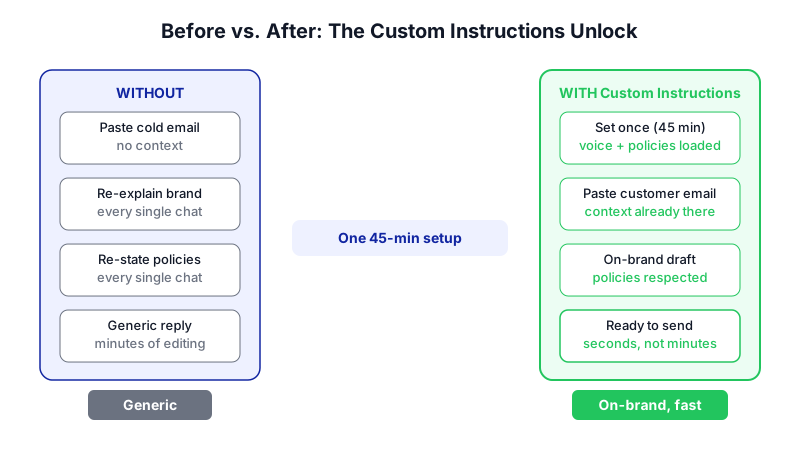
By the end of this tutorial, your support agents will be able to paste any raw customer email into ChatGPT and get back a reply that already sounds like your brand, respects your refund policy, and is ready to drop into Gmail or your helpdesk. Setup takes about 45 minutes once; after that, each reply draft takes seconds instead of minutes.
Last verified: October 2026, against the tools' own documentation. AI tools change often — if a step no longer matches, check the sources at the end.
Who this is for, and what you'll get
This is written for a customer support manager at a small e-commerce brand — roughly 50 to 100 tickets a day, a team of one or two agents, no copywriter, and no budget for a dedicated AI support platform like Gorgias or Intercom's Fin.
You'll walk away with three things:
- A single brand voice and policy system prompt saved once in ChatGPT's Custom Instructions, so every reply is already on-brand.
- A simple paste-in workflow any agent can follow without learning prompt engineering.
- An optional Gmail Connector setup (paid plans only) if you want ChatGPT to pull context from your actual inbox and draft directly against a live email thread.
The thing most ChatGPT tutorials get wrong: they tell you to paste the customer's message in cold and hope for the best. That's why the output feels generic. The real unlock is loading your tone, refund rules, and escalation limits once as a persistent instruction — so you never have to re-explain them in each chat.
What you need
| Tool | Plan needed | Cost | Why |
|---|---|---|---|
| ChatGPT | Free works; Plus or Business recommended | Free; Plus $20/month; Business $25/user/month monthly or $20/user/month annual (min. 2 users) | Free gives you a 1,500-character Custom Instructions limit. Plus and above give 5,000 characters and the Gmail Connector. |
| Gmail | Any Google Workspace or standard Gmail account | Varies | Where you'll paste the finished reply, or where ChatGPT reads from directly if you turn on the Connector. |
If you're based in the EU, EEA, Switzerland, or the UK, the native Gmail Connector is not currently available due to GDPR and local data-protection rules. The copy-paste workflow still works perfectly on any plan — you just won't get the "ChatGPT reads my inbox directly" step.
Step-by-step
Decide which ChatGPT plan you need. If you're testing the workflow with one agent, Free is fine — you just have 1,500 characters to describe your brand voice and policies. If you want more room (5,000 characters) or you want ChatGPT to read and send from Gmail directly, you need Plus, Pro, Business, Enterprise, or Education. For a two-person team, Business at $20/user/month annual is usually the sweet spot.

Writing out your brand voice and refund rules before you type them anywhere makes the setup step faster and the results sharper. Draft your brand voice and policy document. Before touching ChatGPT, write a short internal doc covering: how you want to sound (friendly, formal, playful, apologetic?), your refund window and conditions, your shipping policy basics, what counts as an escalation your agents can't resolve, and 2–3 phrases you never want used (e.g. "unfortunately", "as per our policy"). Keep it tight — under 1,500 characters if you're on Free, under 5,000 on paid plans.
Open ChatGPT's Custom Instructions. On desktop or web, click your profile, go to Settings → Personalization, and make sure Enable customization is toggled on. On mobile, tap Customize ChatGPT. This is where you'll paste the system prompt so every new chat already knows your rules.
Paste in the system prompt. Use the template below (customised to your brand) in the Custom Instructions fields. This is the single most important step — do it once, and every reply afterward benefits.
You are the senior customer support agent for [Brand Name], a [brief description, e.g. "direct-to-consumer skincare brand based in Austin"]. You draft replies to real customer emails.
Voice: warm, direct, human. Short sentences. No corporate jargon. Never use the words "unfortunately", "kindly", or "as per our policy". Sign off with "— [Agent name], [Brand Name] Support".
Policies you must follow:
- Refunds: full refund within 30 days of delivery, no questions asked. After 30 days, offer store credit only.
- Shipping: standard is 3–5 business days US. Lost packages: offer a free reshipment after 7 business days with no tracking movement.
- Damaged items: always offer a free replacement, no return needed. Ask for a photo if not already provided.
- Escalations: if the customer mentions legal action, chargebacks, press, or allergic reactions, do not draft a reply — instead output "ESCALATE TO MANAGER" and summarise why.
Format every reply as a complete email ready to paste into Gmail: subject line, greeting, body, sign-off. Keep bodies under 120 words unless the issue needs more.Save and test. Save the Custom Instructions, open a new chat, and paste in a real (anonymised) customer message from last week. Check the draft against your voice doc. If it's off, tighten the Custom Instructions — add examples of phrases you love, or specific wording you want to avoid.
Create a short paste-in prompt for your agents. Agents don't need to write prompts from scratch. Give them one standard wrapper to use every time:
Here is a customer email. Draft a reply following my saved voice and policy rules. If anything is ambiguous, ask me one clarifying question before drafting.
---
[paste customer email here](Optional, paid plans only) Connect Gmail. On the web app, go to Settings → Connectors, find Gmail, and click Connect. Authorise the Google account you use for support. Once connected, ChatGPT will reference Gmail automatically when it's relevant to your prompt — for example, "Pull the last email from customer@example.com and draft a reply." Since June 2026, the Connector can also send one email per prompt from your real Gmail address, after you explicitly approve each send. It can't send attachments, can't batch-send, and can't monitor your inbox on its own — it only acts when you prompt it.
Decide on a human-review rule. Even with a good system prompt, no draft should go out un-read. Agree with your team: every ChatGPT draft gets a 10-second scan for accuracy (did it quote the right policy? did it name the right product?) before copying into the helpdesk or approving a Gmail send.
Review and refine after one week. Keep a shared doc where agents paste any draft that needed heavy editing. Review it on Friday. Those edits are feedback — update your Custom Instructions to close the gaps.
A worked example
Here's what this looks like in practice for an e-commerce skincare brand.
Customer email that lands in your inbox:
Hi, I ordered the vitamin C serum two weeks ago (order #48192) and it finally arrived yesterday but the pump is broken and the bottle leaked all over the box. I'm pretty disappointed because this was a gift for my sister's birthday which is Saturday. What can you do? — Priya
Agent pastes into ChatGPT using the standard wrapper above. The draft that comes back:
Subject: Sorry about your serum, Priya — let's fix this
Hi Priya,
That's not the unboxing anyone wants, especially for a birthday gift. I'm sorry about the broken pump and the leak.
I'm sending a free replacement out today on expedited shipping so it reaches you before Saturday. You don't need to return the damaged one — please recycle the bottle if you can. If you'd share a quick photo of the damage when you have a second, it helps us flag it with our fulfilment team.
You'll get tracking by email in the next couple of hours. If anything looks off, reply here and I'll jump on it.
— Sam, [Brand Name] Support
The agent scans it, confirms expedited shipping is actually possible, swaps in the real tracking promise, and either pastes into the helpdesk or (on a paid plan with the Connector) tells ChatGPT: "Looks good, send it." ChatGPT asks for confirmation, the agent approves, and it goes out from the real Gmail address. Total time: under 60 seconds.
Limits and gotchas

- Only one set of Custom Instructions at a time. If you run two brands from one ChatGPT account, you have to manually swap the instructions when you switch. For a cleaner setup, consider building a Custom GPT instead — the GPT Builder allows up to 8,000 characters of instructions and you can have multiple GPTs saved side by side.
- Character limits are real. Free and Go: 1,500 characters. Plus, Pro, Business, Enterprise, Education: 5,000 characters. Write your voice doc with the limit in mind.
- The Gmail Connector has hard limits. One email sent per prompt, no batch operations, no attachments, no autonomous monitoring, no persistent email context across separate chat sessions, and it can't handle send-as aliases or move/delete messages. If your workflow needs any of those, stay with copy-paste.
- Region restrictions. The Gmail Connector is not available in the EU, EEA, Switzerland, or the UK. Teams there should use the copy-paste workflow, a Chrome extension, Zapier/Make, or build directly on the OpenAI API.
- Privacy. OpenAI states it does not train its models on data from connected Google apps, with narrow exceptions such as content a user explicitly pastes into a chat. Treat anything an agent pastes as potentially training data on consumer plans; use Business or Enterprise if that matters for your contracts.
- Human review is non-negotiable. ChatGPT will occasionally invent a policy detail ("your 60-day refund window" when yours is 30 days) if your Custom Instructions are vague. Tight instructions reduce this, but every draft still needs an agent's eye before it ships.
When not to use AI for this, and honest alternatives
Skip ChatGPT drafts entirely when:
- The ticket involves a potential allergic reaction, injury, legal threat, chargeback, or press enquiry. Handle these yourself.
- The customer is a VIP, wholesale partner, or influencer where tone and relationship nuance matter more than speed.
- The issue requires looking up data ChatGPT doesn't have — order status, inventory, tracking — unless you've connected those systems through the API.
Honest alternatives if you outgrow this setup: dedicated AI support tools like Gorgias, Intercom Fin, or Zendesk's AI agents integrate directly with your order data and helpdesk, which the ChatGPT + Gmail approach does not. They cost more and take longer to configure, but they scale past a two-person team more cleanly. For most small e-commerce brands at 50–100 tickets a day, the setup in this tutorial is enough.
Frequently Asked Questions
Do I need the paid ChatGPT plan to make this work?
No. The copy-paste workflow runs on the Free plan — you just have a smaller 1,500-character limit for your brand voice and policy instructions, and you can't connect Gmail directly. Plus at $20/month gives you the 5,000-character limit and the Gmail Connector, which is worth it once more than one agent is using the system daily.
What's the difference between Custom Instructions and a Custom GPT for this use case?
Custom Instructions are one global set of rules that apply to every chat on your account — simple and free to set up but limited to 1,500 or 5,000 characters depending on plan. A Custom GPT, built in the GPT Builder, allows up to 8,000 characters and can be saved as a named assistant you open when you need it. If you only run one support brand, Custom Instructions are enough. If you run multiple brands or want a more elaborate setup, build a Custom GPT.
Can ChatGPT send the reply from Gmail automatically?
Only on paid plans with the Gmail Connector enabled, and only one email per prompt after you explicitly approve each send. It cannot batch-send, cannot attach files, and cannot monitor your inbox on its own — it only sends when you tell it to in a prompt. Outside the EU, EEA, Switzerland, and UK.
Will ChatGPT learn our customer data if we paste emails in?
OpenAI states it does not train on data from connected Google apps, but content you paste directly into a chat is treated differently and may be used for training on consumer plans. For better data handling guarantees, use ChatGPT Business or Enterprise, which exclude your inputs from training by default. Check the current terms on OpenAI's site before pasting anything sensitive.
How do I keep the brand voice consistent as the team grows?
Treat your Custom Instructions like a shared document: version it, store the master copy in your team wiki, and update it whenever an agent flags a draft that needed heavy editing. Review it monthly. If you reach the point where your rules won't fit in 5,000 characters, that's the signal to move to a Custom GPT or a purpose-built support tool.
When this workflow outgrows what off-the-shelf ChatGPT can do — say, you want it reading live order data, auto-tagging tickets, and routing escalations — a custom build is the next step, and that's the kind of work CodeNicely does.
Sources & further reading
- ChatGPT Custom Instructions: All Plans Get Access, Paid Users 5,000 Characters
- ChatGPT Custom Instructions Tripled to 5,000 Characters
- ChatGPT Custom Instructions Limit: 1,500 to 5,000 Chars + Fixes (October 2026)
- ChatGPT Custom Instructions Guide: System-Level Prompting
- OpenAI rolls out Gmail, Calendar, and Contacts integration in ChatGPT
- ChatGPT + Gmail: What the Integration Can and Can't Do
- What ChatGPT Can (and Can't) Do With Email — Honest 2026 Map
- ChatGPT Can Now Send Emails Directly From Writing Blocks (2026)
- How to Connect Gmail to ChatGPT: Every Route That Works (2026)
- ChatGPT Gmail integration: What it can and can't do
Get one practical guide a week
Costs, AI tools, partner selection — written for people who make the decision. No spam, unsubscribe anytime.
Thanks — you're on the list. One practical guide a week, nothing else.
That didn't work — please check the email address and try again.
Building something in Customer Support?
CodeNicely partners with founders and tech teams to ship AI-native products that move metrics. Tell us about the problem you're solving.
Talk to our team Book a 30-min call