_1751731246795-BygAaJJK.png)
Build a Vendor Onboarding Checklist with ChatGPT and Notion

 Published by CodeNicely, the product studio founded by Meghal Agrawal and Ujjwal Agrawal in 2017
For: Operations manager at a 40-person B2B SaaS company who onboards 3–5 new software or service vendors per quarter and currently tracks the process in a shared Google Doc that nobody keeps up to date
In this guide
By the end of this tutorial you will have a vendor onboarding database in Notion with four role-specific checklist templates — legal, finance, IT, and the vendor themselves — all generated with ChatGPT and ready to clone the day a new vendor is signed. Plan on about 60–90 minutes the first time, and under 5 minutes per vendor after that.
Last verified: October 2026, against the tools' own documentation. AI tools change often — if a step no longer matches, check the sources at the end.
Who this is for, and what you'll get
You run operations at a small-to-mid-size B2B SaaS company. You sign 3–5 new vendors a quarter — a new payroll tool, a pen-test firm, a data processor — and every single onboarding becomes a scramble because the shared Google Doc nobody updates has drifted from reality.
What you'll build:
- A Vendor Onboarding Notion database with properties for owner, status, due date, priority, and vendor type.
- Four reusable page templates inside that database: Legal & Compliance, Finance & Procurement, IT & Security, and Vendor-Facing.
- A clear first-90-days milestone section inside each template.
- A ChatGPT prompt library you can re-run whenever your onboarding policy changes.
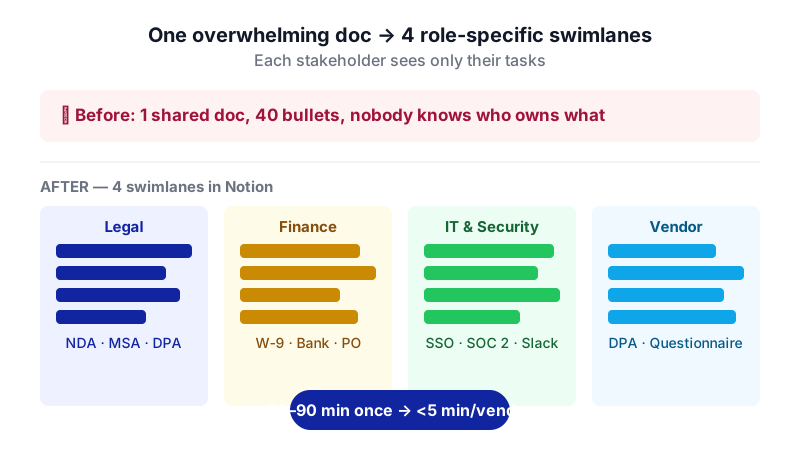
The thing most tutorials get wrong: they ask ChatGPT for "a vendor onboarding checklist" and dump 40 bullet points on one page. The real unlock is prompting ChatGPT to produce separate swimlanes per internal stakeholder, so each person only sees the tasks they own.
What you need
| Tool | Plan needed | Cost | Why |
|---|---|---|---|
| ChatGPT | Free is enough | $0 (Plus is $20/month, Business $20/seat/month billed annually if you want it) | Draft the checklist content and the role-based swimlanes |
| Notion | Plus if your team will share and edit together; Free works for one person | Free, or $10/member/month billed annually for Plus — check the current plan on Notion's pricing page | Host the database, templates, and checkboxes |
A note on Notion's Free plan: it supports unlimited pages and blocks for a single-member workspace, but the 1,000-block cap re-engages the moment a second member joins. For an ops team actioning this together, you'll want the Plus plan to add editors. Free also caps per-file uploads at 5 MB (useful to know when attaching signed MSAs); Plus and above raise that to 5 GB per file.
You do not need Notion AI or Notion Custom Agents for this build. Full Notion AI is bundled into the Business plan ($20/member/month annual, $24 monthly) and Custom Agents are billed separately at $10 per 1,000 credits on Business and Enterprise. All of that is optional here.
Step by step
List what your onboarding actually covers today. Before you prompt ChatGPT, spend ten minutes writing down every step you can remember from your last three vendor onboardings — NDA, MSA, DPA, SOC 2 request, W-9 or equivalent, bank details, SSO provisioning, Slack channel, kickoff call, 30-60-90 reviews. This becomes raw material for the prompt. Garbage in, garbage out.

Breaking one overwhelming doc into four role-specific swimlanes is the core move this tutorial is built around. Prompt ChatGPT for the universal checklist first. Open a new ChatGPT chat and paste a prompt that includes your company context and the raw list from step 1.
You are helping me, an operations manager at a 40-person B2B SaaS company, build a reusable vendor onboarding checklist. We onboard 3–5 software or service vendors per quarter. Generate a universal onboarding checklist that applies to every new vendor, grouped under these phases: Pre-signature, Signature & Documents, Access & Setup, First 30 Days, First 60 Days, First 90 Days. For each item give: a short task name (under 10 words), one sentence of why it matters, and a suggested owner role (Legal, Finance, IT, Ops, or Vendor). Here is a dump of what we currently do, in no order: [paste your list]. Return the output as a markdown table.
Now ask for the swimlanes — one per stakeholder. This is the step most people skip. In the same chat, run four follow-up prompts, one per role, so each stakeholder gets a focused view of only their tasks.
Using the universal checklist above, produce a Legal & Compliance swimlane only. Include every task where Legal is the owner, plus any task where Legal needs to review or approve. Format as a markdown checklist (- [ ] task) grouped by phase. For each task add a one-line "definition of done" so a junior ops person knows when it's complete.
Repeat with
Finance & Procurement,IT & Security, andVendor-Facing(the tasks you'll hand to the vendor themselves, like "return signed DPA" and "share security questionnaire response"). You now have four clean markdown checklists.Create the Notion database. In Notion, create a new page called Vendor Onboarding. Add a new database on that page (table view is fine to start). Rename the default Name property to Vendor. Add these properties, all available on every plan including Free:
- Status (select): Not started, In progress, Blocked, Done
- Primary Owner (person)
- Due Date (date)
- Priority (select): Low, Medium, High
- Vendor Type (select): Software, Services, Data processor, Contractor
Create your first template inside the database. In the top-right of the database, click the dropdown arrow next to the blue New button and select + New template. Name it Legal & Compliance. In the template body, paste the markdown checklist ChatGPT produced for Legal. Notion will convert
- [ ]lines into native to-do (checkbox) blocks automatically. Add a heading for each phase (Pre-signature, Signature & Documents, and so on). When done, click ← Back to [database name] at the top-left to save the template.Repeat for the other three roles. Create Finance & Procurement, IT & Security, and Vendor-Facing templates the same way. You now have four templates sitting under the New dropdown in your database.
Build the "master" vendor template. Create one more template called New Vendor — Master. In its body, add four toggle headings — one per role — and under each toggle, paste the corresponding checklist. This is the one your ops team will use when a vendor signs: it holds every swimlane in a single page so you can assign sections to the right person.
Test it with a real (or recent) vendor. Click the dropdown next to New, pick New Vendor — Master, name the page after your most recent vendor, set the properties, and walk through every checkbox. If something is missing or redundant, fix it in the template (not the instance) so your next onboarding inherits the fix.
Share it with the team. If you're on the Free plan and still solo, you're done. If your ops, finance, and IT leads need to edit, upgrade the workspace to Plus so you can add them as editors without hitting the 1,000-block cap.
A worked example
Say you've just signed Acme Analytics, a data-processor SaaS vendor that will touch customer data. Here's what the flow looks like end-to-end.
Prompt you ran in step 3 for the IT swimlane:
Using the universal checklist above, produce an IT & Security swimlane for a data-processor SaaS vendor that will handle PII. Format as a markdown checklist grouped by phase, with a one-line definition of done per task.
What good output looks like (abbreviated):
## Signature & Documents
- [ ] Request SOC 2 Type II report — Done when report is filed in /Vendors/Acme/Security
- [ ] Review DPA for sub-processor list — Done when sub-processors are logged in RoPA

## Access & Setup
- [ ] Provision SSO via Okta — Done when vendor confirms successful login
- [ ] Scope minimum data access — Done when permissions reviewed by data lead

## First 30 Days
- [ ] Run access audit — Done when audit log is attached to this page
You create a new page from New Vendor — Master, name it Acme Analytics, set Vendor Type to Data processor, assign your IT lead as Primary Owner on the IT toggle, set the due date for the SOC 2 request to Friday, and send them the link. They open the page, see only their swimlane expanded, and start checking boxes. No more "wait, who was supposed to request the SOC 2?" email on day 45.
Limits and gotchas

- ChatGPT does not push into Notion automatically. You copy the markdown out of ChatGPT and paste it into the Notion template. If you want this automated, you'd need Zapier, Make, or the Notion API — out of scope here, and overkill for 3–5 vendors a quarter.
- A human must review the first draft. ChatGPT will confidently invent a plausible-sounding step like "file Form X with the regulator" that doesn't apply to you. Read every line before you save the template. Your legal counsel should sign off on the Legal swimlane specifically.
- Do not paste confidential vendor data into ChatGPT. Keep prompts generic — "a data-processor SaaS vendor handling PII," not "Acme Analytics, contract value $87,000, our customers are XYZ." If that matters to your security team, check your organisation's AI usage policy before you start.
- Free-plan limits that will bite you. Notion Free caps per-file uploads at 5 MB — a signed MSA PDF usually fits, a scanned one often doesn't. Page history on Free is 7 days (30 on Plus, 90 on Business), so if auditability matters, factor that into your plan choice.
- Templates don't retro-update instances. If you fix a typo in the Legal template, the vendor pages you already created won't change. Update the template and the live instances.
When not to use AI for this
Skip this workflow if your onboarding is already heavily regulated — healthcare BAAs, financial-services third-party risk management, government contracting. In those cases a generic AI-drafted checklist is more likely to miss something load-bearing than to help. Use your compliance team's existing framework and only use ChatGPT to reformat it into swimlanes, not to generate the content.
Honest alternatives if Notion isn't your stack: a well-maintained Airtable base with per-role views, a vendor-management tool like Vanta or Drata if your bottleneck is actually security review, or even a shared spreadsheet with filters — the structure matters more than the tool.
Frequently Asked Questions
Do I need to pay for ChatGPT to do this?
No. The Free plan handles this comfortably — you're generating a few thousand words of structured text across a handful of prompts. Plus ($20/month) or Business ($20/seat/month billed annually, minimum 2 seats) are useful if you already use ChatGPT heavily, but they're not required for the checklist itself.
Can I let Notion AI generate the checklist instead?
You can, but full Notion AI is only included in the Business plan at $20/member/month annual (or $24 monthly) and is no longer sold as a standalone add-on for new customers. If you're already on Business, go ahead. Otherwise ChatGPT Free plus manual paste is cheaper and gives you more prompt control.
How often should I regenerate the checklist?
Review it every two quarters, or whenever your legal, finance, or security policies change meaningfully. Keep your source prompts in a Notion page so you can re-run them with updated context rather than starting fresh each time.
What about audit trails — can I see who checked what and when?
Notion tracks page edits in page history: 7 days on Free, 30 days on Plus, and 90 days on Business. If your auditors need longer retention, export completed vendor pages to PDF and store them in your document-management system.
Can I automate pulling the ChatGPT output straight into Notion?
Yes, through Zapier, Make, or a direct Notion API integration, but it's genuinely not worth the setup time for 3–5 vendors a quarter. Manual paste takes under a minute per template and you only build the templates once.
If your vendor pipeline eventually outgrows a copy-paste workflow — think fifty vendors a quarter with automated DPA generation and risk scoring — a custom-built internal tool (which CodeNicely does) starts to pay for itself.
Sources & further reading
- ChatGPT Pricing October 2026: Plans, API Cost, and Is It Worth It?
- ChatGPT Plans & Prices: Free, Plus $20, Pro 500 $500 (Price verified 2026-10-25)
- ChatGPT Context Window and Token Limits by Plan (2026)
- Notion AI Pricing (Oct 2026): Plans, Credits, Team Cost — notion.com/pricing checked 19 October 2026
- Notion AI pricing in 2026: plans, credits and Workers
- Notion AI Pricing in 2026: Plans, Cost & Is It Worth It
- Notion Pricing 2026: Which plan is actually worth it?
- Notion File Upload Limits: Size Caps and Large-File Workarounds (Updated Sep 29, 2026)
- Notion Free Plan Limits: What Actually Caps You (2026)
- How to Add a Template to Notion (2026 Guide)
Get one practical guide a week
Costs, AI tools, partner selection — written for people who make the decision. No spam, unsubscribe anytime.
Thanks — you're on the list. One practical guide a week, nothing else.
That didn't work — please check the email address and try again.
Building something in Operations?
CodeNicely partners with founders and tech teams to ship AI-native products that move metrics. Tell us about the problem you're solving.
Talk to our team Book a 30-min call