_1751731246795-BygAaJJK.png)

Build a Structured Interview Scorecard with ChatGPT and Notion

 Published by CodeNicely, the product studio founded by Meghal Agrawal and Ujjwal Agrawal in 2017
For: An HR manager at a 40-person SaaS company who is running three simultaneous hires, has no dedicated recruiting ops support, and keeps losing good candidates because interviewers give inconsistent, gut-feel feedback that is impossible to compare
In this guide
By the end of this tutorial you'll have a reusable interview scorecard in Notion — with role-specific competencies, weights that match the seniority of the role, standardized questions, and an automatic weighted total — that any interviewer on your team can fill in during a live interview. Plan on about 60 to 90 minutes the first time, and roughly 15 minutes to spin up a new one for each future role.
Last verified: October 2026, against the tools' own documentation. AI tools change often — if a step no longer matches, check the sources at the end.
Who this is for, and what you'll get
This is written for an HR manager or hiring lead at a small company who is running several hires at once without a dedicated recruiting ops person. If your interviewers currently send Slack messages like "strong yes, good vibes" and you can't defend a hire-or-reject decision with evidence, this is the fix.
You'll end up with:
- A Notion database called Interview Scorecards, with one page per candidate per interview round.
- A default template inside that database so every new scorecard opens pre-populated with the same competencies, weights, and questions.
- A Formula property that produces a single weighted score, so you can rank candidates side by side.
- A ChatGPT prompt pattern you can reuse any time you open a new role.
What you need
| Tool | Plan needed for this task | Cost |
|---|---|---|
| ChatGPT | Free is enough for drafting scorecard text. Consider Business if your team shares a workspace and you need the no-training-on-business-data guarantee. | Free. Business is $20/seat/month billed annually ($25 monthly), minimum 2 seats. |
| Notion | Free works for a single HR user. Plus is better once multiple interviewers need to edit scorecards and you want unlimited guests and 30-day page history. | Free. Plus is $10/seat/month billed annually ($12 monthly). |
You do not need Notion AI for this build. The weighted-scoring math is handled by a native Formula property, and the content comes from ChatGPT.
Step-by-step
Write a one-paragraph role brief. Before you touch ChatGPT, write 4–6 sentences covering: title, level (e.g. junior / mid / senior / staff / manager), what the person will own in the first 6 months, who they'll work with, and 2–3 things that would make someone fail in the role. This is the single most important input, because it's what lets ChatGPT weight competencies correctly.
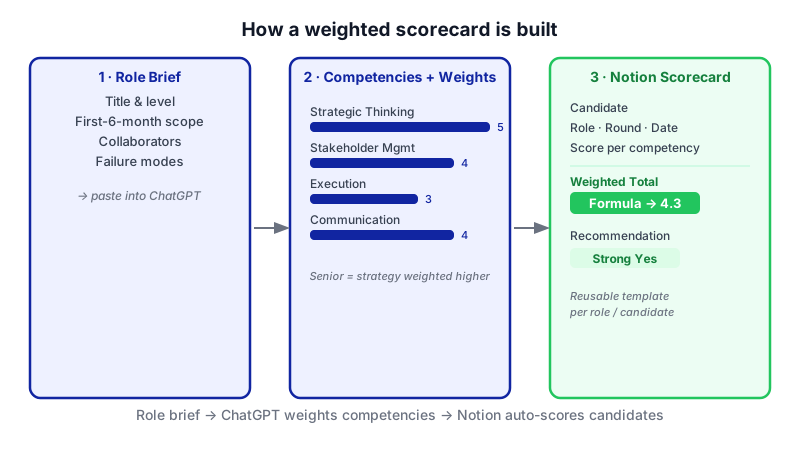
Watch each panel light up in order — a tight role brief is the single input that lets ChatGPT assign seniority-appropriate weights, which Notion then turns into a defensible numeric score. 
Drafting a tight role brief before prompting is the step that determines how useful every output will be. Ask ChatGPT to propose competencies and weights for the level. Open ChatGPT (Free plan is fine) and paste in a prompt like the one below. The key move — and the thing most tutorials skip — is asking for weights that reflect seniority, not just a flat list of nice-to-haves.
You are helping me build a structured interview scorecard. Here is the role brief:
[paste your paragraph]
Please propose 6 to 8 competencies to assess for this specific role at this specific level. For each competency, give me:
1. A one-line definition in plain language.
2. A weight from 1 to 5, where 5 is critical and 1 is nice-to-have. The weights must reflect the seniority of the role — for a senior or staff hire, strategic thinking, judgment, and influence should outweigh pure execution. For a junior hire, learning speed and craft fundamentals should outweigh strategy.
3. A short justification of the weight based on the role brief.
Return the result as a markdown table with columns: Competency, Definition, Weight, Why this weight.Read the output critically. If a weight feels off, push back in the chat ("bump Stakeholder Management to a 5, this role reports into the exec team"). You know the role; ChatGPT is drafting, not deciding.
Generate behavioural questions tied to each competency. Once you're happy with the competency list, continue the same chat with:
For each competency in the table above, write 2 behavioural interview questions (STAR-format friendly) and 1 follow-up probe. The questions should be answerable in 3–5 minutes, should ask about real past situations rather than hypotheticals, and should be specific enough that a weak candidate cannot bluff. Format as a markdown list grouped by competency.
Then ask for the rating anchors, which is what turns a 1–5 score from an opinion into something defensible:
Now, for each competency, write a 1 to 5 rating rubric. Describe in one line each what a 1, 3, and 5 answer looks like for this specific role and level. Keep the language concrete and observable (what the candidate said or did), not abstract.
Create the Notion database. In Notion, create a new page called Interview Scorecards. Inside it, add a new database (full page). Add these properties:
- Candidate — Title (default).
- Role — Select.
- Interview round — Select (e.g. Screen, Hiring Manager, Technical, Final).
- Interviewer — Person.
- Date — Date.
- Overall recommendation — Select (Strong Yes, Yes, No, Strong No).
- Weighted total — Formula (we'll fill this in step 6).
Build the scorecard template inside the database. Click the dropdown arrow next to the blue New button at the top-right of your database, and choose New Template. Name it something like "Scorecard — Senior Product Manager". In the template body, for each competency from ChatGPT, add:
- A heading with the competency name and its weight.
- The 1-line definition.
- The rating rubric (1 / 3 / 5 anchors).
- The behavioural questions and the follow-up probe.
- A blank space for interviewer notes.
Then add a Number property per competency (e.g. Score: Strategic Thinking, Score: Execution, etc.) and a matching Number property for the weight (e.g. Weight: Strategic Thinking). Pre-fill the weight values on the template so interviewers never have to touch them.
Add the weighted-total formula. Edit the Weighted total Formula property. For each competency, multiply its score by its weight and sum them. The pattern looks like:
prop("Score: Strategic Thinking") * prop("Weight: Strategic Thinking")
+ prop("Score: Execution") * prop("Weight: Execution")
+ prop("Score: Stakeholder Management") * prop("Weight: Stakeholder Management")
/* ...one line per competency... */
Now every scorecard produces one comparable number. You can sort the database view by Weighted total to rank candidates after a round.
Set the template as default. Open the templates list via the dropdown arrow next to New, hover over your scorecard template, click the ••• menu, and choose Set as Default. From now on, every new row in the database opens pre-populated with the full scorecard — competencies, weights, rubrics, and questions already in place.
Share with interviewers and do a dry run. Invite your interviewers to the database (or share as a guest if you're on Plus). Create one test scorecard for a fake candidate, fill it in yourself end-to-end during a 45-minute block, and time it. If any section slows you down, trim the question count. Interviewers will not use a scorecard that doesn't fit the actual interview window.
Clone the template for each new role. When a new role opens, repeat steps 1–3 in ChatGPT with the new role brief, then duplicate the Notion template, rename it, and swap in the new competencies, weights, and questions. The database structure stays the same, so your Weighted total formula keeps working.
A worked example: Senior Product Manager at a 40-person SaaS
Role brief pasted into ChatGPT:

We're hiring a Senior Product Manager to own our billing and monetization product area. They'll report to the Head of Product, work daily with engineering, design, and the founder, and in their first 6 months need to ship a self-serve upgrade flow and define our usage-based pricing model. They'll fail if they can't influence engineers without authority, if they default to feature factories instead of pricing/packaging thinking, or if they can't push back on the founder with data.
What good ChatGPT output looks like: a table where Strategic / Commercial Thinking is weighted 5, Stakeholder Influence is weighted 5, Analytical Rigor is weighted 4, Execution & Delivery is weighted 3, and Craft (specs, user research) is weighted 2. For a junior PM, those weights would roughly invert. That shift is the whole point — and it's why the ChatGPT step matters more than just asking for "PM interview questions".
What a filled-in scorecard looks like: an interviewer gives Strategic Thinking a 4, Stakeholder Influence a 3, Analytical Rigor a 4, Execution a 4, Craft a 3. The Weighted total formula produces (4×5) + (3×5) + (4×4) + (4×3) + (3×2) = 69. Another candidate scores 5s on execution and craft but 2s on strategy and influence and lands at 52. Now you have a real conversation to have with the founder.
Limits and gotchas
- ChatGPT drafts, you decide. Weights and rubrics are a starting point. A human who knows the team and the role must sanity-check them before interviewers see them.
- Data privacy. Don't paste candidate names, resumes, or any personal data into ChatGPT Free — the free plan can use conversations for training. If you need a no-training guarantee for shared HR work, ChatGPT Business provides that. For the scorecard-building step there's no reason to put candidate data in ChatGPT at all; you're only generating the template.
- Notion plan limits. On the Free plan, page history is 7 days and external guests are capped at 10 — fine for solo use, tight once a hiring panel is editing. Plus removes those limits. File uploads on Free are capped at 5 MB per file, so attach resumes externally or upgrade.
- Export options are limited. A single scorecard page can be exported as PDF, HTML, or Markdown & CSV from the page's ••• menu → Export. There's no native Word export. Workspace-level PDF export is being retired through August 31, 2026 — individual page export still works on all plans.
- No automated export via API. The official Notion API doesn't have an export endpoint. If you want scorecards pushed into an ATS automatically, you'll need custom work against the block API or a third-party integration.
- A scorecard doesn't fix a bad interviewer. If someone refuses to score against the rubric, the template won't rescue the hire. Train the panel on the rubric before the first interview.
When not to use AI for this
Skip the ChatGPT step if you already have a validated competency framework from your talent team, an industrial-organizational psychologist, or a role-specific framework (e.g. a well-known engineering ladder). Rewriting it with AI will dilute something that already works. Also skip if the role is highly regulated (clinical, legal, safety-critical) — the questions and rubrics in those domains need subject-matter review, not a general-purpose model.
Honest alternatives: a shared Google Doc template works almost as well for one or two hires, without the Notion setup cost. If you're hiring at scale, a dedicated ATS with built-in scorecards (Greenhouse, Ashby, Lever) will do more than Notion will, but costs significantly more and takes longer to roll out.
Frequently Asked Questions
Do I need a paid ChatGPT plan?
No. The Free plan supports unlimited everyday text generation, which is all you need to draft competencies, weights, rubrics and questions. Paid plans add reasoning models, Deep Research, Agent Mode and workspace controls — none required here. Consider ChatGPT Business ($20/seat/month billed annually, minimum 2 seats) only if your HR team wants a shared workspace with a no-training-on-business-data guarantee.
Can I run this entirely on Notion Free?
Yes, for a single HR user building and owning the scorecards. You'll hit friction once multiple interviewers need to co-edit, since Free limits external guests to 10 and page history to 7 days. The Plus plan at $10/seat/month billed annually removes those limits and is the right upgrade point for a small hiring team.
How do I make the scorecard calculate a total automatically?
Use a Formula property. Create a Number property for each competency score and a matching Number property for each weight (pre-filled in the template). Then your Formula multiplies each score by its weight and sums them, using the pattern prop("Score: X") * prop("Weight: X") + .... Sort your database view by that formula to rank candidates.
How do I send a completed scorecard to a hiring manager who doesn't use Notion?
Open the scorecard page, click the ••• menu at the top-right, choose Export, and pick PDF, HTML, or Markdown & CSV. There's no native Word export. If you need bulk or automated export, note that the Notion API doesn't offer an export endpoint, so you'd need a custom build.
How often should I rebuild the competencies and weights?
Rerun the ChatGPT step whenever you open a materially different role — different function, different level, or significantly different scope. For repeat hires in the same role, reuse the existing template and only revisit the weights if the role itself has changed (e.g. the Senior PM role now owns a team).
If this workflow starts to creak — multiple ATSs, custom scoring logic, automatic sync into your hiring pipeline — that's the point where a custom internal tool starts to pay for itself, and it's the kind of build the team at CodeNicely does.
Sources & further reading
- ChatGPT Plans and Pricing — chatgpt.com/pricing (official)
- ChatGPT: What's free in 2026 and what isn't? — Engadget
- ChatGPT Free plan limits in 2026 — datastudios.org
- ChatGPT pricing in 2026: every plan — cloudzero.com
- Database templates in Notion — notion.com/help (official)
- Using database templates — notion.com/help/guides (official)
- Intro to databases in Notion — notion.com/help (official)
- Back up your Notion data — notion.com/help (official)
- Notion export formats: PDF, HTML, Markdown and CSV — breeze.pm
- Notion Pricing 2026 (verified Oct 13, 2026) — plaky.com
Get one practical guide a week
Costs, AI tools, partner selection — written for people who make the decision. No spam, unsubscribe anytime.
Thanks — you're on the list. One practical guide a week, nothing else.
That didn't work — please check the email address and try again.
Building something in HR & Recruiting?
CodeNicely partners with founders and tech teams to ship AI-native products that move metrics. Tell us about the problem you're solving.
Talk to our team Book a 30-min call