_1751731246795-BygAaJJK.png)

Build a Customer FAQ Page in 1 Hour with ChatGPT and Notion

 Published by CodeNicely, the product studio founded by Meghal Agrawal and Ujjwal Agrawal in 2017
For: A customer support manager at a 30-person e-commerce brand who handles a shared inbox alone, notices the same 20 questions arriving every week, and has no developer or content team to build a proper FAQ
In this guide
By the end of this tutorial you'll have a published FAQ page built from your actual support tickets, structured in Notion, and live on a public notion.site URL you can share with customers or link from your website. Plan on about an hour of focused work if you already have 30–50 recent tickets to pull from.
Last verified: October 2026, against the tools' own documentation. AI tools change often — if a step no longer matches, check the sources at the end.
Who this is for, and what you'll get
This is written for a solo customer support manager at a small e-commerce brand: one shared inbox, no developer, no content team, and the same twenty questions landing in your lap every week. If that's you, you'll finish with:
- A clustered list of your most common customer questions, grouped by theme.
- A clean Notion page with each question as a heading and a short, approved answer underneath.
- A public URL customers can read, and a workflow your team can update without re-publishing.
The important move here: you're not brainstorming an FAQ. You're reverse-engineering one from the exact words customers already use. That matters because the way a customer phrases a question in an email is usually the way they'll search for it on Google — so their phrasing should become your headings.
What you need
| Tool | Plan needed | Cost | Why |
|---|---|---|---|
| ChatGPT | Free is enough to start; Plus helps if you have many ticket files | Free, or $20/month for Plus | Cluster tickets into themes and draft answers in your tone |
| Notion | Free plan | $0 | Structure the FAQ and publish it as a public page via Notion Sites |
Two constraints to know before you start. ChatGPT Free allows roughly 3 file uploads per day, with a hard limit of 512 MB per file (CSVs are practically capped around 50 MB). ChatGPT Plus raises this to roughly 80 files per 3 hours. On Notion Free, file uploads are capped at 5 MB per file, which is fine for an FAQ page but worth knowing if you want to attach screenshots.
Step-by-step
Pull your last 30–90 days of support tickets into one file. Export from your helpdesk (Gorgias, Zendesk, Freshdesk, Help Scout — most have a CSV export) or copy-paste the subject lines and first customer message from your inbox into a single spreadsheet. You only need two columns: customer question/subject and your reply. Why: ChatGPT works best when it sees the actual language customers use, not your paraphrase of it.
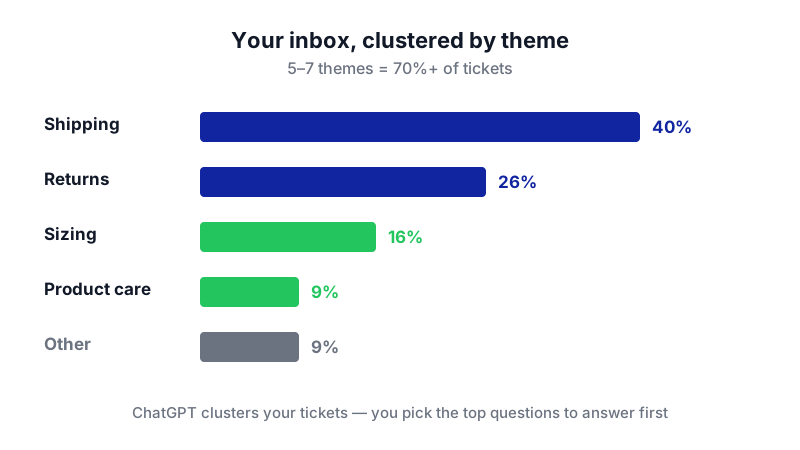
Watch how ChatGPT surfaces the pattern: just four themes account for 91% of your inbox, telling you exactly which questions to answer first. 
Before anything goes into an AI tool, pull your tickets into one file — the raw customer wording is the raw material. Trim the file so it fits ChatGPT's limits. Aim for 50–200 tickets. If you're on Free, keep the CSV under ~50 MB and remember you only get about 3 uploads per day. Strip personally identifying information — names, emails, order numbers, addresses — before uploading. A quick find-and-replace in your spreadsheet is fine.
Ask ChatGPT to cluster the tickets into themes. Upload the CSV and use a prompt like this:
You are helping me build an FAQ for a small e-commerce brand. Attached is a CSV of real customer support tickets. Read all of them and group them into 8–15 themes (e.g. shipping, returns, sizing, product care). For each theme, list: (1) the theme name, (2) how many tickets belong to it, (3) the 3–5 most representative question phrasings in the customer's own words — do not paraphrase, quote them. Return the result as a table.
Why: this gives you the real FAQ structure. You'll usually see that 5–7 themes account for 70%+ of your inbox.
Pick your top questions. From the output, mark 15–25 questions you want to answer first. Prioritise themes with the highest ticket counts and the ones that waste the most of your time to answer manually (returns, shipping times, sizing).
Draft answers in your brand's tone. Feed ChatGPT a few of your best past replies and ask it to match your voice:
Here are 5 real replies I've sent to customers. Study the tone: warm, direct, no corporate language, short sentences, we use "we" and "you". Now, for each of the 20 questions below, write a 2–4 sentence answer in that same tone. Where you don't know a specific fact (shipping times, return window length, warranty period), insert [CONFIRM: ...] so I can fill it in. Do not invent policies.
Why: the
[CONFIRM: ...]trick is critical. It stops the model from inventing a 30-day return window when yours is 14 days.Review every answer and fill in the
[CONFIRM]gaps. This is the human-check step. Read each answer out loud. Replace anything stiff or inaccurate. If a policy answer is complex (e.g. international returns), write it yourself — don't trust a generated draft on something that affects refunds.Create the FAQ page in Notion. Open Notion, create a new page, title it something like Help & FAQ. Underneath, create an H2 heading per theme (Shipping, Returns, Sizing, etc.). Under each H2, add each question as an H3 heading, with the approved answer as a paragraph underneath. Use Notion's toggle blocks if you want questions to collapse by default — click the + button next to a line and choose Toggle heading.
Publish the page to the web. Click Share in the top-right of the Notion page, go to the Publish tab, and click Publish. Copy the public
notion.siteURL. That URL is now live — anyone with the link can read it, no login required.Decide how customers will reach it. You have three realistic options:
- Simplest: link the
notion.siteURL from your website footer, your order confirmation emails, and your email signature. This takes 5 minutes and costs nothing. - Embedded on your site: Notion does not generate an iframe embed code natively. To embed the page inside your own website, use a third-party service like embednotion.com: paste your public
notion.siteURL, copy the HTML snippet it generates, and have whoever manages your website paste that snippet into the help page. Only publicly published Notion pages can be embedded this way. - Custom domain (e.g. help.yourbrand.com): this requires a paid Notion Plus plan ($10/member/month billed annually) plus a custom domain add-on at $8–$10/month per domain. Skip this unless the simpler options aren't enough.
- Simplest: link the
Set your update rhythm. Any edit you make in Notion appears on the published page in real time — no re-publishing needed. Block 20 minutes every two weeks to add new questions from the inbox. Over a few cycles, repeat questions in your inbox should visibly drop.
A worked example
Say you run a small skincare brand. You export 120 tickets from the last 60 days, strip customer names and order numbers, and upload the CSV to ChatGPT with the clustering prompt above.
ChatGPT returns something like:
- Shipping (41 tickets) — "when will my order ship?", "haven't got tracking yet", "do you ship to Canada?"
- Returns & refunds (28) — "can I return an opened bottle?", "how long do refunds take?"
- Ingredients & skin type (19) — "is this ok for sensitive skin?", "is the serum fragrance free?"
- Subscription management (14) — "how do I pause my subscription?", "skip next month"
- …and so on.
You feed five of your best past replies back in with the tone-matching prompt. A good output for "can I return an opened bottle?" looks like:
Yes — if the product irritated your skin or didn't work for you, we'll take it back within [CONFIRM: return window] even if it's been opened. Reply to your order confirmation email and we'll send you a prepaid label.
You replace [CONFIRM: return window] with 30 days of delivery, approve it, and paste it under the H3 heading "Can I return an opened bottle?" in Notion. You repeat for 19 more questions, publish, and link from your footer. Total time: around an hour.
Limits and gotchas
- ChatGPT will invent policies if you let it. Always use the
[CONFIRM: ...]instruction and read every draft. It is confident and wrong about return windows, shipping times, and warranty terms more often than you'd like. - Privacy on uploads. Strip customer names, emails, order numbers and addresses from your CSV before uploading to ChatGPT. If your business has a formal data policy, check whether sending customer messages to a third-party model is permitted — it often isn't without a DPA.
- File upload limits. ChatGPT Free gives you ~3 uploads per 24 hours; Plus gives ~80 per 3 hours. Both plans cap any single file at 512 MB (practically ~50 MB for CSVs). Notion Free caps individual file uploads at 5 MB.
- Notion Free is missing the polish features. SEO metadata, Google Analytics, custom favicon, navigation bars and site themes are only on paid plans. For a basic FAQ, this is fine; for a branded help center, you'll want Plus.
- Version history is 7 days on Free. If a teammate overwrites a good answer, you have one week to roll it back. Consider duplicating the page as a monthly backup.
- Guest limit on Free: 10. Enough for a 30-person brand where only a few people edit the FAQ.
When not to use AI for this, and honest alternatives
Skip the AI step entirely if you only have 10–15 tickets to work from — just read them and write the answers yourself. The clustering value only kicks in once you have enough volume that patterns are hard to see by eye.
Don't use ChatGPT for answers involving money, legal terms, medical/health claims, or regulated product information. Write those yourself and have someone senior sign off.
If your website runs on Shopify, Webflow or WordPress, those platforms have native FAQ or accordion blocks that may look more at home than an embedded Notion page. The Notion route wins when you want to update content without touching your website — but if your developer-free workflow already includes editing site pages, a native FAQ block is cleaner.
If your inbox is drowning and you need actual deflection (not just a page customers can read), you're into helpdesk territory — tools like Gorgias, Intercom, or Zendesk have AI-powered reply suggestions and auto-responders built in. Those cost real money but do more than a static page can.
Frequently Asked Questions
How often should I update the FAQ?
Every two weeks is a good rhythm for a small brand. Open your inbox, scan the last fortnight, and ask: did any question come up more than three times that isn't on the page yet? If yes, add it. Edits appear on the live notion.site URL in real time, so there's nothing to re-publish.
Can I use the free ChatGPT plan for the whole workflow?
Yes, for most small brands. The main constraint is the ~3 file uploads per 24 hours on Free. If you can prepare one clean CSV of your tickets, you can do the clustering in one upload and the drafting in follow-up text prompts without needing to upload again. Plus becomes worth it if you're iterating heavily or working with many separate files.
Why not just embed the Notion page directly on my website?
Because Notion doesn't natively generate an embed code for use on external sites — that feature isn't in the Notion interface. If you want the FAQ to appear inside your own website rather than as a separate notion.site link, you need a third-party service like embednotion.com to generate the iframe snippet, which someone then pastes into your site's HTML. Linking the public URL is simpler and works for most small brands.
Will a Notion-hosted FAQ hurt my SEO?
Honestly, a page on a notion.site subdomain won't rank for your brand the way a page on yourbrand.com/faq would. For SEO-driven traffic you want it on your own domain — which means either embedding via a third-party tool, paying for Notion's custom domain add-on, or eventually moving the content into your website's CMS. For reducing repeat inbound email, which is the goal here, the Notion URL is fine.
Can my team edit the FAQ with me?
Yes. On Notion Free you can invite up to 10 guests to edit the page. For a 30-person brand where only a few people touch the FAQ, that's plenty. If more of your team needs full workspace access, you'll need a paid plan.
If this workflow starts creaking — you want real ticket deflection, routing, or a help center tied into your product data — that's the point where an off-the-shelf stack stops being enough and a custom build (which we do at CodeNicely) becomes the sensible next step.
Sources & further reading
- ChatGPT Plans and Pricing — OpenAI Official
- ChatGPT Subscription Pricing (Verified 2026-10-24) — AI Pricing Guru
- ChatGPT File Upload Limits 2026 — chatgptlimit.com
- ChatGPT File Upload Limits by Plan — whizi.io
- Notion Pricing Plans — Official Notion Pricing Page
- Notion Sites Availability & Pricing — Official Notion Help Centre
- Publish a Website with Notion Sites — Official Notion Help Centre
- Embeds, Bookmarks & Link Mentions in Notion — Official Notion Help Centre
- Notion Sites in 2026: Build a Website with Notion — sync2sheets.com
- Embed Notion Pages Into Your Website — embednotion.com
Get one practical guide a week
Costs, AI tools, partner selection — written for people who make the decision. No spam, unsubscribe anytime.
Thanks — you're on the list. One practical guide a week, nothing else.
That didn't work — please check the email address and try again.
Building something in Customer Support?
CodeNicely partners with founders and tech teams to ship AI-native products that move metrics. Tell us about the problem you're solving.
Talk to our team Book a 30-min call