
Turn a Landing Page into a 7-Email Nurture Sequence with ChatGPT and HubSpot

 Published by CodeNicely, the product studio founded by Meghal Agrawal and Ujjwal Agrawal in 2017
For: A marketing manager at a 15-person B2B SaaS company who has a healthy stream of landing page leads but no time to write follow-up emails, so most leads go cold within days of signing up
In this guide
By the end of this tutorial you'll have a seven-email nurture sequence running automatically in HubSpot, triggered the moment someone fills out your landing page form. Expect around 90 minutes the first time you build it, and about 20 minutes to clone and adapt it for future campaigns.
Last verified: November 2026, against the tools' own documentation. AI tools change often — if a step no longer matches, check the sources at the end.
Who this is for, and what you'll get
You're a marketing manager at a small B2B SaaS company. Leads come in from landing pages, but you don't have time to write individual follow-ups, so most go cold within a week. You want an automated drip that feels written by a human — not a seven-part template that reads like it was generated in one go.
You'll walk away with:
- A list of the top objections on your landing page (ChatGPT extracts these for you).
- Seven emails, each written around one objection, with subject lines, body copy and CTAs.
- A HubSpot Workflow that enrolls new form submitters and sends the emails on a schedule you choose.
A note before you start: Workflows, not Sequences
HubSpot has two features with similar-sounding names, and picking the wrong one will waste your day. Here's the short version:

- Sequences is a sales tool. A rep manually enrolls contacts (up to 50 at a time on Professional), emails send from that rep's personal Gmail or Microsoft 365 inbox, and the sequence auto-unenrolls anyone who replies. It's built for 1:1 outreach, not for automated nurture triggered by a form fill. Automatic trigger-based enrollment only exists on Sales Hub Enterprise.
- Workflows is the marketing automation tool. It enrolls contacts automatically from a trigger (like a form submission), sends from HubSpot's marketing email infrastructure, and includes proper unsubscribe handling.
For a sign-up-triggered nurture, you want Workflows. This tutorial uses Workflows.
What you need
| Tool | Plan needed | Cost |
|---|---|---|
| ChatGPT | Any plan, including free | Free tier works; paid plans available |
| HubSpot (for Workflows that send marketing emails) | Marketing Hub Professional | Starts around $890/month for 2,000 marketing contacts, billed annually |
If you're on HubSpot's Free plan, you get up to 2,000 marketing email sends per month with HubSpot branding, but you don't get multi-step Workflow automation — so you can't run this nurture end-to-end on Free. Check the current pricing on HubSpot's pricing page before you commit.
Step-by-step
-
Pull the raw material from your landing page. Open the landing page you want to nurture from and copy every bit of visible text: headline, subhead, bullets, FAQ, testimonials, pricing notes. Paste it into a plain text document. This is the fuel for the whole sequence — ChatGPT needs to see the exact promises and language your lead just read.
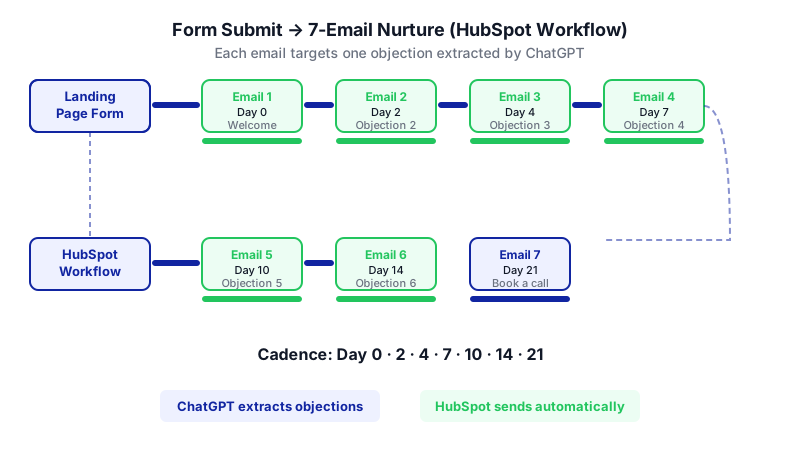
Watch each email appear in sequence — every one targets a distinct objection ChatGPT extracted from your landing page, sent automatically on the cadence you set. -
Ask ChatGPT to extract the seven biggest objections. Most tutorials skip this step and go straight to "write me seven nurture emails." That's why the outputs feel like one generic blob. You want each email to tackle a distinct concern a lead actually has after reading the page.
You are a B2B SaaS demand gen strategist. I'll paste the full copy from our landing page. Read it carefully and list the seven most likely objections or hesitations a lead would have after reading it — the real reasons they'd sign up for the free trial but then go silent. Rank them from most common to least common. For each objection, write one sentence describing the underlying worry in the lead's own voice. Here is the page copy: [paste copy]
Review the list. Swap in any objection you know your sales team hears often that ChatGPT missed. You now have seven specific angles.
-
Decide the cadence. A workable default for B2B SaaS: Day 0 (welcome), Day 2, Day 4, Day 7, Day 10, Day 14, Day 21. Write this down — you'll need it when you build the Workflow.
-
Draft each email, one at a time, around one objection. Don't ask ChatGPT for all seven at once. Running them individually keeps each email focused and lets you iterate without the model losing the thread.
Write email 3 of 7 in a nurture sequence for leads who signed up for a free trial of [product], a [one-line description]. This email's single job is to address objection #3 from the list above: "[paste the objection]." Constraints: under 150 words, plain text, no emoji, conversational B2B tone, one clear CTA linking to [resource URL or action]. Start the body with a short, specific observation — not "I hope this email finds you well." Give me three subject line options under 45 characters. Sign off as [your name], [your title].
Repeat for emails 1 through 7. For email 1 (welcome), ask it to acknowledge the sign-up and set expectations for the series. For email 7, ask it to invite a direct sales conversation with a calendar link.
-
Edit each draft for truth and voice. ChatGPT will occasionally invent features or claims. Read every sentence and cut anything your product doesn't actually do. Then read the whole sequence out loud in order — this catches repetition and tonal jumps between emails.
-
Create the marketing emails in HubSpot. In HubSpot, create seven marketing emails (one per draft) and save each as an automated email so it can be used inside a Workflow. Paste in the subject line you picked and the body copy. Set the sender name and reply-to address to a real person on your team — replies to a nurture should land in a human inbox.
-
Build the Workflow. Create a new contact-based Workflow. Set the enrollment trigger to "Form submission" on your landing page form. Add a Send Email action for email 1, a Delay action (2 days), Send Email for email 2, and so on through email 7, matching the cadence from step 3.
-
Add a goal and an exit condition. Set a goal like "Meeting booked" or "Became an opportunity" so contacts who convert exit the Workflow and stop receiving nurture emails. Without this, you'll keep sending "are you still interested?" emails to people who already booked a call.
-
Test with your own email. Submit the landing page form with a test email address you control. Confirm email 1 arrives, then use HubSpot's workflow testing tools to fast-forward the contact through the remaining steps. Check rendering on mobile.
-
Turn it on and watch the first week. Review open rates, click rates and replies after seven days. If one email is dragging the whole sequence down, rewrite just that email using the same ChatGPT prompt pattern — don't rebuild the series.
A worked example
Say you run marketing at a SaaS that does automated SOC 2 evidence collection. Your landing page offers a free 14-day trial.

Sample objections ChatGPT might surface from your page copy:
- "I'm not sure this will actually integrate with our stack."
- "Our auditor is picky — will they accept output from this tool?"
- "Setup looks like a project I don't have time for."
- "We already have a half-built spreadsheet system."
- "The price isn't on the page, which makes me nervous."
- "We're six months from our audit — is it too early?"
- "I need buy-in from engineering and don't know how to pitch it."
Good output for email 4 (the spreadsheet objection) looks like a 120-word note that opens with something concrete ("Most teams we talk to start with a shared sheet and three Slack channels for evidence requests…"), names the real pain of that approach, offers one short proof point, and ends with a single CTA: "See a 3-minute teardown of the spreadsheet-to-SOC-2 handoff." No "Dear valued customer." No stacked CTAs. No claims your product doesn't back up.
Limits and gotchas
- ChatGPT has no HubSpot integration. You're copy-pasting. Don't try to automate this bridge for a seven-email series — it's not worth the setup.
- ChatGPT will embellish. It may claim your product has integrations, certifications or metrics it doesn't. Fact-check every specific claim.
- Workflow marketing emails require Marketing Hub Professional. Starter caps you at up to 10 workflows with restricted triggers and actions, and Free doesn't include multi-step Workflow automation at all.
- Don't confuse Sequences with Workflows. If a well-meaning teammate suggests using Sequences, remember: Sequences need a rep to enroll each contact manually (up to 50 at a time), send from a personal inbox, cap at 500 sends/user/day on Professional, and don't include an unsubscribe link — which creates compliance risk depending on your jurisdiction.
- Have a human read the final sequence in order. ChatGPT writes each email in isolation, so you'll occasionally get two emails that make the same point.
- Privacy. Don't paste customer names, contract details or anything confidential into ChatGPT prompts. Landing page copy and generic objection descriptions are fine.
When not to use AI for this
Skip this approach if your product sells to a tiny, highly specific audience (say, under 100 target accounts). In that case a sales rep writing one personal note per lead will outperform any nurture sequence, and HubSpot Sequences — the 1:1 sales tool — is a better fit than Workflows.
Also skip it if your landing page is brand new and you don't yet know what objections leads have. Run it manually for a month, log the replies and questions, then come back and build the automation with real objections instead of guessed ones.
Honest alternatives: a freelance copywriter can draft seven nurture emails for a few hundred to a couple thousand dollars, and the voice consistency will be higher than anything you'll get from ChatGPT on the first pass. Use AI when speed and iteration matter more than a polished house voice.
Frequently Asked Questions
Can I do this entirely on HubSpot's Free plan?
No. HubSpot Free lets you send marketing emails (up to 2,000/month with HubSpot branding), but multi-step Workflow automation isn't included. You need Marketing Hub Professional to run a seven-step automated nurture triggered by a form submission.
Why not use HubSpot Sequences since it's literally called a sequence?
Sequences is a Sales Hub feature for 1:1 outreach from a rep's personal inbox. On Professional, a rep has to enroll contacts manually (up to 50 at a time), the emails don't include an unsubscribe link, and anyone who replies is auto-unenrolled. It's the wrong tool for automated, sign-up-triggered marketing nurture.
How long does the full build actually take?
About 90 minutes the first time: 15 minutes to extract objections, 45 minutes to draft and edit seven emails with ChatGPT, 30 minutes to build and test the Workflow in HubSpot. Future campaigns are faster because you can clone the Workflow structure.
How often should I refresh the emails?
Review performance monthly. Rewrite any single email with open rates or click rates well below the others, using the same one-objection-per-email prompt pattern. Rebuild the full sequence from scratch every 6-12 months or whenever your landing page changes substantially.
What if my landing page changes?
If the offer, pricing or main promise changes, re-run step 2 (objection extraction) with the new page copy and compare. Usually two or three objections shift, and you only need to rewrite the matching emails — not the whole series.
When a nurture outgrows off-the-shelf tools — for example, when you need per-lead personalization driven by product usage data — a custom build is worth considering, and it's the kind of thing we do at CodeNicely.
Sources & further reading
- Create and edit sequences — HubSpot Knowledge Base (official)
- Sending limits for connected email accounts — HubSpot Knowledge Base (official)
- HubSpot Sequences Explained: What They Do, How They Differ from Workflows — Supered.io (updated October 2026)
- HubSpot Sequences Alternatives: Cost and Limits — GTM Flow (updated November 5, 2026)
- HubSpot Sequences vs. Workflows: Which Runs Your Follow-Up? — VantagePoint (updated November 2026)
- HubSpot Sequences: Setup, Limits and 3 Templates — Growigami (November 2026)
- HubSpot Email Automation Guide 2026: Sequences vs Workflows, Limits — Sybill.ai
- HubSpot Workflows vs Sequences: Full Guide — HuboExperts
- How to Set Up HubSpot Email Sequences: Step-by-Step Setup Guide — AskElephant.ai (September 2026)
- HubSpot Sales Hub Starter and Sequences: What You Actually Get in 2026 — CRM News Today
Get one practical guide a week
Costs, AI tools, partner selection — written for people who make the decision. No spam, unsubscribe anytime.
Thanks — you're on the list. One practical guide a week, nothing else.
That didn't work — please check the email address and try again.
Building something in Marketing?
CodeNicely partners with founders and tech teams to ship AI-native products that move metrics. Tell us about the problem you're solving.
Talk to our team Book a 30-min call