
Turn a New Regulation into a Staff Checklist with Claude and Notion

 Published by CodeNicely, the product studio founded by Meghal Agrawal and Ujjwal Agrawal in 2017
For: A compliance manager at a 60-person fintech or healthcare SaaS company who receives a new regulatory update (think GDPR amendment, HIPAA guidance, or an updated employment law) and has to translate dense legal language into tasks her non-legal colleagues can actually act on — without a legal team on staff
In this guide
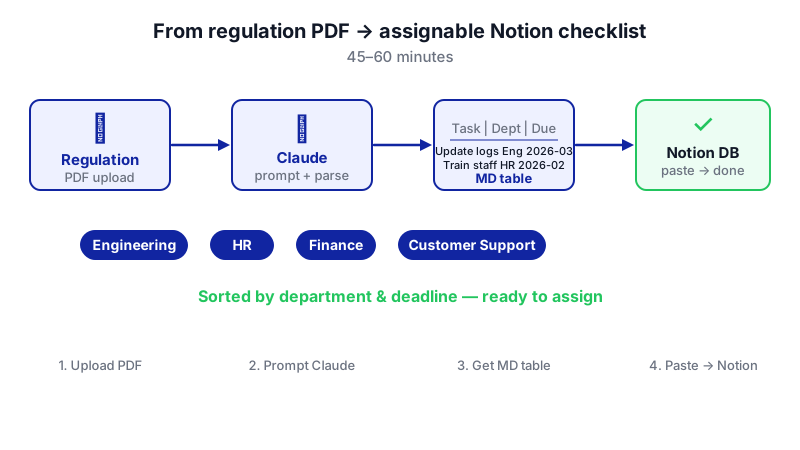
By the end of this tutorial you'll have a plain-English compliance checklist — sorted by department and deadline, with owners and due dates — sitting inside a Notion database, ready to assign. From the moment you open the PDF of a new regulation, this takes about 45 to 60 minutes.
Last verified: November 2026, against the tools' own documentation. AI tools change often — if a step no longer matches, check the sources at the end.
Who this is for, and what you'll get
You're the compliance person at a 40 to 100-person fintech or healthcare SaaS. A regulator just published an update — a GDPR amendment, new HIPAA guidance, an employment law revision — and you're the one who has to translate it for Engineering, HR, Customer Support and Finance. You don't have in-house legal counsel. You do have a calendar that's already full.
You'll walk away with:
- A structured Notion database of compliance tasks derived directly from the regulation text.
- Each task written in plain English, tagged with a responsible department, an owner, and a due date.
- Multiple views — by deadline, by department, by status — so you can stop chasing people over email.
The thing most tutorials miss: they tell you to ask the AI to summarize the regulation. That's the wrong job. Summaries still leave you doing the translation work. The real time-saver is prompting Claude to output obligations already sorted by who is responsible and by when, in a format Notion will convert to native blocks the second you paste it in.
What you need
| Tool | Plan needed | Cost | Why |
|---|---|---|---|
| Claude | Free works; Pro recommended for heavy use | Free, or Pro at $20/month (or $17/month billed annually at $200/year) | Reads the regulation PDF and produces the structured checklist. File uploads are available on all plans, including Free. |
| Notion | Free works for a solo setup; Plus or Business for team features | Free ($0), Plus ($10/user/month billed annually), Business ($20/user/month billed annually) | Hosts the assignable checklist. Task assignment, databases and checklist views are available on all plans including Free. |
Notion AI is not required for this workflow — Claude handles the document analysis, and Notion handles the assignment and tracking. That matters because full Notion AI is now bundled only into the Business plan and above.
Step-by-step
-
Get the regulation into a format Claude can read. Download the official PDF from the regulator's site. Claude accepts PDF, DOCX, TXT, HTML, RTF, EPUB and more, with a limit of 1,000 pages per PDF and 500 MB per file in a standard chat. Any realistic regulatory document fits comfortably.

Breaking a regulation into columns — department, owner, deadline — before you prompt saves significant back-and-forth. -
Start a new Claude chat and upload the file. One document per chat is cleanest. If you're comparing an old and new version, upload both — Claude allows up to 20 files per chat. If you plan to work on multiple regulations over time, use Claude Projects (unlimited on paid plans, capped at 5 on Free) so you can keep each regulation's context separate and come back to it.
-
Give Claude the context it needs about your company. Before you ask for the checklist, tell Claude what your org looks like. This is what makes the output assignable instead of generic.
We are a 60-person healthcare SaaS company based in the EU. Our departments are: Engineering, Product, Customer Support, Sales, Marketing, HR, Finance, and Compliance (me). We do not have in-house legal counsel. We process protected health information on behalf of US hospital clients. Our customers are mid-sized US hospitals. Keep this in mind for everything that follows.
-
Ask Claude for the checklist in the exact structure Notion will accept. This is the key prompt. Notice it asks for obligations grouped by responsible department and deadline — not a summary.
Read the attached regulation carefully. For every obligation it places on an organization like ours, produce one row in a Markdown table with these exact columns: Task | Department | Owner (job title) | Due | Priority | Source (section or paragraph reference) | Plain-English explanation.
Rules:
- One row per discrete action. If a single clause implies three actions, write three rows.
- Task must start with a verb and be something a non-lawyer can execute.
- Department must be one of: Engineering, Product, Customer Support, Sales, Marketing, HR, Finance, Compliance.
- Due must be an actual date based on the regulation's effective date or deadline. If the regulation gives a relative deadline (e.g., "within 30 days of effective date"), compute the calendar date and show it as YYYY-MM-DD.
- Priority is High, Medium, or Low based on penalty exposure and dependency on other tasks.
- Source must cite the article, section, or paragraph number so I can verify.
- Plain-English explanation is one or two sentences, no legalese.
After the table, list any obligations where you are uncertain which department owns them, and any deadlines that depend on information not in the document.Why this works: Markdown tables paste directly into Notion as native database-ready blocks, and asking Claude to flag its own uncertainty gives you a built-in review list.
-
Review the output against the source. Spot-check five or six rows against the Source column references in the regulation. You're looking for: anything Claude invented (rare, but possible), anything it missed (more common with long documents), and anything in the "uncertain" list at the bottom that you need to resolve before publishing the checklist.
-
Ask Claude for any fixes in-line. Don't restart. Just reply:
Good. Three changes: (1) The breach notification task should be owned by Engineering, not Customer Support. (2) Add a task for Marketing to update the consent language on the pricing page. (3) Re-check Article 14 — I think you missed the documentation requirement.
-
Create the Notion database. In Notion, create a new page and add a new database (full page is easiest for a team-facing checklist). Set these properties:
- Task — the default Title property.
- Done — Checkbox property.
- Owner — Person property.
- Due — Date property.
- Department — Select property, with the departments as options.
- Priority — Select property: High, Medium, Low.
- Source — Text property.
- Explanation — Text property.
-
Get Claude's output into Notion. You have two options:
- Paste: Copy the Markdown table from Claude and paste it into the Notion database. Notion auto-converts pasted Markdown — tables, headings, bulleted and numbered lists, and to-do checkboxes — into native blocks.
- Import: If the output is long, ask Claude to give it to you as a downloadable .md file, then in Notion go to Settings → Import → Text & Markdown and upload. Markdown imports are capped at 5 MB per file on Free and 50 MB on paid plans — a checklist will never come close.
-
Assign owners and due dates. Open each row and set the Owner by clicking the Person property and typing
@and the person's name. The Due date is already filled from Claude's output; confirm it. If you prefer, you can insert a quick/to-do listblock on any related briefing page to tag people with@and a due date for reminders. -
Create the views you'll actually use. On the database, add:
- A Calendar view grouped by the Due date, so nothing sneaks up on you.
- A Board view grouped by Department, so you can share each department its own column.
- A Table view filtered by Done is unchecked and sorted by Due ascending — your weekly review list.
-
Share and brief. Share the database page with the team, and in your kickoff message link people directly to their filtered view. Because every task cites its Source, anyone who wants to know "why do I have to do this?" can click through.
A worked example
Say you've just received updated HIPAA guidance on breach notification timelines. You upload the 42-page PDF to Claude, give it your company context, and run the prompt above. Here's roughly what one row of the output should look like after it lands in Notion:
- Task: Update the incident response runbook so that Security notifies Compliance within 24 hours of any suspected PHI exposure.
- Department: Engineering
- Owner: Head of Security
- Due: 2025-03-15
- Priority: High
- Source: Section 4.2(b)
- Explanation: The guidance shortens the internal escalation window. Your current runbook says 72 hours; it must be 24.
A realistic 40-page regulation might produce 25 to 60 tasks spread across five or six departments. The "uncertain" list at the bottom of Claude's response is usually where you'll spend most of your review time — and that's the right place to spend it.
Limits and gotchas

- Claude is not your lawyer. It's excellent at structured extraction and translation. It is not a substitute for qualified legal review on high-stakes interpretation, novel regulations, or anything involving enforcement risk. Treat the output as a solid first draft.
- Always verify the Source references. Spot-check that the article and paragraph numbers Claude cites actually say what the row claims. This catches almost all errors.
- Dates need sanity checks. If the regulation references an effective date that isn't in the document itself (e.g., "upon publication in the Official Journal"), Claude may guess. Always verify computed dates.
- Long documents and context limits. In Claude Projects, total content must fit within a 200,000-token context window and individual files are capped at 30 MB. A standard chat handles up to 1,000-page PDFs and 500 MB files — use a fresh chat for very long regulations.
- Privacy. Published regulations are public, so uploading them to Claude is fine. If you're combining regulations with internal documents (e.g., your current policies), review your plan's data handling and your company's AI policy first.
- No direct Claude-Notion connection. The handoff is manual (paste or Markdown import). That's a feature, not a bug — the pause lets you review before publishing to the team.
When not to use AI for this, and honest alternatives
Skip this workflow when:
- The regulation is ambiguous or genuinely novel. If even experienced counsel is debating what a clause means, a language model won't resolve it. Pay for a short consultation and feed that interpretation back in.
- The penalty exposure is material. For anything where a mistake could cost the company serious money or a license, use Claude to prepare the brief, then have a lawyer sign off before you assign tasks.
- The regulation requires jurisdiction-specific interpretation. State-by-state or country-by-country nuance is where models still stumble.
Reasonable alternatives: a fractional compliance counsel for a monthly retainer, a specialist regtech platform (expensive, but auditable), or asking your auditor for their interpretation in writing.
Frequently Asked Questions
Do I need Claude Pro, or is the Free plan enough?
Free works for the actual task — file uploads and the structured output prompt are available on every plan. You'll hit usage caps if you're processing multiple long regulations in a session. Pro at $20/month (or $17/month billed annually) gives at least 5× the Free tier's usage and unlimited Projects, which is worth it if this is a monthly or weekly task.
Do I need Notion's paid plan or Notion AI?
No. The entire checklist workflow — databases, assignments with @, due dates, Calendar and Board views, Markdown paste and import — works on Notion Free. You'd move to Plus ($10/user/month billed annually) or Business ($20/user/month billed annually) for team-scale permissions and features, not for this task specifically. Notion AI is not needed because Claude does the AI work.
Can I automate the Claude-to-Notion handoff?
Not natively — there's no built-in direct integration in this workflow. Tools like Zapier or Make can connect the two if you process regulations frequently, but for a monthly or quarterly compliance update the paste or Markdown import is fast and gives you a natural review checkpoint.
How do I handle a regulation update that modifies an existing checklist?
Upload both the old and new versions to the same Claude chat (up to 20 files allowed) and ask for a diff: new obligations, removed obligations, and changed deadlines. Paste only the diff into Notion as new rows, and update affected existing rows by hand. Keep the original database — version history matters for audits.
How accurate is Claude at extracting obligations from dense legal text?
In practice, very good at identifying explicit obligations and deadlines, and reasonable at inferring which role owns each one when you give it your org structure. It's weaker at implicit obligations (things the regulation assumes without stating) and at interpretation. That's exactly why the prompt asks Claude to flag its own uncertainties — those are your review priorities.
If this workflow starts handling dozens of regulations a month across multiple jurisdictions, an off-the-shelf setup eventually hits its ceiling, and a custom-built compliance tool (which CodeNicely builds) becomes the better fit.
Sources & further reading
- Claude Pro Plan: Features, Pricing, and Honest Review (2026) — fast.io
- Claude Pricing: In-Depth Guide [2026] — juma.ai
- Claude Pricing in 2026: Free vs Pro vs Max — AItomation Academy
- How to Upload a Folder to Claude: Multi-File Projects & MCP — fast.io
- Claude File Size Limit: Chat, Projects, and Context Ceilings — fast.io
- Claude File Upload Limit and Claude Pro Upload Limit by Plan — mentalclone.com
- How to Use Claude: Plans, Limits, Features and Fixes — kingy.ai
- Centralize Your Tasks with Notion's Connected Checklists — notion.com (official)
- Import data into Notion — notion.com Help Center (official)
- Notion AI Pricing (Nov 2026): Plans, Credits, Team Cost — sentra.app
Get one practical guide a week
Costs, AI tools, partner selection — written for people who make the decision. No spam, unsubscribe anytime.
Thanks — you're on the list. One practical guide a week, nothing else.
That didn't work — please check the email address and try again.
Building something in Legal & Compliance?
CodeNicely partners with founders and tech teams to ship AI-native products that move metrics. Tell us about the problem you're solving.
Talk to our team Book a 30-min call