
Write a Job Posting That Attracts A-Players with ChatGPT

 Published by CodeNicely, the product studio founded by Meghal Agrawal and Ujjwal Agrawal in 2017
For: An HR manager or office manager at a 15–80 person company who owns recruiting but has no dedicated copywriter, and whose last job posting got flooded with unqualified applicants
In this guide
By the end of this tutorial, you'll have a polished, bias-reduced job posting — intro, responsibilities, requirements, and culture hook — ready to paste into LinkedIn or any job board. Plan for about 30 minutes, including a short intake call with your hiring manager.
Last verified: November 2026, against the tools' own documentation. AI tools change often — if a step no longer matches, check the sources at the end.
Who this is for, and what you'll get
You're the HR lead or office manager at a 15–80 person company. You own recruiting, you don't have a copywriter, and your last posting pulled in a flood of unqualified applicants. You want a repeatable way to write postings that attract the right people and filter out the wrong ones — without learning a new tool stack.
You'll walk away with:
- A one-page intake template you can reuse for every role.
- A ChatGPT prompt chain that turns intake notes into a draft, then refines it in Canvas.
- A finished posting that reads like a human wrote it, with bias-reduced language and honest requirements.
What you need
| Tool | Plan | Cost | Why |
|---|---|---|---|
| ChatGPT | Free is enough. Plus if you use it daily. | Free: $0. Plus: $20/month (monthly billing only). | Drafts, rewrites, and inline edits via Canvas. |
| A 15-minute call with the hiring manager | — | — | Source material. This is the step most people skip. |
A note on plans: the Free plan now includes unlimited text chat (subject to abuse guardrails), and Canvas — the side-panel workspace used for editing — is available on all plans, including Free. You do not need to pay for this workflow.
Step-by-step
-
Run a 15-minute intake with the hiring manager. This is where strong postings are won or lost. Generic postings happen because HR writes from a job title, not from the real job. Capture, in your own words:
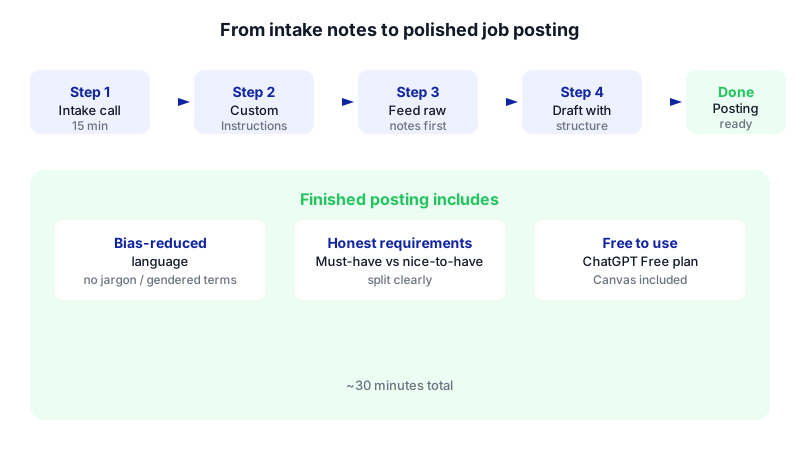
Watch each step light up in order — the whole workflow takes about 30 minutes and costs nothing on ChatGPT's Free plan. 
A short intake call — not a job description — is where a strong posting actually begins. - What this person will actually do in week 1, month 3, and month 12.
- The three problems they're being hired to solve.
- What "great" looks like after 90 days.
- Skills that are truly required vs. nice-to-have (push back on long wish lists).
- Who they'll work with, and what the team's working style is really like.
- Deal-breakers: things that would cause you to reject in the first interview.
- Compensation range, location/remote policy, and benefits worth bragging about.
Keep this as plain notes in a document or email. Don't format it. ChatGPT works best from raw, specific inputs.
-
Set Custom Instructions once, so every future posting sounds like your company. In the ChatGPT web app, go to Settings > Personalization > Custom Instructions. These apply to all new conversations. Paste something like:
We're a 40-person B2B software company based in Pune. Our tone is warm, direct, and concrete — no corporate jargon, no hype words like "rockstar", "ninja", or "world-class". When drafting job postings, use inclusive, EEO-compliant language, avoid gendered terms, avoid unnecessary degree requirements, and write in second person ("you'll"). Prefer short paragraphs and scannable bullet points.
You only do this once. Every new chat will now default to your voice.
-
Start a new chat and feed in the intake notes first — not a job description. This is the step most tutorials get wrong. Dumping an old JD in and asking ChatGPT to "polish" it recycles the same generic language that got you unqualified applicants last time. Instead, start with:
I'm hiring for a [role title] at my company. Below are raw intake notes from the hiring manager. Before you write anything, ask me up to 5 clarifying questions about anything that's unclear, contradictory, or missing — especially around day-to-day responsibilities, success metrics, and must-have vs. nice-to-have skills. Intake notes: [paste your notes]
Answer its questions honestly. If you don't know, say so and offer to check with the hiring manager. Ten minutes here beats an hour of rewrites later.
-
Ask for the first draft with a clear structure. Once ChatGPT has what it needs, prompt:
Now write the job posting. Use this structure: 1. A 2–3 sentence opening hook that tells a strong candidate why this role matters, written in second person. 2. "About us" — 3 sentences, specific, no clichés. 3. "What you'll do" — 5–7 bullets, each starting with a verb, focused on outcomes not tasks. 4. "What we're looking for" — separate "Must have" (3–5 items) from "Nice to have" (2–4 items). Be honest; don't pad. 5. "How we work" — 2–3 sentences on team culture, not perks. 6. "Compensation and logistics" — salary range, location, benefits. 7. A short closing paragraph encouraging people who don't check every box to apply. Use inclusive language. Avoid words that research shows discourage underrepresented candidates from applying (e.g., "aggressive", "dominant", "rockstar"). Avoid degree requirements unless I specified one is mandatory.
ChatGPT may open the draft in Canvas or a Writing Block — a side-panel workspace with a mini formatting toolbar — automatically when it detects a writing task. If it does, good: you'll edit there in the next step.
-
Iterate in Canvas instead of regenerating. Canvas lets you select any sentence or paragraph and apply targeted edits — shorten, lengthen, change tone, suggest alternatives — without ChatGPT rewriting the whole posting. Use it for things like:
- Highlight the opening hook and ask: "Make this more specific to the problem this role solves. Cut adjectives."
- Highlight the "Must have" list and ask: "Challenge each item. Which of these are genuinely required to succeed in the first 90 days?"
- Highlight the whole posting and ask: "Flag any phrases that could unintentionally discourage women, career-changers, or candidates without a four-year degree from applying."
This is where you earn the 30-minute timeline. You're not starting over, you're sharpening.
-
Do a human pass for honesty. Read the whole posting out loud. Ask yourself:
- Would the hiring manager actually agree with every bullet?
- Is any claim about culture something a new hire would push back on in month 2?
- Is the salary range real, or hedged?
Fix anything that feels off. ChatGPT is a drafter, not the hiring manager.
-
Copy, paste, publish. ChatGPT has no native Word export, and its built-in data export (Settings > Data Controls > Export Data) sends you a ZIP of JSON and HTML — not a clean document. For a job posting, the fastest path is manual: select the finished draft in Canvas, copy it, and paste it directly into LinkedIn's job post editor or your ATS. Most job boards preserve basic formatting like bullets and bold on paste.
If you need it in Word, paste it in, then use Keep Text Only or Merge Formatting and reapply headings and bullets manually. "Paste without formatting" will strip bold, bullets, and structure.
A worked example: Senior Operations Manager
Here's what the raw material and output actually look like in practice.
Sample intake notes (what you paste into ChatGPT)
Role: Senior Operations Manager
Team: Reports to COO, manages 2 coordinators
Why hiring: COO is spending 60% of her time on vendor coordination and billing issues. Need someone to own this end-to-end.
Week 1: Shadow COO, meet top 10 vendors, audit current billing process.
Month 3: Own weekly vendor review, cut billing errors by half.
Month 12: Run operations independently, COO only involved in escalations.
Must have: 5+ yrs ops experience, has managed vendor contracts, comfortable with spreadsheets and basic SQL or willing to learn.
Nice to have: SaaS background, has used NetSuite.
Deal-breakers: Can't handle ambiguity, needs daily direction.
Culture: Small team, direct feedback, no politics, hybrid 3 days in office (Pune).
Comp: 18–24 LPA + health + 20 days PTO.
NO four-year degree requirement — we hire for skill.
Sample prompt
Write the job posting using the structure I specified earlier. Lean into the "COO is drowning in vendor coordination" angle in the opening hook — a strong ops person will find that specific and compelling. Don't mention a degree requirement.
What good output looks like
The opening doesn't start with "We are a fast-growing company seeking a motivated Operations Manager." It starts with something like: "Our COO is spending more than half her week chasing vendors and fixing billing errors. We're hiring a Senior Operations Manager to take that off her plate — and own operations end-to-end within a year."
The "What you'll do" bullets are outcomes ("Cut vendor billing errors by 50% in your first 90 days"), not tasks ("Manage vendor relationships"). The "Must have" list has four items, not twelve. The closing invites candidates who don't hit every box.
That is the posting that filters for A-players.
Limits and gotchas
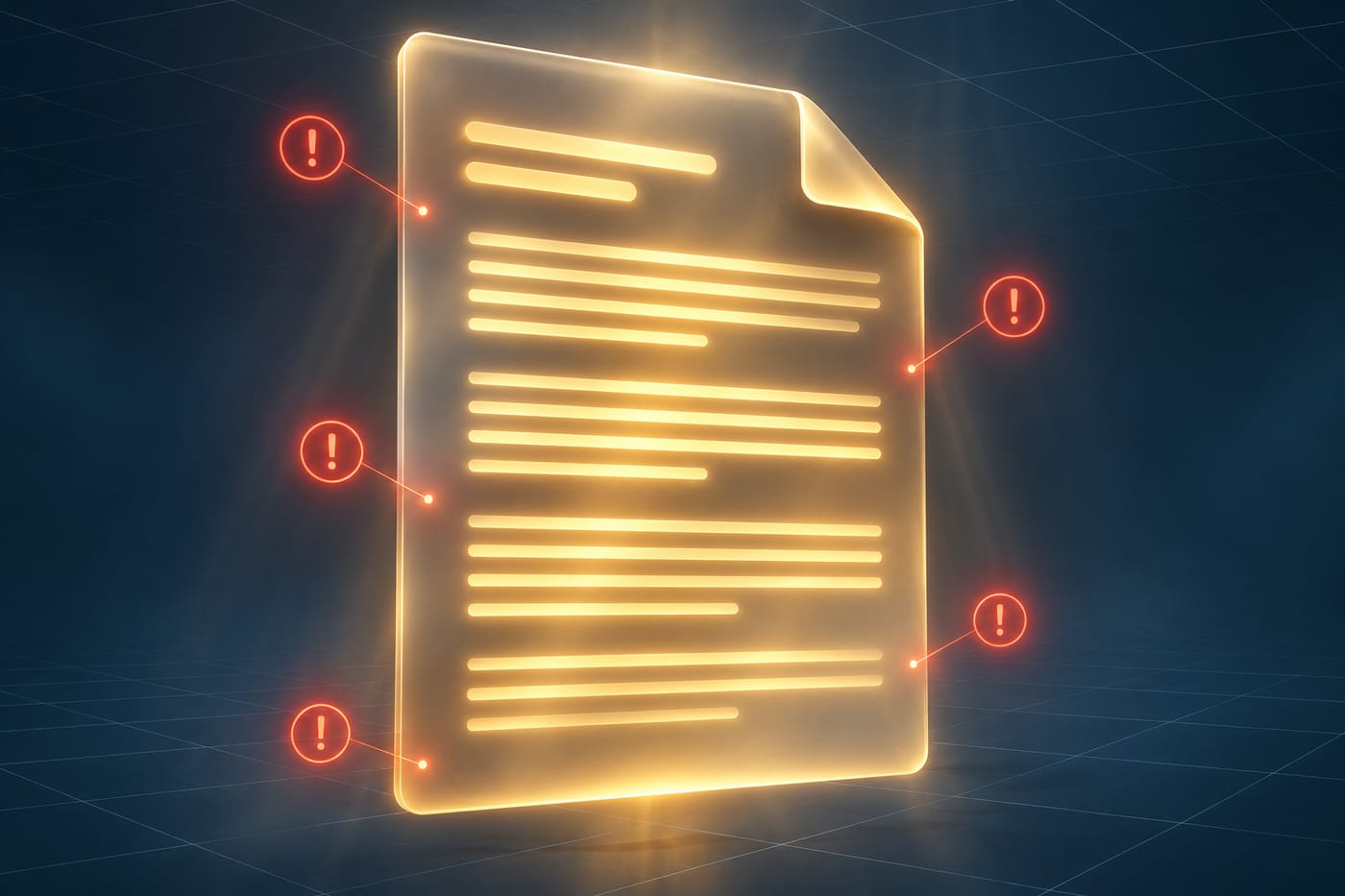
- Bias reduction is prompt-driven, not automatic. ChatGPT will generate bias-reduced, EEO-conscious language when you ask for it explicitly. There's no built-in filter that does this for you.
- File uploads on Free are capped at 3 per day, 512 MB per file (20 MB per image). Not an issue for pasted notes, but worth knowing if you ever want to upload a PDF job brief.
- No native Word export. The data export tool (Settings > Data Controls > Export Data) emails a ZIP of JSON/HTML across all your conversations — not useful for a single document. Plan to copy-paste.
- Salary, titles, and legal claims need a human check. ChatGPT doesn't know your local employment law or your actual comp bands. Verify.
- Privacy. Don't paste anything confidential you wouldn't want retained — real candidate names, internal salary data for named employees, confidential strategy. Intake notes about the role itself are generally fine.
- Canvas and Writing Blocks are rolling out gradually. If you don't see them, you can still iterate by highlighting text in your reply and asking ChatGPT to revise specific sections.
When not to use AI for this, and honest alternatives
Skip this workflow — or lean on it only lightly — when:
- The role is highly regulated or safety-critical (clinical, legal, financial compliance). Use your legal/compliance team's approved template as the base, and only use ChatGPT to tighten the "About us" and culture sections.
- You don't actually have intake notes. ChatGPT amplifies what you give it. If you skip the hiring manager call, you'll get a polished version of a generic posting — which is exactly the problem you're trying to solve.
- You're writing for a senior leadership hire where the posting is really a positioning document. A good executive search partner or an experienced recruiter will outperform a 30-minute draft.
Honest alternatives: a well-maintained internal template library, a one-page posting framework from your ATS, or a freelance copywriter for your top 2–3 most-hired roles.
Frequently Asked Questions
Do I need ChatGPT Plus for this, or is Free enough?
Free is enough. The Free plan supports unlimited text chat for writing tasks like this, and Canvas — the editing workspace you'll use most — is available on all plans. Upgrade to Plus ($20/month, monthly billing only) if you're using ChatGPT daily across many tasks, not just for the occasional job posting.
Can ChatGPT export my finished posting directly to Word or a PDF?
Not natively. ChatGPT's built-in export sends a ZIP of all your conversations as JSON and HTML — not a single document. For a job posting, copy the text from the chat or Canvas and paste it into LinkedIn, your ATS, or Word. If you paste into Word, use Keep Text Only or Merge Formatting and reapply bullets and bold, since "paste without formatting" strips structure.
How do I make sure the posting uses inclusive language?
Ask for it directly in your prompt — tell ChatGPT to use inclusive, EEO-compliant language, avoid gendered or exclusionary terms, and avoid unnecessary degree requirements. Then, as a final pass in Canvas, highlight the whole posting and ask it to flag phrases that might discourage specific groups from applying. Bias reduction is prompt-driven, so being explicit matters.
What if the hiring manager won't do an intake call?
Send them the intake questions by email or Slack and ask for bullet-point answers. Even 5 minutes of their real input beats an hour of guessing. If they still won't engage, draft a posting using what you know, then send it to them for edits — a concrete draft usually unlocks feedback that an empty form doesn't.
Can I reuse the same ChatGPT setup for every role?
Yes — that's the point of setting Custom Instructions once. Your company tone, formatting preferences, and inclusive-language rules carry across every new chat. For each role, you only need to paste fresh intake notes and run the same prompt chain. Over time, you'll build a library of past postings you can reference for consistency.
When this workflow outgrows copy-paste — for example, auto-generating postings from your ATS intake forms and posting to multiple boards — a custom build is an option, and it's the kind of thing CodeNicely does.
Sources & further reading
- ChatGPT Plans: Free, Go, Plus, Pro, Business, and Enterprise (official pricing page reference)
- ChatGPT Plans Compared 2026: Free, Go, Plus, Pro & More – gradually.ai
- ChatGPT pricing in 2026: every plan, what it costs – CloudZero
- ChatGPT Free Plan Limits in 2026 – chatai.guide
- ChatGPT Usage Limits (Free, Plus, Pro) – aiplanfinder.com
- ChatGPT Usage Limits (2026): Plus, Pro, Business – justinmckelvey.com
- What is ChatGPT Canvas? The Complete 2026 Guide – instapods.com
- ChatGPT Writing Blocks: What They Are and How to Edit – gHacks
- How to Export ChatGPT to Word (DOCX): Complete Guide – ai-toolbox.co
- How to Copy Text from ChatGPT to Word Without Breaking Formatting – backrun.co
Get one practical guide a week
Costs, AI tools, partner selection — written for people who make the decision. No spam, unsubscribe anytime.
Thanks — you're on the list. One practical guide a week, nothing else.
That didn't work — please check the email address and try again.
Building something in HR & Recruiting?
CodeNicely partners with founders and tech teams to ship AI-native products that move metrics. Tell us about the problem you're solving.
Talk to our team Book a 30-min call