Write a 30-Day New Hire Onboarding Plan with ChatGPT and Notion

 Published by CodeNicely, the product studio founded by Meghal Agrawal and Ujjwal Agrawal in 2017
For: An HR manager or ops lead at a 15–60 person company who personally onboards every new hire, has no dedicated L&D team, and is rebuilding the same welcome doc from scratch every time someone new joins
In this guide
By the end of this tutorial you'll have a reusable, role-specific 30-day onboarding plan — with success milestones, daily tasks, check-in prompts for the hiring manager, and a shareable Notion page you send the new hire on day one. Plan on about 90 minutes the first time, and 20 minutes to adapt it for each future hire.
Last verified: November 2026, against the tools' own documentation. AI tools change often — if a step no longer matches, check the sources at the end.
Who this is for, and what you'll get
You're the HR manager or ops lead at a company of roughly 15–60 people. You personally handle every new hire, there's no learning and development team behind you, and you've been rebuilding the same welcome doc from scratch every time someone joins. This guide fixes that.
What you'll walk away with:
- A 30-day plan structured around outcomes, not a flat task list — so a new hire knows what "good" looks like by day 30.
- Day-by-day activities for weeks 1–4, broken into learning, doing, and relationship-building.
- Manager check-in prompts for day 1, end of week 1, day 15, and day 30.
- A Notion page you can duplicate for every future hire and share with them as a guest.
What you need
| Tool | Plan needed for this tutorial | Cost |
|---|---|---|
| ChatGPT | Free is enough for a one-off plan. Plus is more comfortable for iterative sessions because of the larger context window and no ads. | Free ($0); Plus $20/month |
| Notion | Free plan works for a solo HR manager sharing a page with one new hire as a guest (up to 10 guests allowed). | Free ($0) |
If you're handling sensitive role data (compensation, performance expectations tied to named people), consider ChatGPT Business, which states it does not train on your data. It's $25/seat/month billed monthly or $20/seat/month billed annually, with a 2-seat minimum.
You do not need Notion AI for this workflow. Notion AI's full capabilities (including the Notion Agent) are gated behind the Business plan at $20/member/month. We're using ChatGPT for the writing and Notion purely as the structured home for the plan — so the Free tier is fine.
Step-by-step
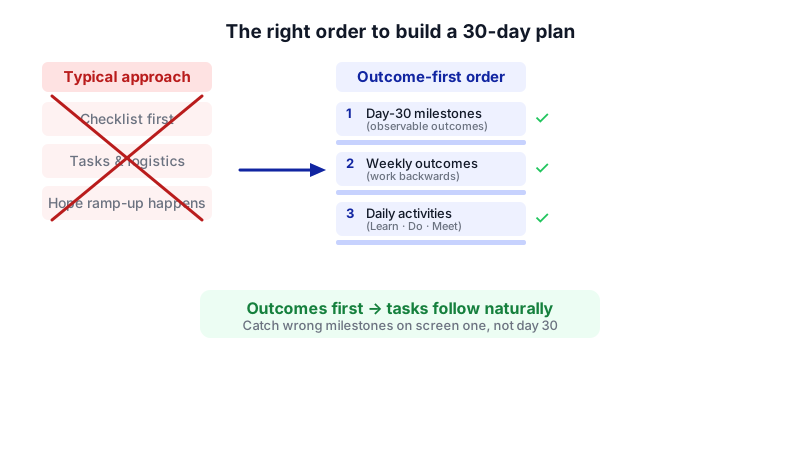
The core idea most onboarding templates get wrong: they start with a checklist of tasks ("set up laptop, read handbook, meet the team") and hope ramp-up happens. It doesn't. Instead, we'll have ChatGPT define what success looks like at day 30 first, then work backwards into weekly outcomes, then into daily activities. That's what turns a generic checklist into an actual plan.
- Gather the raw inputs before you open ChatGPT. You need: the exact role title, the hiring manager's name, 3–5 bullet points from the job description about core responsibilities, the tools/systems the person will use daily, and anything role-specific (e.g., "must know our pricing tiers by week 2"). Having this ready means one good prompt instead of ten mediocre ones.
- Open a new ChatGPT chat and set the context. Paste the role brief in one go. Use this prompt:
You are an experienced HR partner helping a 40-person company onboard a new hire. I'll give you the role details. Your job is to first define what success looks like at day 30, then week-by-week outcomes, then daily activities — in that order. Don't start writing a task list yet. Here are the role details:
Why this works: you force the model to commit to outcomes first. If the milestones are wrong, everything downstream is wrong, and you want to catch that on screen one.
- Role: [e.g., Mid-level Account Executive]
- Hiring manager: [name, title]
- Core responsibilities: [paste 3-5 bullets]
- Tools they'll use daily: [e.g., HubSpot, Slack, Google Workspace, Gong]
- Team size they'll work with: [e.g., 4-person sales team]
- Any specific knowledge they must have by day 30: [e.g., our 3 pricing tiers, ICP, 2 competitor comparisons]
Start by proposing 5 concrete success milestones for day 30. Each milestone should be observable (something a manager could say "yes, done" or "no, not yet" to). Wait for my approval before continuing. - Review and edit the day-30 milestones. Push back where they're vague. If ChatGPT writes "understands the product well," reply:
Rewrite milestone 2 so it's observable. What specific thing can the AE do or demonstrate that proves they understand the product?
Good looks like: "Can deliver a 15-minute product demo of our core SKU to a prospect without supervision, covering the top 5 objections." That's a milestone a manager can actually assess. - Ask ChatGPT to break milestones into weekly outcomes. Once you're happy with the 5 milestones:
Good. Now break each milestone into weekly outcomes for weeks 1, 2, 3, and 4. For each week, list what the new hire should be able to do by the end of that week to be on track for the day-30 milestones. Keep it to 3-5 outcomes per week.
- Generate the daily schedule. Now reverse-engineer days from weekly outcomes:
Now draft a daily schedule for all 20 working days. For each day, give me: (1) a focus theme, (2) 2-4 specific activities tagged as Learn, Do, or Meet, (3) estimated time, and (4) what the new hire should be able to show their manager at the end of the day. Day 1 should be lighter (setup, intros, overview). Days 2-5 focus on foundational learning. Week 2 introduces shadowing. Week 3 is supervised doing. Week 4 is independent doing with checkpoints.
If the output feels generic, add: "Make the activities specific to [role] at a 40-person B2B SaaS company. No generic 'read the employee handbook' filler." - Generate manager check-in prompts. This is the bit most plans skip:
Finally, write check-in scripts for the hiring manager for: end of day 1, end of week 1, day 15, and day 30. Each script should have 5-7 questions the manager should ask, mixing "how are you feeling" questions with "show me what you've done" questions. Day 30 should include a go/no-go framing against the 5 success milestones we defined earlier.
- Set up the Notion page. In Notion, create a new page titled
Onboarding — [Role] — [New Hire Name]. You can start from scratch, or browse the templates at notion.com/templates (Notion publishes an "Employee Onboarding – 30-60-90 New Hires Portal" template you can duplicate as a structural starting point). Either way, you want these sections as sub-headings or toggles: Welcome & Logistics, Day 30 Success Milestones, Week-by-Week Outcomes, Daily Schedule, Manager Check-ins, Resources & Links. - Paste the ChatGPT output into Notion, section by section. Don't dump it all in one block. Paste the milestones into the "Day 30 Success Milestones" section as a checklist (type
/to-do). Paste the daily schedule as a table or as toggle blocks (one toggle per day). Toggles are better here because they keep the page scannable — the new hire clicks into today without being overwhelmed by day 27. - Add the human touches Notion can't generate. Write the first paragraph yourself — a one-line welcome from you by name, your Slack handle, and "if anything feels confusing, text me first." Add the hiring manager's calendar link. Attach the employee handbook (keep it under 5 MB — that's the per-file attachment limit on Notion's Free plan).
- Share with the new hire on day 1. Click Share, invite them by email as a Guest (not a Member). Guests don't count against the 1,000-block limit that applies when you add Members on the Free plan. The Free plan allows up to 10 guests on specific pages, which is more than enough for one hire at a time. If you want the new hire to be able to export their own copy to PDF later, give them Full Access permission — on the Free plan, guests can only export pages they have Full Access to.
- Save the master as a template. Duplicate the finished page and rename it
TEMPLATE — Onboarding — [Role]. Strip out the new hire's name and the personal welcome. Next time you hire for the same role, duplicate the template, re-run only steps 2–6 in ChatGPT if the role has shifted, and otherwise just update the welcome paragraph.
A worked example
Say you're hiring a Customer Success Manager at a 35-person B2B SaaS company. Your role brief into ChatGPT looks like:
Role: Customer Success Manager (mid-level)
Hiring manager: Priya, Head of CS
Core responsibilities: own a book of 40 SMB accounts, drive renewals, run quarterly business reviews, surface expansion opportunities to sales
Tools: HubSpot, Intercom, Notion, Slack, Loom
Team size: 3-person CS team
Must have by day 30: can run a QBR unsupervised, knows our top 10 accounts' health scores, has met every account's primary contact at least once
Good ChatGPT output for milestone 1 looks like: "By day 30, has independently run at least 2 QBRs with live customers, with Priya observing but not intervening, and has received written positive feedback from at least one of those customers." That's specific, observable, and the manager can assess it in one meeting.
A good day 8 entry in the daily schedule looks like: "Focus: Shadow QBRs. Activities: (1) Attend 2 QBRs led by Priya [Meet, 2hr], (2) Take structured notes using our QBR template [Do, 1hr], (3) Debrief with Priya on what she did at each inflection point [Meet, 30min]. End of day: share a Loom summarizing the 3 biggest things you learned about how we run QBRs."
If ChatGPT gives you "Day 8: Learn about customer success" instead, push back harder with role specifics.
Limits and gotchas
- ChatGPT will invent things it doesn't know. It doesn't know your tools, your pricing, or your competitors. Anywhere the plan says "review our competitor comparison doc," you need to actually have that doc or remove the task. Read the full output before sending it.
- A human needs to sanity-check role-specific claims. Especially around compliance, legal onboarding steps, and anything with compensation. ChatGPT is writing a structure, not making HR policy.
- Privacy: on ChatGPT Free and Plus, your inputs may be used to improve the model unless you opt out in settings. If you're pasting anything sensitive (named individuals, salaries, performance notes), either strip identifiers or use ChatGPT Business, which does not train on your data.
- Notion Free has a 7-day page history window for version rollback. If a new hire accidentally overwrites a section in week 3, you can only go back 7 days. For a 30-day plan, duplicate the master template at the start of each hire and keep the original untouched as your backup.
- 5 MB file attachment limit on Notion Free. If your handbook is a 20 MB PDF, link to it in Google Drive rather than uploading it.
- Guest export restriction: if you only give the new hire "Can View" permission, they can't export the page to PDF. Give them Full Access if they need a local copy.
When not to use AI for this
Skip this workflow — or at least skip ChatGPT — if the role is highly regulated (clinical, legal, financial services compliance roles) where onboarding content must trace to approved source material. In that case, work from your compliance team's documentation directly and use ChatGPT only to format what you already have.
Also skip it if you're onboarding your first person for a brand-new role you don't yet understand yourself. ChatGPT will confidently write a plan for a role you can't evaluate, and you won't know what's wrong until month two. Hire first, work in the role alongside them for 30 days, then write the plan for hire number two.
Honest alternatives: BambooHR, Rippling, and Gusto all include onboarding checklist features if you already use them for payroll — they won't give you role-specific plans, but they handle the logistical side (I-9, benefits enrollment, equipment requests) better than Notion will.
Frequently Asked Questions
Can I do this entirely free?
Yes. ChatGPT Free handles the writing (no message cap on text chats as of late 2026, though chats are ad-supported in the US), and Notion Free handles the hosting and sharing with up to 10 guests per page. Total cost: $0. You'd only pay if you want ChatGPT Plus for a smoother iterative session or ChatGPT Business for the no-training-on-your-data guarantee.
Do I need Notion AI for this?
No. Notion AI's full features including the Notion Agent are only on the Business plan ($20/member/month annual). Since ChatGPT is doing the generation and you're pasting results into Notion manually, Notion AI adds nothing to this specific workflow.
How long does this actually take the first time?
Budget 90 minutes end-to-end for your first role: 20 minutes gathering inputs, 30 minutes iterating with ChatGPT, 30 minutes structuring in Notion, 10 minutes adding personal touches. Each subsequent hire for the same role takes about 20 minutes if you've saved the template.
What if the new hire's role evolves mid-onboarding?
Open the Notion page, update the affected week's outcomes directly, and add a short note dated with what changed and why. For bigger pivots, go back to the original ChatGPT chat (if you still have it) and ask it to regenerate week 3 and 4 with the new context — then paste the revised sections in.
How do I keep the plan consistent across different hiring managers?
The five day-30 milestones are the anchor. Lock those at the top of the Notion page and require any hiring manager to sign off on them before week 1 begins. Everything else — daily activities, check-in scripts — can flex per manager, but milestones are your consistency guarantee.
When this workflow starts to creak — multiple roles, multiple locations, integrations with your HRIS — that's the point to consider a custom build, which is the kind of thing we do at CodeNicely.
Sources & further reading
- ChatGPT Usage Limits 2026: Free, Go, Plus and Pro Caps (Promoclock)
- ChatGPT Message Limits: What Each Plan Caps (Withplainly)
- ChatGPT Context Window and Token Limits by Plan 2026 (AI Toolbox)
- LLM Context Window Sizes in 2026: Every Model's Limit (Maximem)
- ChatGPT Pricing November 2026: Plans, API Cost (GeoToolbox)
- ChatGPT Plans 2026: Free, Go, Plus, Pro, Business and Enterprise Compared (Intuition Labs)
- Notion Pricing 2026: Free vs Plus vs Business (Workmanagementhub)
- Notion Pricing 2026: Which Plan Is Actually Worth It? (Eesel)
- Notion Pricing 2026: Plans, Seats, and AI Cost (PageDog)
- How to Use Notion AI in 2026 (Slite)
Get one practical guide a week
Costs, AI tools, partner selection — written for people who make the decision. No spam, unsubscribe anytime.
Thanks — you're on the list. One practical guide a week, nothing else.
That didn't work — please check the email address and try again.
Building something in HR & Recruiting?
CodeNicely partners with founders and tech teams to ship AI-native products that move metrics. Tell us about the problem you're solving.
Talk to our team Book a 30-min call