
Build a Product Quiz That Sells with ChatGPT and Canva

 Published by CodeNicely, the product studio founded by Meghal Agrawal and Ujjwal Agrawal in 2017
For: Marketing manager at a 15-person DTC wellness supplement brand who needs to guide first-time visitors to the right product but has no developer or UX designer on staff
In this guide
By the end of this tutorial you'll have a 5–7 question product recommendation quiz, with branded visuals and a tailored call-to-action for each outcome, live at a shareable link you can drop into email, ads or your store. Budget about 3 hours for the first build; the second one takes 45 minutes.
Last verified: November 2026, against the tools' own documentation. AI tools change often — if a step no longer matches, check the sources at the end.
Who this is for, and what you'll get
You run marketing for a small DTC wellness brand. First-time visitors land on your catalog, see six supplements, can't tell which one is for them, and leave. You don't have a developer and you don't want to learn one more SaaS tool than you have to.
You'll walk away with:
- A clean answer-to-product logic matrix (the part that actually drives conversions) written by ChatGPT.
- 5–7 quiz questions, answer options, and per-result CTAs — all copywritten in your brand voice.
- A visually designed quiz and results pages built in Canva.
- A working, branching, shareable quiz link — using Canva for visuals and a dedicated quiz tool for the branching logic.
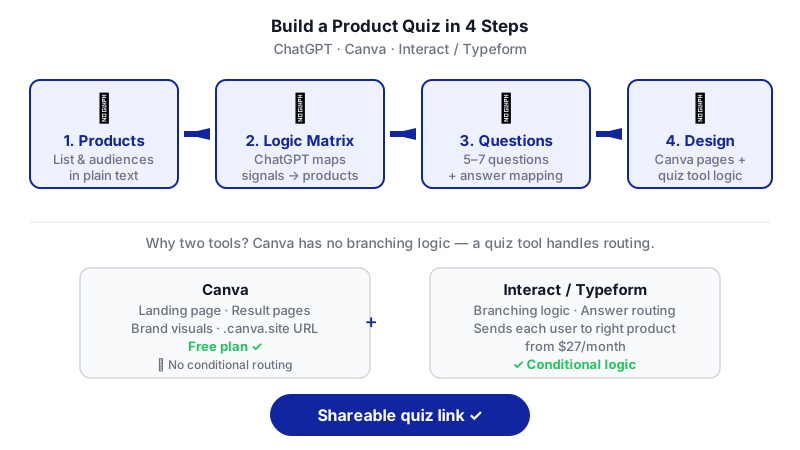
One important heads-up before you start: Canva's built-in Polls & Quizzes feature cannot route people to different results based on their answers. It collects responses but has no branching logic. So the quiz experience itself will live in a dedicated quiz tool (Interact or Typeform), while Canva handles the brand design and the landing/results pages. We'll cover both paths honestly below.
What you need
| Tool | Plan needed | What it does here | Cost |
|---|---|---|---|
| ChatGPT | Free plan is enough | Builds your logic matrix, writes questions, answers, result copy and CTAs | Free |
| Canva | Free plan is enough to publish to a .canva.site URL | Designs the landing page, result pages and all brand visuals; hosts the quiz via Canva Websites | Free (Pro only needed if you want a custom domain) |
| A branching quiz tool | Paid — Interact starts at $27/month; Typeform also supports branching | Runs the actual conditional logic that sends each visitor to the right product | Check the vendor's pricing page |
Why the third tool? Canva's Polls & Quizzes is capped at 10 questions, supports anonymous responses, and as of July 2025 can be embedded inside Canva Websites — but it has no conditional logic. Each Canva design is a static document. If you want a visitor who answers "low energy + poor sleep" to land on your magnesium page and a visitor who answers "bloating + irregular digestion" to land on your probiotic page, you need a tool built for that.
Step-by-step
- List your products and who each one is for. Before you touch any tool, write a plain text list: product name, the problem it solves, and the type of customer it's for. This is the raw material ChatGPT will reason over. Keep it to one or two sentences per product.
- Get ChatGPT to build the logic matrix first — not the questions. This is the step most tutorials skip, and it's where the money is. You want ChatGPT to decide what outcomes exist and what combination of answers leads to each one, before writing any quiz copy. Paste this prompt into ChatGPT:
You are helping me design a product recommendation quiz for a DTC wellness supplement brand. Here are my products and who each is for: [paste your list]. Before writing any quiz questions, do this: (1) Define 4–6 distinct customer outcomes, one per product or product bundle. (2) Propose 5 underlying "signal" dimensions a quiz should measure to separate those outcomes (e.g. primary health goal, sleep quality, stress level, dietary pattern, lifestyle). (3) Build a matrix showing which combination of signals maps to which product outcome. Return the matrix as a table. Do not write quiz questions yet.
Read the matrix carefully. If two outcomes look too similar, tell ChatGPT to merge them. If one product has no clear signal pattern, you may not need it in the quiz at all. - Turn the matrix into questions. Once the matrix is solid, ask ChatGPT to generate questions that cleanly measure each signal:
Great. Now write 5–7 quiz questions that measure the signal dimensions in the matrix above. Each question should have 3–4 answer options. For every answer option, tell me which signal value it maps to, so I can plug this into a branching quiz tool. Keep the tone friendly, conversational, and plain English — we sell to busy adults, not biohackers. End with a single "what's your email" question before results.
You now have the full question tree plus the mapping the quiz tool needs. - Write the result pages and CTAs. Each outcome needs a short result page: a headline, one paragraph explaining why this product fits, 2–3 bullet benefits, and a CTA button. Prompt:
For each of the [N] outcomes, write a result page with: a warm headline that names the person's situation back to them, a 60-word paragraph explaining why [product] fits, three benefit bullets, and a CTA button label. The CTA should offer a first-purchase incentive — propose two options per outcome so I can A/B test.
- Design the visual shell in Canva. In Canva, create a new Website design. Build your intro page (brand logo, a single sentence promising the outcome, a "Start the quiz" button) and one page per result. Use your real product photography. Keep each page simple — one message, one CTA. You're building the wrapper the quiz will sit inside.
- Set up the branching quiz in Interact or Typeform. Create a new quiz, paste in the questions and answer options from ChatGPT, then use the tool's logic/branching editor to map each answer combination to the correct outcome using the matrix from step 2. Add the result copy to each outcome page and link the CTA buttons to the matching product page on your store. Grab the embed code or shareable link when done.
- Connect the quiz to Canva. You have two options. Option A: in the Canva Website editor, embed the third-party quiz on your intro page using Canva's embed element so the whole experience lives on your
.canva.siteURL. Option B (simpler): make the "Start the quiz" button on your Canva intro page link straight to the quiz tool's hosted URL, then have each quiz result CTA link to your store's product page. Option B is faster to ship and easier to debug. - Publish the Canva Website. In the Canva editor, click Publish in the top right. In the Website panel, review and customize the Site address (your free
.canva.siteURL), then open Settings to set the title, enable mobile resize, and add a password if you want to preview privately first. Click Publish. If you later want a branded domain likequiz.yourbrand.com, that requires Canva Pro, Teams, or Education. - Test every path end-to-end. On your phone, run through the quiz four or five times picking different answers each time. Check that every answer combination lands on the correct result page and that every CTA button opens the correct product page. This is the step where small mapping mistakes surface.
- Drive traffic and watch what happens. Link the quiz from your homepage hero, your Instagram bio, your welcome email, and any paid traffic. Give it two weeks before judging. Then go back to ChatGPT with your actual answer data and ask it to suggest which questions to tighten.
A worked example
Let's say you sell five products: a magnesium sleep blend, a daily multivitamin, a probiotic, an adaptogen stress formula, and a greens powder.
Sample input to ChatGPT (step 1):
Magnesium Sleep Blend — for adults who struggle to fall or stay asleep. Daily Multivitamin — for people with inconsistent diets who want baseline coverage. Probiotic — for digestion issues, bloating, post-antibiotics. Adaptogen Stress Formula — for high-stress professionals feeling wired and tired. Greens Powder — for people who don't eat enough vegetables and want more energy.
What good output looks like for the matrix: ChatGPT returns a table with five outcomes (one per product) and five signal dimensions: primary goal, sleep quality, stress level, digestion, and diet quality. The matrix shows, for example, that "primary goal = better sleep" + "sleep quality = poor" routes to magnesium, regardless of other answers — because sleep is the strongest signal. That kind of priority rule is exactly what you want ChatGPT to make explicit.
What good quiz copy looks like: Question 1 reads "What's the one thing you'd most like to feel different in 30 days?" with answers like "Sleep through the night," "Have steadier energy," "Feel calmer under pressure," "Feel lighter in my stomach," "Just cover my nutritional bases." Each answer maps cleanly to a signal value — not two, not three.
What a good result page looks like: Headline: "Sounds like your body is asking for better sleep, not more caffeine." Paragraph explaining why magnesium glycinate helps. Three bullets. CTA: "Try Sleep Blend — 20% off your first bottle."
Limits and gotchas
- Canva's native Polls & Quizzes won't do this job. It's capped at 10 questions, collects responses, and now embeds inside Canva Websites — but it has no conditional logic. Don't try to force it.
- Canva's "Generate quiz" (Magic Write) doesn't add branching either. It drafts questions from your design content. Useful for ideation, not for logic.
- ChatGPT Free limits. About 12 pages of text per prompt (fine for this task) and roughly 3 file uploads per day. You won't hit the ceiling drafting a quiz.
- Human review is non-negotiable. Read every ChatGPT-written line out loud before it ships. Wellness copy especially — avoid any wording that could be read as a medical claim. Have someone who isn't you take the quiz cold.
- Data and privacy. You're collecting email addresses and health-adjacent answers. Make sure your quiz tool's privacy policy and your own site's policy cover this, and that you have consent before adding people to marketing emails.
- Static exports kill interactivity. If you download your Canva design as PDF or image, every link and form stops working. Share the Canva Website URL, not a file.
When not to use AI for this, and honest alternatives
If you only sell one or two products, skip the quiz — write a stronger product page instead. If your product selection depends on genuinely medical factors (allergens, medications, pregnancy), don't let a quiz be the final word; route those visitors to a human or a licensed practitioner. And if you need the quiz deeply wired into your Shopify catalog, inventory and customer profile, an off-the-shelf tool will hit limits fast; at that point a native Shopify app like Octane AI or a custom build makes more sense.
Frequently asked questions
Can I really not do the branching in Canva?
Not with the drag-and-drop editor. Canva's Polls & Quizzes has no conditional logic. The one exception is Canva Code, an AI-assisted coding environment that can publish a live site with real logic — but that requires coding comfort or carefully guided AI code generation, which is a different tutorial.
Do I need the paid ChatGPT plan?
No. The Free plan handles unlimited text chat and the context window (~12 pages per prompt) is more than enough to draft matrix, questions and result copy. Paid plans are useful if you want longer context for big projects, not for this.
How many questions should the quiz have?
Five to seven, plus an email capture at the end. Fewer than five and you can't reliably separate outcomes; more than seven and completion rates drop. The matrix you build in step 2 tells you the minimum you actually need.
Can I use a custom domain like quiz.mybrand.com?
Yes, but connecting a custom domain to a Canva Website requires Canva Pro, Teams, or Education. On Free you get a .canva.site URL, which is perfectly usable to launch and test.
What if ChatGPT's recommendations don't match my product expertise?
Override it. The matrix is a draft, not an answer. Tell ChatGPT "for anyone who selects high stress, always route to the adaptogen formula, even if they also mention sleep" and have it rebuild. You know your products; use ChatGPT for structure and speed, not for final judgment.
If your quiz starts outgrowing stitched-together tools — deeper Shopify integration, logged-in customer data, dynamic inventory-aware recommendations — a custom build is the next step, and it's something CodeNicely helps DTC teams with.
Sources & further reading
- Add forms and quizzes – Canva Help Center
- Publish websites to a free domain – Canva Help Center
- Publish Canva websites – Canva Help Center
- What's new: 10 features to transform your creative workflow (July 2025) – Canva Newsroom
- What's new in Canva Websites – Canva Newsroom
- Microsite: Definition, Examples & Templates – Canva
- Publish and manage Canva Code websites – Canva Help Center
- ChatGPT Plans and Pricing – OpenAI (official)
- How to Make a Quiz on Canva (Templates & Designs) – SimpleQuizMaker
- 12 Best Online Quiz Makers (2026) – EmailToolTester
Get one practical guide a week
Costs, AI tools, partner selection — written for people who make the decision. No spam, unsubscribe anytime.
Thanks — you're on the list. One practical guide a week, nothing else.
That didn't work — please check the email address and try again.
Building something in E-commerce?
CodeNicely partners with founders and tech teams to ship AI-native products that move metrics. Tell us about the problem you're solving.
Talk to our team Book a 30-min call