
Build a Product Bundle Strategy with ChatGPT and Excel

 Published by CodeNicely, the product studio founded by Meghal Agrawal and Ujjwal Agrawal in 2017
For: An e-commerce manager at a 15-person home goods brand who owns 200+ SKUs, sees average order value flatlining, and has no data analyst to mine purchase patterns
In this guide
By the end of this tutorial you'll have a short, prioritized list of 5–10 product bundle offers — each with a suggested discount, a one-line sales angle, and a projected margin impact — ready to pitch to your team or load into your store. Budget around 60–90 minutes the first time, and about 20 minutes once you've done it once.
Last verified: November 2026, against the tools' own documentation. AI tools change often — if a step no longer matches, check the sources at the end.
Who this is for, and what you'll get
You run e-commerce at a small home goods brand. You have 200+ SKUs, average order value is flat, and nobody on the team has the time to dig through sales exports looking for patterns. You suspect bundling could help, but you don't want to guess.
What you'll walk away with:
- A ranked table of 5–10 candidate bundles tied to real co-purchase patterns in your data.
- A suggested discount for each bundle that protects margin.
- A one-sentence sales angle you can hand to whoever writes your product copy.
- A simple Excel sheet to sanity-check the margin math before anything goes live.
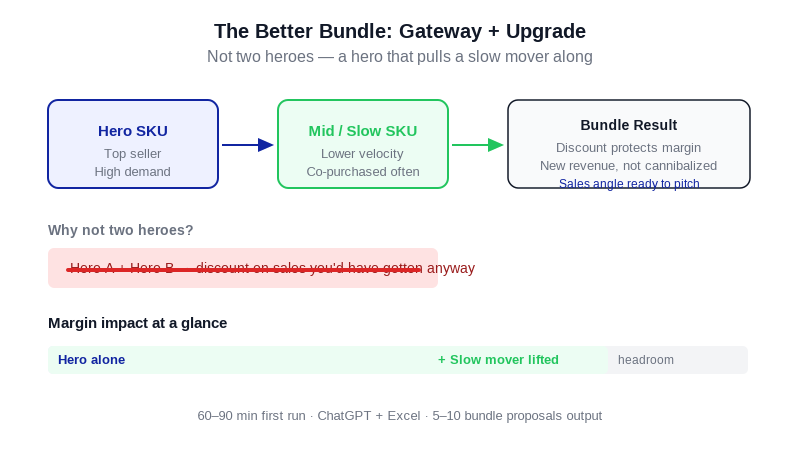
The thing most "bundle your best-sellers" advice gets wrong: bundling two hero SKUs together usually cannibalizes sales you'd have gotten anyway. The better move is "gateway + upgrade" pairings — a hero product that pulls a mid-tier or slow-moving SKU along with it. That's what this workflow is built to find.
What you need
| Tool | Plan needed | Cost | Why |
|---|---|---|---|
| ChatGPT | Free works; Plus is easier | Free $0/mo; Plus $20/mo; Pro from $100/mo (per chatgpt.com/pricing) | Data analysis on your sales CSV. Free users are capped at 3 file uploads per day, so Plus is more comfortable if you'll iterate. |
| Microsoft Excel | Any current Microsoft 365 (Windows, Mac, or Web) | Standard Microsoft 365 subscription | Final margin math and a clean .xlsx you can share. ChatGPT only exports CSV tables and PNG charts, not .xlsx. |
You'll also need one sales export covering the last 6–12 months, as a .csv or .xlsx file under about 50 MB (the practical spreadsheet cap in ChatGPT). Minimum columns: order ID, SKU, product name, quantity, unit price, unit cost (or margin). If you have category, add it.
Step-by-step
-
Pull a clean sales export. Go into your store backend (Shopify, WooCommerce, whatever you use) and export line-item order history for the last 6–12 months. The reason: bundles need co-purchase evidence, and you can't build that from a monthly revenue summary — you need one row per SKU per order.
Before uploading, open the file in Excel and delete columns you don't need (customer names, addresses, tax lines). That keeps the file smaller and removes personal data.
-
Add a unit cost column if it's missing. ChatGPT can't pull cost data from your store — its analysis environment can't make outside web requests. So paste in a
unit_costcolumn from whatever you use to track COGS. Even rough averages per SKU are fine for a first pass. -
Start a new ChatGPT chat and upload the file. Attach the .csv or .xlsx. Supported file types for data analysis include .xls, .xlsx, and .csv. If you're on Free, remember you get 3 uploads per day, so treat each one carefully.
-
Ask ChatGPT to profile the data first. Don't jump to bundles. You want to catch column issues before they poison the analysis.
You are helping me analyze a home goods e-commerce sales export. The file is attached. First, tell me: (1) how many unique orders, unique SKUs, and the date range; (2) column names and what each one appears to contain; (3) any obvious data quality issues like missing values, negative quantities, or refund lines I should exclude before analysis. Do not do any bundle analysis yet.
Read the response. If it flags refund rows or test orders, tell it which rows to exclude.
-
Ask for co-purchase patterns, not best-seller lists. This is the step that avoids the classic mistake.
Using the attached order data, find SKU pairs that are frequently bought together in the same order. For each pair, show: SKU A, SKU B, number of orders containing both, the total units of each sold overall, and the "lift" — how much more often they appear together than you'd expect by chance. Return the top 30 pairs as a table. Exclude pairs where both SKUs are already in the top 10 best-sellers by revenue; I want pairings where at least one SKU is a mid-tier or slow mover.
Why the exclusion: pairing two heroes just gives a discount to sales you were going to get anyway. You want a hero pulling something else off the shelf.
-
Download the pairs table. When ChatGPT generates a table, there's a download button at the top-right corner of the table; the file comes down as CSV. Save it somewhere you can find it.
-
Ask ChatGPT to turn the top pairs into bundle proposals. Now you're asking it to think like a merchandiser, grounded in the data it just produced.
From the co-purchase pairs above, propose 8 bundle offers. For each bundle, give me: (1) the SKUs included (2 or 3 products), (2) a one-line sales angle written for a home goods shopper (why these go together), (3) a suggested discount percentage between 5% and 20% off the combined retail price, (4) the reasoning for the discount size — smaller discount if the "upgrade" SKU has healthy margin and strong lift, larger discount if we need to move the mid-tier item. Return as a table with columns: Bundle Name, SKUs, Sales Angle, Suggested Discount %, Reasoning.
-
Download that table too, then bring both into Excel. ChatGPT does not export .xlsx from data analysis. Open Excel, go to the Data tab, and import each CSV — or just open the CSVs and copy-paste into a fresh workbook. Save as .xlsx.
-
Add the margin math in Excel. ChatGPT's suggested discount is a starting point; you need to see the margin impact in your own sheet. For each bundle row, add columns for:
- Combined retail price (sum of unit prices)
- Combined unit cost (sum of unit costs)
- Bundle price (retail × (1 − discount%))
- Bundle margin $ (bundle price − combined cost)
- Bundle margin % (bundle margin / bundle price)
- Margin vs. selling items separately (bundle margin − (combined retail − combined cost))
Apply conditional formatting to the margin % column — red below your floor (say 25%), green above your target (say 40%). Now you can see at a glance which bundles are worth running.
-
Cut the list to 5–10 and rank it. Sort by bundle margin %, then by co-purchase lift from step 5. Drop any bundle where the margin dips below your floor or where the "upgrade" SKU is something you're trying to discontinue. What's left is your pitch.
A worked example
Say you sell kitchen and home textiles. Your sales export shows 18,000 line items across 7,200 orders over the last nine months. You upload it and ask for co-purchase pairs excluding hero-on-hero combinations.

ChatGPT comes back with pairs like:
- Linen tea towel 4-pack (hero, 1,400 units sold) + beeswax wrap set (mid-tier, 180 units sold) — appear together in 62 orders, lift of 4.1×.
- Ceramic mixing bowl (hero) + wooden spurtle (slow mover, 44 units sold) — appear together in 29 orders, lift of 6.8×.
You ask for 8 bundle proposals. A good output row looks like this:
Bundle Name: Everyday Baking Duo
SKUs: Ceramic mixing bowl + wooden spurtle
Sales Angle: "The bowl you'll reach for every weekend, plus the stirring tool pros swear by."
Suggested Discount: 10%
Reasoning: High lift (6.8×) means the pairing is already resonating; the spurtle is a slow mover with 70% margin, so 10% off still leaves the bundle margin healthy.
In Excel you drop in costs: bowl retails $48 (cost $19), spurtle retails $14 (cost $4). Combined retail $62, bundle price at 10% off $55.80, combined cost $23, bundle margin $32.80, margin % 58.8%. Conditional formatting turns that cell green. Keep it.
Limits and gotchas
- ChatGPT can't see your live store. Its Python environment can't make outside web requests, so pricing, inventory and cost all come from the CSV you upload. If prices change weekly, re-upload before each planning cycle.
- File size. 512 MB is the hard upload cap, but spreadsheets are practically limited to around 50 MB. If your export is bigger, trim date range or columns first.
- Upload limits. Free plan: 3 file uploads per day. Plus plan: up to 80 files per 3-hour window, which can be lowered during peak hours.
- No .xlsx export from ChatGPT. Tables download as CSV, charts download as PNG. You rebuild the formatted workbook in Excel yourself.
- Human check required on angles. ChatGPT's sales angles are a starting draft. Read every one — it doesn't know your brand voice, and it doesn't know if two products actually make sense together in a home (a cast iron skillet and a silk pillowcase have co-purchase lift because the same customer buys both, not because they belong in a bundle).
- Privacy. Strip customer PII from the export before uploading. You only need SKU, quantity, price, cost and order ID — not names, emails or addresses.
- Correlation isn't causation. Lift tells you two products tend to co-occur. It doesn't guarantee a bundle will convert. Treat the output as hypotheses, test two or three live, and keep what works.
When not to use AI for this, and honest alternatives
Skip this workflow if:
- You have fewer than ~50 SKUs. You already know your catalog. Sit down for an hour with a notebook and the best-seller report.
- Your platform already does this. Shopify (with apps like Frequently Bought Together), BigCommerce and Klaviyo all offer co-purchase or recommendation reports. If you're paying for one, use it first.
- Your margins are already thin. If most SKUs run under 30% margin, any discount will eat the bundle alive. Fix pricing before fixing assortment.
- You need real-time recommendations on the storefront. That's a product-recommendation engine, not a one-shot planning exercise.
Frequently Asked Questions
Can I do this on the free ChatGPT plan?
Yes. File uploads and data analysis are available on the Free plan. The main constraint is 3 file uploads per day, so plan your uploads: one for the sales export, and keep the other two as a buffer for re-uploads if you need to fix the file. If you'll iterate heavily, Plus at $20/month gives you much more room.
Why can't ChatGPT just save the result as an Excel file?
ChatGPT's data analysis exports tables as CSV and charts as PNG — it doesn't produce .xlsx directly. Excel opens CSV files natively, so the workflow is: download the CSV, open or import it in Excel, then save as .xlsx. It's one extra click, not a blocker.
How often should I rebuild the bundle list?
Quarterly is a reasonable cadence for most home goods brands, or whenever you launch a wave of new products. Seasonal businesses (holiday-heavy catalogs) should run it before each major season. The analysis itself takes about 20 minutes once you've done it before.
What if ChatGPT suggests a bundle that makes no sense?
It will happen — co-purchase data can pair things that share a buyer but not a use case. Just delete those rows and keep the ones that pass the sniff test. The point of the workflow is to surface candidates faster than you could manually, not to replace your judgment.
Is my sales data safe to upload?
Review your organization's AI usage policy and OpenAI's current data handling terms before uploading. At minimum, strip customer names, emails, addresses and payment details from the file first — the analysis only needs SKU, quantity, price, cost and order ID.
If this workflow starts feeling cramped — you want co-purchase analysis running automatically on live store data, or bundle recommendations pushed back into your storefront — that's the point where a small custom build (which CodeNicely does) tends to pay for itself.
Sources & further reading
- ChatGPT Plans and Pricing — chatgpt.com/pricing (official)
- Data analysis with ChatGPT — OpenAI Help Center
- Extracting Insights with ChatGPT Data Analysis — OpenAI Help Center
- ChatGPT Release Notes — OpenAI Help Center (file upload limits, 20-file cap)
- ChatGPT Business Overview — OpenAI Help Center (Standard/Premium pricing)
- File formats that are supported in Excel — Microsoft Support
- File formats supported in Excel for Mac — Microsoft Support
- ChatGPT File Upload Limits: 512 MB a File, 20 per Message, 50 MB for Spreadsheets (2026) — fastero.com
- ChatGPT Free plan 2026: GPT-5.6 Luna, unlimited chats, 3 uploads a day — datastudios.org
- ChatGPT for Data Analysis: How Leaders Turn Spreadsheets Into Insights (2026 Guide)
Get one practical guide a week
Costs, AI tools, partner selection — written for people who make the decision. No spam, unsubscribe anytime.
Thanks — you're on the list. One practical guide a week, nothing else.
That didn't work — please check the email address and try again.
Building something in E-commerce?
CodeNicely partners with founders and tech teams to ship AI-native products that move metrics. Tell us about the problem you're solving.
Talk to our team Book a 30-min call