Turn Angry 1-Star Reviews into Win-Back Emails with ChatGPT

 Published by CodeNicely, the product studio founded by Meghal Agrawal and Ujjwal Agrawal in 2017
For: Customer experience manager at a 15-person e-commerce brand who personally monitors Google and Trustpilot reviews but spends 2–3 hours a week drafting individual responses and rarely has time to follow up with a recovery offer
In this guide
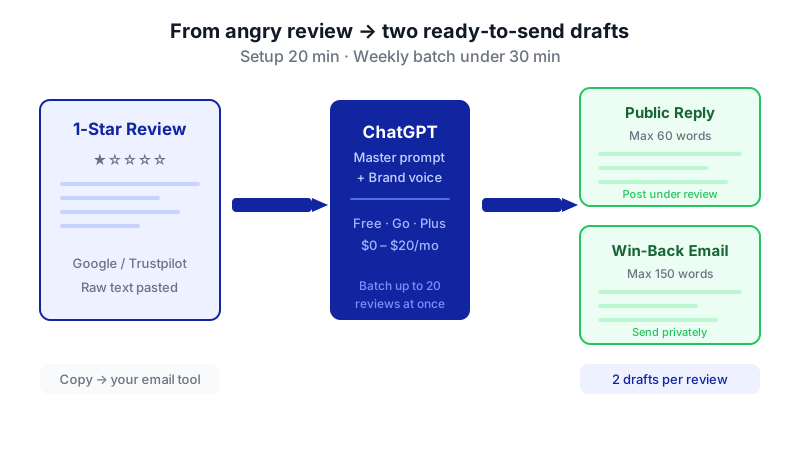
By the end of this tutorial you will have a repeatable ChatGPT workflow that turns a weekly batch of up to 20 negative Google and Trustpilot reviews into two things per review: a short public reply and a personalized private win-back email with a concrete remedy. Setup takes about 20 minutes once; each weekly batch after that takes under 30 minutes.
Last verified: November 2026, against the tools' own documentation. AI tools change often — if a step no longer matches, check the sources at the end.
Who this is for, and what you'll get
This is for customer experience managers, founders and support leads at small e-commerce brands who already monitor reviews but can't keep up with individualized follow-up. If you're currently writing one-off replies and skipping the recovery offer because there's no time, this is written for you.
You'll leave with:
- A saved brand-voice profile inside ChatGPT so every draft sounds like you.
- A reusable master prompt that takes raw review text and produces a public reply + a private win-back email for each customer.
- A simple weekly routine you can run in one sitting.
What you need
You only need one tool. The Free plan works; a paid plan is more comfortable once you're processing 15–20 reviews at a time.

| Tool | Plan | Cost | Why this plan |
|---|---|---|---|
| ChatGPT | Free | $0/month | Unlimited text conversations; Custom Instructions available; 27K-token context (tight for 20 long reviews in one go). |
| ChatGPT | Go | $8/month | Ad-free, 54K-token context, roomier Custom Instructions at 5,000 characters. |
| ChatGPT | Plus | $20/month | 54K context, 5,000-char Custom Instructions, and higher reasoning-model limits for nuanced replies. |
Prices are US pricing as of November 2026. If you need team access, Business seats are $25/user/month monthly or $20/user/month annually with a two-seat minimum. For anything else, check the current plan on OpenAI's pricing page.
One caveat up front: ChatGPT does not export directly to email clients, help desks or CRMs, and there is no bulk send. You will copy each finished email into your sending tool (Gmail, Klaviyo, Gorgias, whatever you use). The time saving is in the drafting, not the sending.
Step-by-step
Write down your brand voice in three lines. Before you open ChatGPT, jot down: (a) three adjectives for how you sound (e.g. "warm, direct, slightly playful"); (b) one phrase you always use and one you never use; (c) your standard return/refund policy in one sentence. This is the raw material for Custom Instructions.
Open Custom Instructions in ChatGPT. Click your profile icon, then Settings → Personalization → Custom Instructions. You'll see two fields. These apply to every new chat automatically, so you only configure them once.
On Free and Go you have 1,500 characters per field; on Plus, Pro, Business, Enterprise and Education you have 5,000. That is plenty for a brand voice brief.
Fill in "What would you like ChatGPT to know about you?" This is the context field. Paste something like:
I run customer experience at [Brand], a 15-person e-commerce company that sells [product category] to [customer type]. We get roughly 10–20 negative reviews a week across Google and Trustpilot. Our return policy: free returns within 30 days, refund issued within 5 business days of receipt. Our typical remedies for unhappy customers are: (1) full refund, (2) free replacement, (3) 20% discount code for their next order. I'm the one who signs off emails, first name [Your Name].
Fill in "How would you like ChatGPT to respond?" This is the voice field. Example:
When I ask you to write customer replies, use this voice: warm, direct, slightly conversational, never corporate. Short sentences. Use the customer's first name once. Never say "We apologize for any inconvenience" or "Your satisfaction is our top priority." Do say "I'm sorry this happened" and "Here's what I'd like to do." Always acknowledge the specific complaint in the first sentence. Public replies should be max 60 words. Private emails should be max 150 words and end with a clear next step. Sign emails with my first name only.
Save. From now on, every chat inherits this.
Collect the week's negative reviews into one document. Open a plain text or Google Doc and for each review copy in: reviewer name (or first name), star rating, platform, date, review text, order number if you have it, and the product purchased. Keep each review clearly separated. A simple format works best.
Open a new ChatGPT chat and paste the master prompt. Use this prompt, then paste your reviews underneath. If you're on Free and pasting 20 long reviews, do two batches of 10 to stay inside the 27K-token window.
I'm going to paste a batch of negative reviews below. For each review, produce two things:
1) PUBLIC REPLY (max 60 words): to be posted under the review on Google or Trustpilot. Acknowledge the specific complaint in the first sentence. Do not offer a specific remedy publicly — instead, invite them to continue the conversation by email.
2) PRIVATE WIN-BACK EMAIL (max 150 words): Subject line + body. Address the customer by first name. Reference their specific complaint and, if available, their order and product. Offer ONE concrete remedy chosen from: full refund, free replacement, or 20% discount code. Pick the remedy that best matches the complaint (e.g. damaged item → replacement; slow delivery → discount; wrong item → refund + replacement). End with a clear next step and my first name.
Format the output as a numbered list matching the review order. Label each section PUBLIC REPLY and EMAIL clearly. Do not invent facts I haven't given you — if the review is vague, keep the reply general and ask a clarifying question in the email.
Here are the reviews:
[paste reviews]Read every draft before sending. ChatGPT will occasionally misidentify the complaint, pick the wrong remedy, or soften language in a way that doesn't match your voice. Scan each one for: correct complaint identified, right remedy for the situation, no invented facts (order numbers, delivery dates, product variants), tone matches your brand.
Ask for targeted rewrites inline. You don't need to start over. Just reply in the same chat:
For review #4, the complaint was about the smell of the product, not the packaging. Rewrite the email and offer a full refund instead of a discount.
Copy outputs into your sending tools. Paste public replies into Google Business Profile or Trustpilot. Paste the private emails into your email platform or help desk. If you tag customers in your CRM, add a "win-back sent" tag so you can measure response rates later.
Set a 30-minute calendar block weekly. Same day, same time. Treat it like inventory. Over a quarter, this is the difference between replying to 15 customers a week and recovering a meaningful share of them.
A worked example
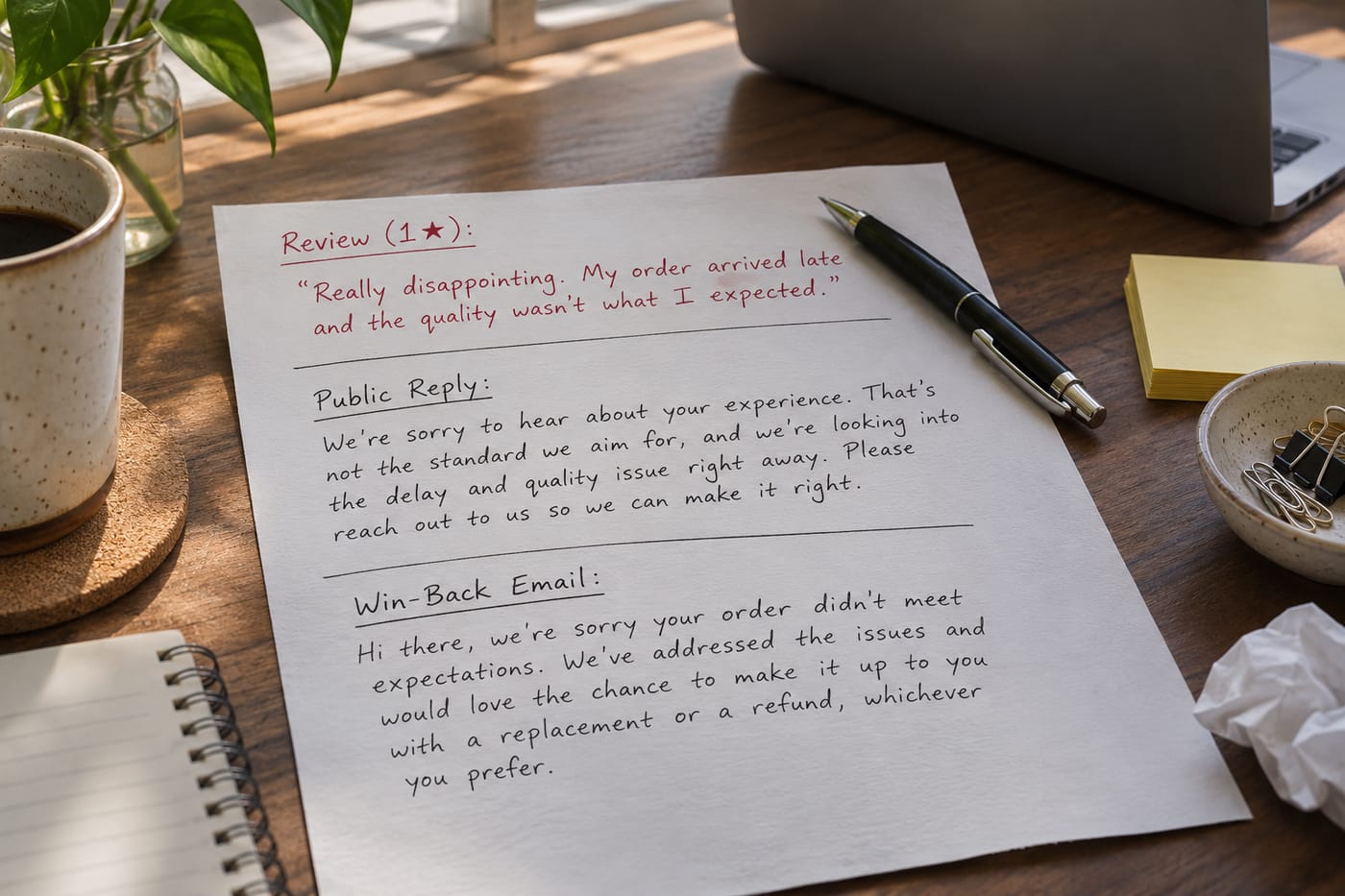
Say you sell scented candles. Here's one raw review from your batch:
Reviewer: Priya S.
Rating: 1 star
Platform: Trustpilot
Order: #28471
Product: Fig & Cedar candle, 8oz
Review: "Smelled nothing like the description. Barely any throw even in a small room. Waste of £32."
With the Custom Instructions and master prompt above, a good ChatGPT output looks like:
PUBLIC REPLY (54 words):
Priya, I'm sorry the Fig & Cedar wasn't what you expected — scent throw should fill a small room easily, so something isn't right here. I'd like to make this good. I've sent you a private email so we can sort it out directly. — [Your Name]
Subject: About your Fig & Cedar candle, Priya
Hi Priya,
I saw your review about order #28471 and I'm genuinely sorry. The Fig & Cedar should have a strong, warm throw — if it barely scented your room, the batch may be off or the wick wasn't burning properly on first light.
Here's what I'd like to do: a full refund of £32 back to your original payment method, processed today. You're welcome to keep the candle. If you'd ever want to try a different scent on us down the line, just reply to this email.
Thanks for telling us — it's the only way we catch issues like this.
[Your Name]
That's the shape to aim for: specific complaint named, real remedy offered, human sign-off, no corporate filler.
Limits and gotchas
- Context window. On Free, the Instant model holds about 27K tokens. Twenty long reviews plus the prompt can crowd that. Go/Plus/Business get 54K; Pro/Enterprise get 128K. If outputs start getting shorter or ChatGPT "forgets" earlier reviews, split into smaller batches.
- Custom Instructions are global. Only one active set per account. If you also use ChatGPT for unrelated work and don't want the brand-voice rules applied there, use ChatGPT Projects or a Custom GPT for this workflow instead — each Project can hold its own instructions.
- File uploads are limited. If you'd rather upload your policy docs than paste them, Free allows 3 uploads per day; paid plans allow around 80 every 3 hours. Projects cap files at 5 (Free), 25 (Go/Plus), or 40 (Pro/Business/Enterprise/Edu), with 10 files uploadable at once and a 512 MB per-file limit.
- No native export or bulk send. Every email gets copy-pasted into your sending tool. Budget 5–10 minutes for this at the end of each batch.
- Hallucinated facts. ChatGPT will sometimes invent order details, delivery dates, or product variants if your review is vague. The prompt tells it not to, but always skim before sending.
- Privacy. You're pasting customer names and order numbers into ChatGPT. Check your company's data policy; many teams strip or pseudonymize last names and only keep order numbers when needed. For sensitive categories, a Business or Enterprise plan with stricter data controls is worth the cost.
- Ads on Free. The Free plan shows ads in the US and 30+ other countries. Paid plans are ad-free if that bothers you while working.
When not to use AI for this, and honest alternatives
Skip ChatGPT and write by hand when:
- The review alleges harm, illness, or legal risk. Those need a human reply, usually with input from whoever handles compliance.
- The customer is a repeat high-value account. They'll recognize a templated voice. Personalize fully.
- The complaint is about a known, ongoing incident (a shipping outage, a recall). Use a prepared statement, not a fresh draft each time.
Alternatives worth knowing: most help desks (Gorgias, Zendesk, Front) have built-in AI reply suggestions that pull from your ticket history and connect directly to the customer record — less flexible on voice than ChatGPT, but no copy-pasting. Review-management platforms like Trustpilot's own AI reply feature handle public replies but not private win-back emails. If you ever outgrow this manual workflow and want the review → draft → send loop fully automated against your order data, a custom build (which is the kind of thing CodeNicely does) is an option.
Frequently Asked Questions
Do I need the paid plan to make this work?
No. The Free plan can draft every email and the Custom Instructions feature is included. The reasons to upgrade are practical: more room in Custom Instructions (5,000 vs 1,500 characters), a bigger context window for larger batches, no ads, and better reasoning models for nuanced complaints. Try Free for two weeks, then decide.
How do I keep ChatGPT from sounding generic?
The Custom Instructions do most of the work, but be specific in them: list phrases you never use, phrases you always use, and give one concrete example of a reply you like. If a draft still sounds flat, paste it back and say "rewrite this in the voice of the earlier example I gave you — shorter, warmer, less corporate."
Can ChatGPT read reviews directly from Google or Trustpilot?
Not reliably, and not as a built-in feature. The dependable workflow is to copy reviews into a document yourself and paste them into the chat. If you want full automation from review platform to sent email, that's a custom integration, not an off-the-shelf ChatGPT feature.
What about customers who respond to the win-back email?
Handle those replies personally. The point of the email is to open a one-to-one conversation; once they reply, you're in a normal support thread. You can still use ChatGPT to draft responses, but at that point you're having a real exchange and speed of thought matters more than template polish.
How do I measure if this is actually working?
Tag every customer who gets a win-back email in your CRM or spreadsheet. Track three numbers over 90 days: reply rate to the email, repurchase rate within 60 days, and whether the public review gets updated or removed. Even modest recovery on 1-star reviewers is usually worth the 30 minutes a week.
Sources & further reading
- Projects in ChatGPT — OpenAI Help Center
- ChatGPT Pricing November 2026: Plans, API Cost, and Is It Worth It? — GeoToolbox
- ChatGPT Pricing in November 2026: Free vs. Go vs. Plus vs. Pro — Tech2Geek
- ChatGPT Plans & Prices: Free, Plus $20, Pro 500 $500 — AIPricing.guru
- Best Custom Instructions for ChatGPT (Ultimate Guide for 2026) — GodOfPrompt
- ChatGPT Custom Instructions: 5,000-Char Guide — TechJournal
- Custom Instructions Guide: ChatGPT, Claude & Gemini (2026) — FindSkill
- ChatGPT Custom Instructions: What to Actually Put There — Prompt Architects
- ChatGPT File Upload Limits 2026: Size, Count and Plans — AI Toolbox
- ChatGPT Projects File Limit: Plan Caps and Search Workarounds — Fast.io
Get one practical guide a week
Costs, AI tools, partner selection — written for people who make the decision. No spam, unsubscribe anytime.
Thanks — you're on the list. One practical guide a week, nothing else.
That didn't work — please check the email address and try again.
Building something in Customer Support?
CodeNicely partners with founders and tech teams to ship AI-native products that move metrics. Tell us about the problem you're solving.
Talk to our team Book a 30-min call