Turn a Logo and Color Palette into a Full Social Media Kit with ChatGPT and Canva
 Published by CodeNicely, the product studio founded by Meghal Agrawal and Ujjwal Agrawal in 2017
For: A marketing coordinator at a 15-person e-commerce brand who inherited a logo and a rough style guide but has no in-house designer and needs consistent branded assets across every social channel by end of week
In this guide
By the end of this tutorial you will have a complete, on-brand social media kit — profile pictures, cover images, feed post templates and Story frames — correctly sized and exported for Instagram, LinkedIn and Facebook, all built from a single logo file and your brand colors. Budget about three to four focused hours; less if your logo is already clean.
Last verified: November 2026, against the tools' own documentation. AI tools change often — if a step no longer matches, check the sources at the end.
Who this is for, and what you'll get
This is written for a marketing coordinator at a small e-commerce brand who inherited a logo and a loose style guide and now needs consistent branded graphics across every channel, fast, without hiring a designer.
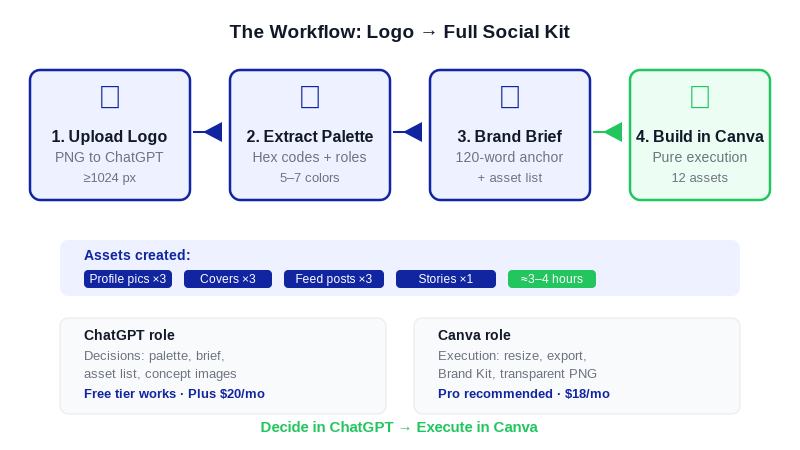
You will finish with:
- A documented hex-code palette and a one-paragraph brand brief you can reuse forever.
- A named asset list with the correct 2026 pixel dimensions for each platform.
- A Canva Brand Kit (or Brand System) holding your logo, colors and fonts.
- Profile pictures, cover/banner images, feed post templates and Story frames for Instagram, LinkedIn and Facebook, exported as PNGs ready to upload.
The trick most tutorials miss: do not open Canva first. Use ChatGPT to make every design decision up front, so Canva becomes pure execution.
What you need
| Tool | Plan needed | Cost | Why |
|---|---|---|---|
| ChatGPT | Free works; Plus is smoother | Plus is $20/month | Extracts your palette, writes the brief, generates the asset list and sample imagery. Free tier image generation is limited; Plus has higher (unpublished) limits. |
| Canva | Pro strongly recommended | Pro is $18/month or $144/year | Pro unlocks the full Brand Kit, Magic Resize, transparent PNG export and SVG export — all core to this workflow. Free plan works but you will manually rebuild each size. |
| Your logo file | PNG, JPEG or WebP, under 20 MB | — | ChatGPT cannot read SVG or EPS in chat. If your logo is vector only, open it in any design tool and export a high-resolution PNG first. |
Step-by-step
Prepare your logo as a PNG. ChatGPT accepts PNG, JPEG, WebP and non-animated GIF uploads, up to 20 MB each. If all you have is an SVG or EPS, get someone to export a high-resolution PNG (at least 1024 px on the long edge) with a transparent background. This is the one step you cannot skip.
Extract a precise hex-code palette with ChatGPT. Open a new chat, upload the logo PNG and ask for the colors. The point here is to turn a vague "our brand is navy and gold" into exact hex values you can paste into Canva.
Attached is our company logo. Please identify every distinct color and return a palette as a markdown table with: color name, hex code, RGB values, and a suggested role (primary, secondary, accent, neutral, background). Suggest one or two additional complementary neutrals that would work for text and backgrounds. Keep the total palette to 5–7 colors.
Save the output. This is your source of truth from now on.
Write a one-paragraph brand brief. This paragraph will anchor every creative decision and every future prompt. Ask ChatGPT:
Based on this logo and palette, write a one-paragraph brand brief (about 120 words) covering: brand personality in three adjectives, tone of voice, visual style keywords (e.g. minimal, editorial, playful), two or three typography directions that pair well with the logo, and what to avoid. The brand is a 15-person e-commerce company selling [your category]. Audience is [your audience].
Fill in the brackets honestly. Paste the paragraph into a notes doc — you will reuse it constantly.
Generate your asset list with exact pixel dimensions. Rather than hunt through platform help pages, have ChatGPT compile the list from the current 2026 specs you already know:
Create a table of every asset I need for a complete social media kit on Instagram, LinkedIn and Facebook. Columns: asset name, platform, pixel dimensions, aspect ratio, and purpose. Include: profile picture, cover/banner photo, feed post template, and Story/vertical template for each platform where applicable. Use these dimensions: Instagram feed 1080×1350 (4:5 preferred) and 1080×1080 (square), Instagram Stories 1080×1920, Facebook feed post 1200×630, LinkedIn feed post 1200×627, LinkedIn cover 1584×396. Suggest standard sizes for profile pictures.
You now have a checklist. Print it or keep it open in a tab.
(Optional) Generate on-brand concept imagery in ChatGPT. If you need lifestyle or abstract graphics to layer into posts, generate them now. Be clear-eyed: ChatGPT's image model outputs only three canvas sizes — 1024×1024 square, 1536×1024 landscape or 1024×1536 portrait — and only as PNG or JPEG. You cannot ask it for 1200×630. These are concepts you will crop or layer in Canva, not finished assets.
Using the brand brief above and this palette [paste hex codes], generate a 1024×1024 square background graphic in a [minimal / editorial / etc.] style suitable for an Instagram post. Use the palette colors only. Leave the center area relatively empty so text can be overlaid later. Do not include any text in the image.
Set up your Canva Brand Kit (Brand System). In Canva, go to the main menu and open Brand (now called Brand System after Canva's October 2025 update). Upload your logo PNG, paste in every hex code from step 2, and upload or select the fonts suggested in your brief. On the free plan you get 1 kit and only 3 color slots, with no custom font upload — if your palette has more than 3 colors or you need a specific font, this is where Canva Pro pays for itself. Pro supports up to 5 full kits with unlimited colors and custom fonts.
Build one "hero" template at the primary size. Create a new design at 1080×1350 px (Instagram feed, 4:5 portrait — currently the preferred Instagram size). Apply your Brand Kit so the logo, colors and fonts are one click away. Design one strong post template: logo placement, headline style, subhead style, background treatment. Do not design ten variations yet. Nail one.
Magic Resize that hero into every other size. With your 1080×1350 design open, use Canva's Magic Resize (sometimes labelled Magic Switch) to generate copies at 1080×1080 (Instagram square), 1080×1920 (Instagram Story), 1200×630 (Facebook feed), and 1200×627 (LinkedIn feed) in a single action. This is Pro only. On the free plan you must rebuild each size manually by creating new designs and copying elements across.
Magic Resize is not magic — it rescales, it does not recompose. Open each resized copy and tidy up: nudge the logo, resize the headline, re-center the graphic. Budget 5–10 minutes per size.
Build the cover and profile assets. Create separate designs at 1584×396 (LinkedIn cover) and your chosen Facebook cover size, plus a 1080×1080 profile picture that still reads clearly when cropped to a circle. Profile pictures are where a lot of logos fall apart — if yours has a wordmark, consider using just the icon.
Export everything. In each design, click
Sharein the top-right, thenDownload, choose PNG, and download. If you need a transparent background (common for profile icons and logo overlays), check the Transparent background option — this requires Canva Pro. If you ever need a scalable version of the logo for print or third-party platforms, export as SVG from the same menu (also Pro).File everything in one folder, named by platform. Structure:
/brand-kit/instagram/,/brand-kit/linkedin/,/brand-kit/facebook/. Future you, and anyone you hand this off to, will be grateful.
A worked example
Say you work for a brand called Fern & Oak, selling ceramic homewares. You have a logo PNG with a leaf mark in deep green and a wordmark in off-black.
Palette from ChatGPT (step 2 output):
- Forest — #2F4A3A — primary
- Ink — #1C1C1A — primary text
- Bone — #F2EDE4 — background
- Clay — #C98A6B — accent
- Sage — #A8B89E — secondary
Brief (step 3): "Fern & Oak is grounded, considered and quietly warm. Tone is calm, confident, lightly poetic — never shouty or discount-driven. Visual style: editorial, generous white space, natural textures, botanical motifs used sparingly. Typography: a refined serif (think Canela, Lora) for headlines paired with a clean humanist sans (Inter, Work Sans) for body. Avoid gradients, drop shadows and stock-looking photography."
Hero template (step 7): 1080×1350 portrait. Bone background. Serif headline top-left in Ink. Small leaf mark bottom-right in Forest. Subhead in Work Sans. One line of body copy, generous margins.
Good output: After Magic Resize, your Instagram Story version has the headline recentered vertically, the leaf mark enlarged, and plenty of empty space at top and bottom so Instagram's UI does not cover anything. Your LinkedIn 1200×627 version has the headline shifted left and the leaf moved to the right third, because landscape rewards horizontal composition.
Limits and gotchas
- ChatGPT does not output platform-ready files. It produces PNG or JPEG raster images at 1024×1024, 1536×1024 or 1024×1536 only. Treat anything it generates as a concept or a background element, never as the final asset.
- ChatGPT cannot read SVG or EPS. Convert your logo to PNG first or the color extraction and image generation steps will not work.
- Free-tier image generation is capped. OpenAI does not publish a number; community reports suggest roughly 2–3 images per day on free. If you plan to iterate on concept images, Plus at $20/month is worth it for the session.
- Canva Free will slow you down. You lose Magic Resize, transparent PNG export, SVG export, custom font uploads and the full Brand Kit. If you need a kit across three platforms this week, Pro pays itself back in hours saved on day one.
- Color extraction is not perfect. Always sanity-check ChatGPT's hex codes against your original brand guide if one exists. Logos displayed on screen can shift slightly from print spec values.
- Human review matters. Open every resized design and check cropping, legibility at thumbnail size, and profile-picture circle crops before you upload anywhere.
- Privacy: if your logo or brief contains confidential product or launch info, check your company's policy on uploading to ChatGPT. For most finalized brand assets this is a non-issue.
When not to use AI for this, and honest alternatives
If you are rebranding from scratch, launching a brand new identity, or your logo itself needs redesigning, skip this workflow and hire a designer. AI is excellent at systematizing an existing identity across channels. It is not a replacement for the strategic work of creating one.
If you need scalable vector logo files for print, signage, packaging or merchandise, neither ChatGPT nor the free tier of Canva will give you production-grade SVG or EPS. Get the vector source file from whoever created your logo, or pay a designer an hour to redraw it.
If your brand already has a professional template library in Figma or Adobe Express, use it. This workflow shines when you are starting from nothing.
Frequently asked questions
Can I do this entirely on the free plans?
Technically yes, practically no. Canva Free limits your Brand Kit to 3 colors with no font upload, and crucially has no Magic Resize — meaning you rebuild every design manually at every size. For a three-platform kit that is many extra hours. Canva Pro at $18/month for one month is almost always the right call.
Why can't ChatGPT just make my social posts at the right size directly?
Its image model is hard-locked to three canvas sizes: 1024×1024, 1536×1024 and 1024×1536. No prompt wording changes that. It also only outputs PNG or JPEG, never vector. Use it for concepts, palettes and copy; use Canva for the final pixel-accurate files.
How often should I refresh this kit?
Rebuild the hero template once or twice a year, or whenever platform-recommended sizes change. Your palette, brief and Brand Kit should stay stable for years. Canva's Brand System lets you update a template once and push changes to anything linked to it.
What if my logo looks bad as a small profile picture?
Very common with wordmark logos. Create a simplified mark — often just the icon or the first letter — on a solid brand-color background at 1080×1080, and use that as the profile picture everywhere. Keep the full logo for cover images and in-post placements where it has room to breathe.
Is this workflow safe to run with confidential brand material?
For published or soon-to-be-published assets, yes. For unreleased product launches or anything under NDA, check your organization's AI usage policy before uploading. If in doubt, use only the public-facing logo and omit any sensitive context from your prompts.
If this kit becomes the backbone of a larger content operation and you start wanting automated generation, approval workflows or integrations with your product catalog, that is the point where an off-the-shelf stack stops scaling and a custom build — which is what we do at CodeNicely — starts to make sense.
Sources & further reading
- GPT Image — Wikipedia
- The new ChatGPT Images is here — OpenAI
- ChatGPT Image Generation Limit (2026): Per Plan, Reset, Tips — chatgptlimit.com
- ChatGPT Free Plan Image Generation Limits 2026 — aifreeapi.com
- Image Upload Limits for ChatGPT, Claude and Gemini (2026) — tinypngnow.com
- Using ChatGPT for Graphic Design? Think About This Before You Do — The Seeker
- The ChatGPT Prompt for Custom Image Sizes and Aspect Ratios — webwize.com
- Canva Pro vs Free (2026) — Style Factory Productions
- Canva Pricing (2026) — Style Factory Productions
- Canva Free Plan Limits: What You Get vs Pro (2026) — usecarly.com
Get one practical guide a week
Costs, AI tools, partner selection — written for people who make the decision. No spam, unsubscribe anytime.
Thanks — you're on the list. One practical guide a week, nothing else.
That didn't work — please check the email address and try again.
Building something in Design?
CodeNicely partners with founders and tech teams to ship AI-native products that move metrics. Tell us about the problem you're solving.
Talk to our team Book a 30-min call