
Design a Brand Style Guide in 1 Hour with ChatGPT and Canva

 Published by CodeNicely, the product studio founded by Meghal Agrawal and Ujjwal Agrawal in 2017
For: Marketing coordinator at a 15-person e-commerce brand who owns all creative requests but has no in-house designer and keeps getting inconsistent assets back from contractors
In this guide
By the end of this tutorial, you will have a polished, multi-page PDF brand style guide — logo usage, color palette, typography, and tone of voice — ready to hand to any freelancer, agency, or new hire. Budget about 60 minutes if you already have your logo and a rough sense of your brand colors.
Last verified: November 2026, against the tools' own documentation. AI tools change often — if a step no longer matches, check the sources at the end.
Who this is for, and what you'll get
This is written for the marketing coordinator at a small e-commerce brand who approves every piece of creative but doesn't design in-house. If your contractors keep sending back work that is almost on-brand but not quite — slightly wrong blue, headline font you've never seen before, product copy that sounds like a different company — the problem is almost always that nobody wrote the rules down.
You'll finish with:
- A written brand brief (voice adjectives, do/don't phrases, color meanings, font rationale) drafted with ChatGPT.
- A Canva Brand Kit with your logo, colors, fonts, and Brand Voice stored for reuse on every future design.
- A shareable PDF style guide you can email to any contractor on day one.
What you need
| Tool | Plan needed | Cost |
|---|---|---|
| ChatGPT | Free tier is enough for the writing work. Plus is optional. | Free, or $20/month for Plus |
| Canva | Canva Pro (or Business/Enterprise/Education/Nonprofit) for the full Brand Kit. Free will not work for the full kit — free users can only save three brand colors and no logos or fonts. | Canva Pro: US$12/month billed yearly (US$144/year) or US$18/month billed monthly. A 30-day free trial of Pro is available. |
You'll also need: your logo file (PNG, JPG, or SVG), any existing brand colors you know (hex codes if you have them), and — ideally — a link to your current website so ChatGPT and Canva can both reference real examples.
Step-by-step
Most tutorials tell you to open Canva first. Don't. The time-saver is doing the thinking in ChatGPT first — auditing what you already have and writing the rules in plain language — before you touch a design tool. Design is just the layout of decisions you've already made.
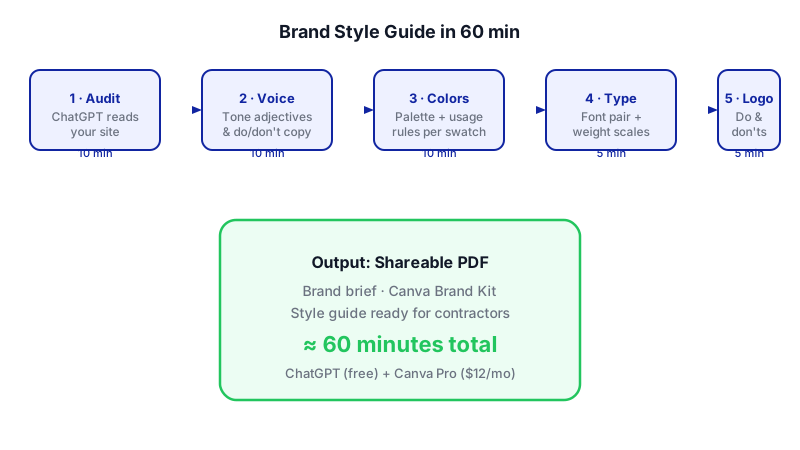
- Audit your current brand in ChatGPT (10 minutes). Open a new ChatGPT chat and paste your website URL plus a short description of your business. Ask it to describe what the brand currently looks and sounds like, so you have a baseline. Use a prompt like this:
I'm the marketing coordinator at [Brand Name], a 15-person e-commerce company that sells [product] to [audience]. Our website is [URL]. Please audit our brand as it stands today and tell me: (1) what tone of voice our copy currently uses, with 3-5 adjectives and example phrases; (2) what the visual personality seems to be based on our site; (3) any inconsistencies you notice. Be specific and blunt.
This gives you an honest outside read before you commit to rules. - Define your tone of voice in writing (10 minutes). Now ask ChatGPT to lock in the voice. The output of this step will go directly into your style guide and into Canva's Brand Voice field later.
Based on the audit above, write a brand voice section for our style guide. Include: 3 voice adjectives with one-sentence definitions, a "we sound like / we don't sound like" table with 5 rows, and 3 short before/after examples rewriting generic product copy in our voice. Keep the whole section under 400 words.
Copy this output into a plain doc — you'll paste it into Canva shortly. - Lock your color palette (10 minutes). If you already have hex codes, give them to ChatGPT. If you don't, describe the mood and let it suggest a palette you can approve or reject.
Our primary brand color is [hex] and our logo also uses [hex]. Please propose a complete palette: 1 primary, 1 secondary, 2 accents, and 2 neutrals. For each, give me the hex code, a one-line description of when to use it (e.g., "primary CTA buttons only"), and what it should NOT be used for. Also flag any accessibility concerns for text on white.
You now have a documented palette with usage rules, not just a row of swatches. - Pick a typography pairing (5 minutes). Ask for a heading/body pair that fits your voice. Confirm each font is available in Canva or that you have the file.
Recommend 2 font pairings (heading + body) that match the brand voice above and are commonly available on Canva. For each pairing, explain in one sentence why it fits, and specify weights for H1, H2, body, and caption. Avoid variable fonts.
(Canva's Brand Kit doesn't support variable fonts, so that constraint matters.) - Draft logo usage rules (5 minutes). Even one page of "do and don't" examples will save you months of off-brand assets.
Write a logo usage section for a brand style guide. Cover: minimum size, clear space (in a simple unit anyone can eyeball), approved backgrounds, and 6 specific things freelancers must NEVER do with the logo (stretch, recolor, add effects, etc.). Keep it under 250 words.
- Open Canva and create a Brand Kit (5 minutes). On the Canva homepage, go to the Brand tab, open the dropdown, and select Create new Brand Kit. Name it something like "[Brand Name] — Master Kit". Canva Pro allows up to 5 Brand Kits, so you have room for sub-brands later. If you're on a plan with the Brand Kit Builder, you can shortcut a lot of this by pointing it at your website URL or an uploaded PDF — it will extract logos, colors, fonts, and voice automatically for you to review and refine.
- Upload your logo, colors, fonts, and voice (10 minutes). Inside the Brand Kit:
- Upload your logo as PNG, JPG, or SVG. (Note: if you need a transparent-background PNG and don't already have one, that export option is Pro-only in Canva.)
- Add each hex code from your ChatGPT palette, labelled by role (Primary, Secondary, etc.).
- Upload fonts in OTF, TTF, or WOFF format if they aren't already in Canva's library, and assign each a role: heading, subheading, or body. You can store up to 500 fonts per kit, which you will never hit.
- Paste your voice adjectives into the Brand Voice field (e.g., "Professional, clear, and friendly"). This is where the written rules live inside Canva itself so they show up when your team designs.
- Build the style guide document (15 minutes). Create a new multi-page Canva design (A4 or US Letter works). Use one page per section: Cover, Logo Usage, Color Palette, Typography, Tone of Voice, Examples. Paste in the written content ChatGPT generated. Use your newly saved Brand Kit colors and fonts for every element — this is the whole point: the guide itself should be on-brand.
- Export as PDF and share (2 minutes). Use Canva's Share → Download → PDF Standard. This export is available on every plan and is more than enough for emailing to freelancers. If you need a print-shop-ready version later, PDF Print is a Pro-only format.
A worked example
Say you run marketing for "Northfolk Goods," a direct-to-consumer brand selling Scandinavian-style home textiles. Here's what the flow actually looks like.
Sample brief you paste into ChatGPT:
I'm the marketing coordinator at Northfolk Goods, a 15-person e-commerce brand selling linen bedding and throws to 30-50 year old urban homeowners. Our website is northfolkgoods.com. Audit the brand as it stands today — voice, visual personality, inconsistencies.
What good output looks like: ChatGPT comes back with something like "Voice is warm but slightly formal, with occasional Danish loanwords. Tone shifts noticeably on the FAQ page, which reads corporate. Visual personality is muted — cream, sand, sage — but the Instagram grid uses a saturated teal that doesn't appear on the site." That last sentence alone is worth the exercise: you now know you have a real inconsistency to fix.
Your final voice section might read: "Warm, considered, quietly confident. We sound like a knowledgeable shopkeeper, not a hype brand. We say 'This throw is woven in Portugal from European flax.' We don't say 'OMG you NEED this in your life!!'"
Your palette page shows six swatches with hex codes and a one-line usage rule under each. Your typography page shows H1/H2/body samples in the actual fonts. Your logo page shows the mark on light and dark backgrounds, plus a grid of six crossed-out misuses. Ten pages total, exported as a single PDF.
Limits and gotchas

- ChatGPT free tier message limits. The free plan caps you at roughly 10 messages per 5-hour window on the flagship model before downgrading to a lighter model. Draft your prompts in a notepad first so you don't waste turns on typos.
- Canva Free is not enough for a real Brand Kit. Free users can only save three brand colors — no logo, no fonts, no Brand Voice. Use the 30-day Pro trial if you don't want to pay yet. Note that the trial's AI allowance matches the Free plan, not full Pro.
- Font constraints. Canva doesn't support variable fonts in Brand Kit uploads, and you can't set letter/line spacing at the Brand Kit level — only font family, weight, and role. If your brand depends on tight custom spacing, document it in the PDF itself as a rule rather than relying on the kit.
- Transparent PNGs and SVG exports are Pro-only. If a freelancer needs your logo on a transparent background, make sure you have that file saved before your trial ends.
- A human still has to approve. ChatGPT will confidently suggest colors or voice adjectives that don't match your business. Treat every output as a draft. You are the brand owner; it is the junior copywriter.
- Don't paste confidential data into ChatGPT. Unreleased product names, pricing strategy, customer lists — keep them out. Your style guide shouldn't need any of it anyway.
When not to use AI for this
If you're going through a full rebrand — new name, new logo, repositioning — do not shortcut this with ChatGPT and Canva. Hire a brand designer. This workflow is for codifying a brand that already exists and just isn't written down. It's also not the right path if you need print-production specs (bleed, CMYK color profiles, spot colors); a professional designer and a real print spec sheet will serve you better. Honest alternatives: hiring a freelance brand designer on a platform like Contra or Working Not Working for a one-off guide (typically a few thousand dollars), or using a dedicated brand-management tool like Frontify if you're a larger team.
Frequently Asked Questions
Can I really do this on the Canva free plan?
You can design the PDF on Canva Free and export it as PDF Standard, but you cannot save a proper Brand Kit — free users are limited to three saved brand colors with no logo, font, or Brand Voice storage. That defeats the main benefit, which is making the brand reusable on every future design. Use the 30-day Pro trial at minimum.
How often should I update the style guide?
Review it every six months and any time you add a new product line, change your primary audience, or notice contractors asking the same question twice. Small updates (a new accent color, a revised voice example) take 15 minutes if your Brand Kit is already set up. Treat it as a living document, not a monument.
What if ChatGPT suggests a color palette I don't like?
Push back in the same chat. Say what's wrong ("too cool, I want something warmer and more earthy") and ask for three alternatives. The quality of these models comes out in the second and third prompt, not the first — don't accept the opening suggestion just because it's there.
Do freelancers actually read style guides?
They read short ones. Keep your PDF under 15 pages, lead with the logo do-and-don't grid and the color palette, and put tone of voice before any lengthy history or mission section. If it looks like a textbook, it won't get opened a second time.
If this workflow starts to creak — multiple sub-brands, dozens of contractors, an approval process that needs tracking — that's when an off-the-shelf tool stops being enough and a custom internal tool (which CodeNicely builds) becomes worth considering.
Sources & further reading
- Set up Brand Kits — Canva Help Center
- Brand Kit Best Practices Guide — Canva Help Center
- Upload and use brand logos — Canva Help Center
- Upload and use Brand Kit fonts — Canva Help Center
- Set up your Brand Kit automatically (Brand Kit Builder) — Canva Help Center
- Manage your brand assets in Canva — Canva Help Center
- Canva Pricing: Compare Free, Pro, Business and Enterprise plans — Canva Official
- Canva Enterprise vs Business vs Pro: what's the difference? — Canva Learn
- Canva Free vs Pro Export: Download Limits, Quality & Features Compared (2026)
- ChatGPT Free vs Paid (2026): Which Should You Choose? — Nexos AI
Get one practical guide a week
Costs, AI tools, partner selection — written for people who make the decision. No spam, unsubscribe anytime.
Thanks — you're on the list. One practical guide a week, nothing else.
That didn't work — please check the email address and try again.
Building something in Design?
CodeNicely partners with founders and tech teams to ship AI-native products that move metrics. Tell us about the problem you're solving.
Talk to our team Book a 30-min call